EugeneBotha
Known Participant
January 21, 2020
Answered

Cannot connect beam starting/end piont to shape layer positions?

  • January 21, 2020
  • 1 reply
  • 1141 views

I cannot connect the beam effect starting/endpoint to shape layer positions. The starting/endpoint go to the middle-right-top of the solid layer. I want them to connect to the anchor points of the two shape layers. The shape layers are parented to other shapes and I don't want to take away those parent links. I just need the leash to connect to the hand and the collar layer. The beam solid is the one that is selected.  below. Another vector is already in the place the beam effect should be. 
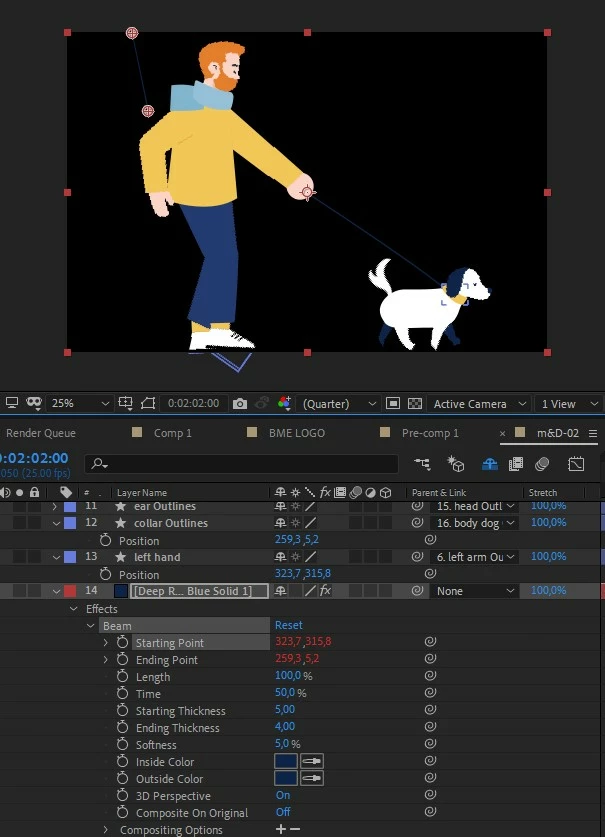
 

Is there some way to fix this using the beam effect or is there an alternative to get a leash?

This topic has been closed for replies.
Correct answer Mathias Moehl

What expression did you use to link? Just the pick-whip?

Try something like

var myShapeLayer = PICK-WHIP-THE-LAYER-HERE;
myShapeLayer.toComp(myShapeLayer.transform.anchorPoint)

Insert this code as expression, then select the PICK-WHIP-THE-LAYER-HERE part and replace it using the expressions pick-whip with the code you get from pick-whiping the layer (not the position of the layer, just drag the pick-whip on the layer name)


1 reply

Mathias Moehl
Community Expert
Mathias MoehlCommunity ExpertCorrect answer
Community Expert
January 21, 2020

What expression did you use to link? Just the pick-whip?

Try something like

var myShapeLayer = PICK-WHIP-THE-LAYER-HERE;
myShapeLayer.toComp(myShapeLayer.transform.anchorPoint)

Insert this code as expression, then select the PICK-WHIP-THE-LAYER-HERE part and replace it using the expressions pick-whip with the code you get from pick-whiping the layer (not the position of the layer, just drag the pick-whip on the layer name)


Mathias Möhl - Developer of tools like BeatEdit and Automation Blocks for Premiere Pro and After Effects
EugeneBotha
Known Participant
January 21, 2020

Thanks a lot. That works really well within the beam effect layer.