Silverbell
Inspiring
January 13, 2018
Answered

Cannot rotate handle in Graph Editor

  • January 13, 2018
  • 3 replies
  • 11126 views

I have two problems.

First - i cannot rotate handles in Graph Editor which i can do in all other applications?

Second - Whenever i grab point of the handle and try to move it it moves whole handle. How to lock it in place and move only one side without moving whole handle?

Here is the video that showing my problem - 2018 01 13 04 55 40 - YouTube
    This topic has been closed for replies.
    Correct answer Roei Tzoref
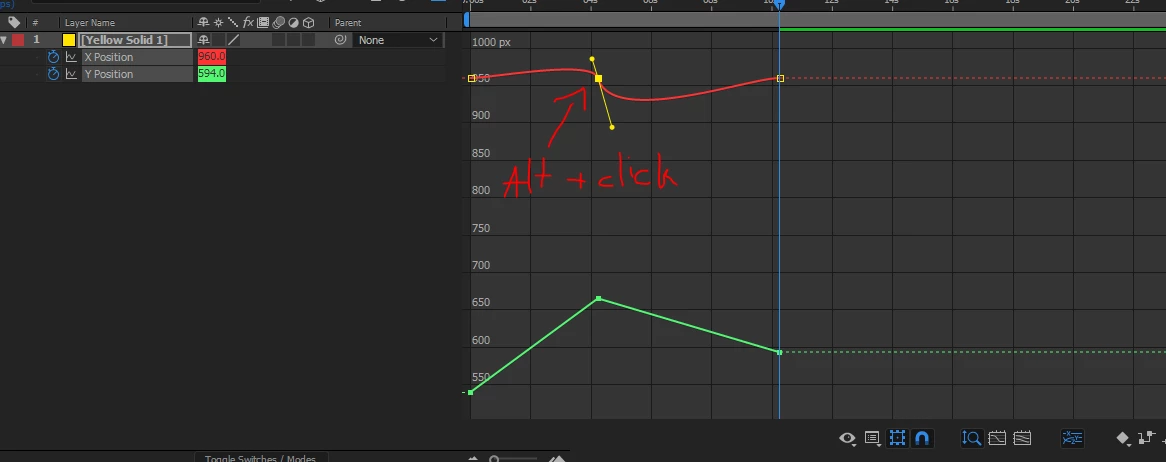
    In the value graph no handles at all.

    position keyframes do not allow value graph handles until you separate the dimensions.

    now you can alt+click on a keyframe to extract a bezier handle

    you should read here more about the graph editor:

    Animation basics in Adobe After Effects

    any topic you want to know more about in Ae, just type it's name in the upper right search filed in your Ae interface

    3 replies

    Silverbell
    Inspiring
    January 13, 2018

    so i needed something like in maya or other programs to rotate handles but anyways i did it already in hard way by using some so called "rows"

    Silverbell
    Inspiring
    January 13, 2018

    In the value graph no handles at all. There are only dots to move. And i think i needed to have ability for the handles to rotate in  the speed graph so my final graps would look like a smooth waves.

    Roei Tzoref
    Roei TzorefCorrect answer
    Legend
    January 13, 2018
    In the value graph no handles at all.

    position keyframes do not allow value graph handles until you separate the dimensions.

    now you can alt+click on a keyframe to extract a bezier handle

    you should read here more about the graph editor:

    Animation basics in Adobe After Effects

    any topic you want to know more about in Ae, just type it's name in the upper right search filed in your Ae interface

    Jose Panadero
    Community Expert
    Community Expert
    January 13, 2018

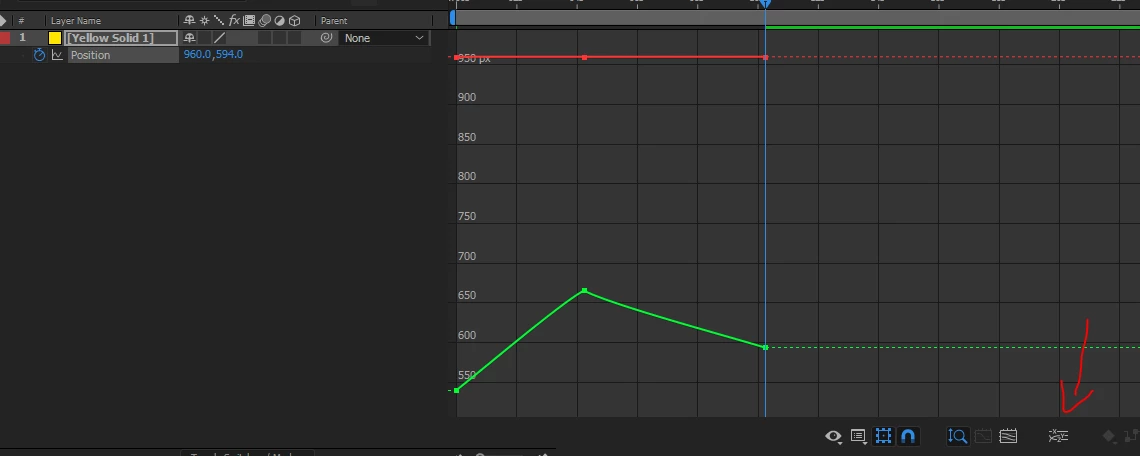
    This is because you are using the Speed graph, not the Value Graph. In the Speed Graph you can move the handles to change influence for easing the speed. Click in the second button you have in the bottom of the Graph Editor and change it to Value Graph.

    Known Participant
    March 18, 2020

    OK, I did that. I'm trying to smooth out the time over 5 keyframes with the shape of a path. Whether I"m in the speed graph or Value graph, the handles remain fixed to horizontal. I agree with Silverbell... it's nonsense to present a UI element that's worked a certain way for decades and have it not work that way in a new context. 


    How do I get them to move vertically. Even better, the keyframes split in half! Nonsense. I just want one smooth simple arc like a hill. Without being able to adjust the angle of the keyframes, it's impossible. 

    Participant
    October 14, 2022

    How did you solve this problem?