
kjetils30485119
Inspiring
April 21, 2017
Answered

Cannot use Motion Graphics Demo 2017 in AE

  • April 21, 2017
  • 2 replies
  • 7429 views

Hi,

I wanted to follow along with the video on how to use Motion Graphics, from this site: Create Motion Graphics templates |  and tried to add the demo files to my library. Once in AE, the demos appear greyed out and it says that this cannot be opened in After Effects.
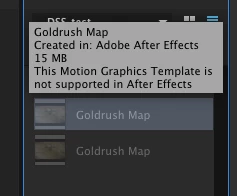
Since my Creative Cloud folder is not syncing in Finder (at least I cannot see new items here), I am not able to open the demo files from here.

    This topic has been closed for replies.
    Correct answer David Arbor

    Right now templates can be created in After Effects and then used in Premiere. They can't be edited back inside of After Effects. I suspect this will change in the (hopefully) near future, but the first release of this new feature focuses on sharing your work with editors.

    2 replies

    Participant
    May 4, 2017

    davidarbor

    There is in fact a workaround I've found (at the moment). Open the library assets in Adobe Premiere, place the asset on the timeline, selecting the asset & right click "Reveal in Explorer (PC)" and then open that .aegraphic file in After Effects.

    Note: this DOES NOT seem to work on Macs for some reason. I've tried the same approach multiple times, but it simply won't open on Mac systems.

    That said, I simply saved the .aegraphic files as regular After Effects files on the PC, collected them (like you would a normal AE project), and placed them in another folder.

    All of this, so I could follow a simple tutorial. You note that, "there will be a lot of great looking templates for sale and the inability for you to dig in to them will protect the template authors' work" - but the truth his, there are already a lot of great looking After Effects templates on sale (and have been for years at places like Videohive.net). These files are completely open files with no restrictions. The benefit for the purchaser is that they can open the files and learn.

    It has very little to do with protecting the template authors' work. After all, if these templates are primarily aimed at editors who don't want to be bothered with AE in the first place, why would they go to the trouble of locking them?

    Roei Tzoref
    Legend
    May 4, 2017
    then open that .aegraphic file in After Effects.

    file->open that's all it takes. interesting. thank you.

    David ArborCorrect answer
    Inspiring
    April 21, 2017

    Right now templates can be created in After Effects and then used in Premiere. They can't be edited back inside of After Effects. I suspect this will change in the (hopefully) near future, but the first release of this new feature focuses on sharing your work with editors.

    kjetils30485119
    Inspiring
    April 21, 2017

    Yeah but this demo files to a tutorial which Adobe has made - And it says "If you want to follow along with this tutorial, use the Motion Graphics Demo assets. Click Save to copy the assets to your Creative Cloud Library."

    The files don't even show up in Premiere Pro.

    Inspiring
    April 21, 2017

    I just saved the library and saw it show up in Premiere. If you open the Essential Graphics panel in Premiere did you switch from "Essential Graphics" to "Libraries" in the dropdown? Try doing that and see if "2017 Motion Graphics Demo" is a library there. See attached screenshot.