
ashimg23377171
Inspiring
April 1, 2018
Answered

Cannot view elements of a png in the timeline

  • April 1, 2018
  • 1 reply
  • 513 views

Hello

I have imported a PNG on to my project. The png was created using InDesign.

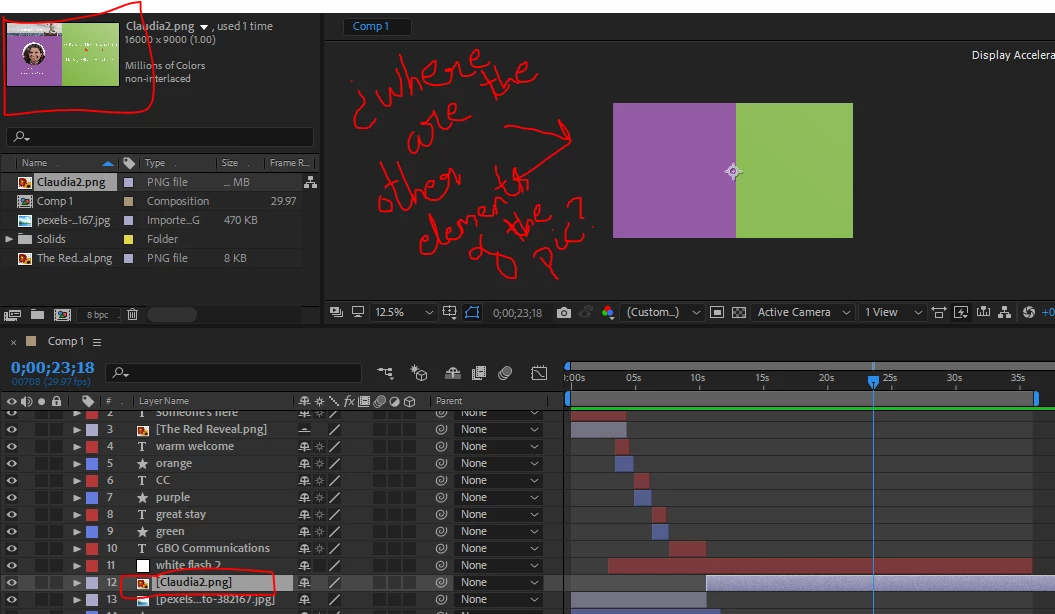
However, when I drop the png in the AE timeline, all is see is the purple and green frames. I am unable to view the other elements on my png. I am not sure why this is happening. Upon rendering the timeline as well, all I see is the purple and green bits of the png. I have completely hit a wall, and any guidance would be appreciated. Thank you.
    This topic has been closed for replies.
    Correct answer Roei Tzoref

    the png layer is enormously big. scale it down. since it's 16000x9000 then the short cut Ctrl+Alt+F (fit to comp) would fit it perfectly in comp size. you should be aware that bringing assets to Ae should involve preparation. all those pixels will take time to calculate. you should learn to optimize your assets before bringing them to Ae. here's a read about it: Preparing and importing still images in After Effects

    1 reply

    Roei Tzoref
    Roei TzorefCorrect answer
    Legend
    April 1, 2018

    the png layer is enormously big. scale it down. since it's 16000x9000 then the short cut Ctrl+Alt+F (fit to comp) would fit it perfectly in comp size. you should be aware that bringing assets to Ae should involve preparation. all those pixels will take time to calculate. you should learn to optimize your assets before bringing them to Ae. here's a read about it: Preparing and importing still images in After Effects

    ashimg23377171
    Inspiring
    April 1, 2018

    Got it. thanks very much Roei.

    It worked.