Participant
March 17, 2017
Answered

Cant remove picture from composition!

  • March 17, 2017
  • 2 replies
  • 517 views

So I made a new composition and a picture from a previous video I made is there for some reason! I have no idea how to fix it! Can someone please help??

This topic has been closed for replies.
Correct answer Szalam

neoj9491043  wrote

Adobe CC 2015

What exact version number?

Help>About After Effects will tell you.
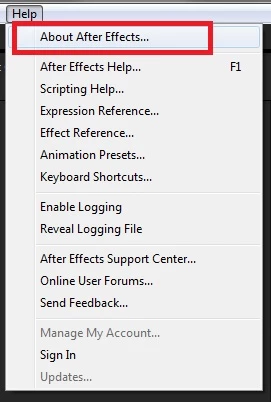
It could be anywhere from 13.5.0 to 13.7.2 (I think - I can't remember if CC 2015 was the one that had the extra point release for Macs or if it was CC 2015.3)
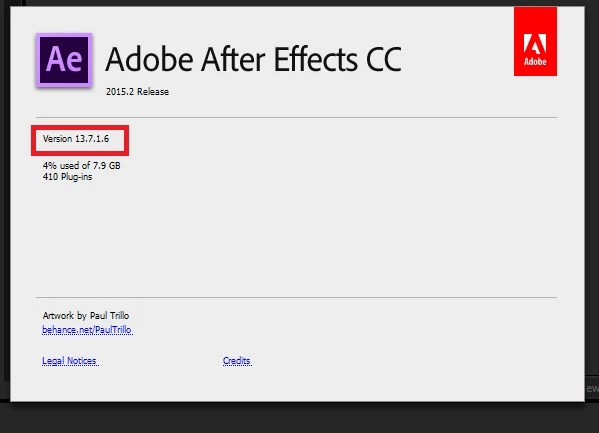
Anyway, you should give some thought to installing the latest version alongside your current one. It's faster and has much fewer bugs overall. If you hit update on AE in the CC app to go to CC 2017, if you twirl open the "Advanced Options" section, you can uncheck the option to remove older versions and the new version will install without messing with your current version.

neoj9491043  wrote

And how would I go about clearing the cache?

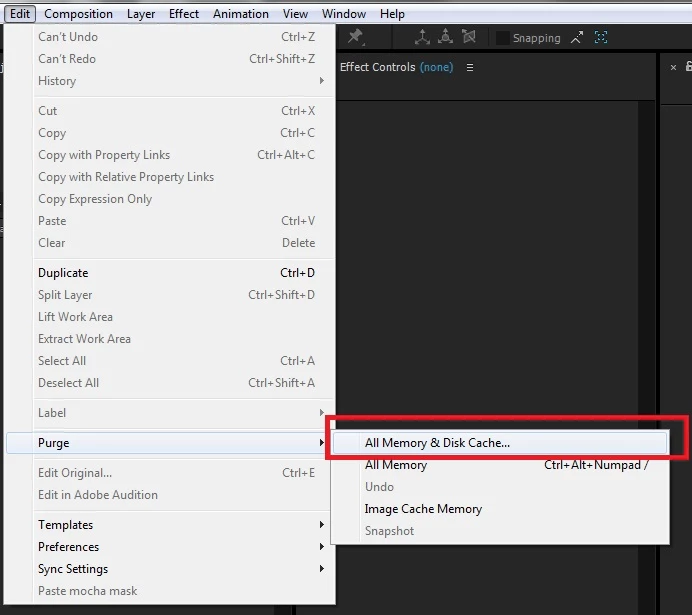
Edit>Purge>All Memory & Disk Cache...
2 replies

Legend
March 17, 2017

I'd check every layer at that position in the timeline to see if that picture is part of it. If it's not, I'd try purging the cache and re-putting the cursor on that position in the timeline or re-rendering that section of the timeline.

Szalam
Community Expert
Community Expert
March 17, 2017

What, exact, version number of AE are you running? I know you're not running the latest and this looks like one of the bugs that was fixed in an update.

Does clearing the cache make it work?

Participant
March 17, 2017

Adobe CC 2015

And how would I go about clearing the cache?

Szalam
Community Expert
SzalamCommunity ExpertCorrect answer
Community Expert
March 17, 2017

neoj9491043  wrote

Adobe CC 2015

What exact version number?

Help>About After Effects will tell you.

It could be anywhere from 13.5.0 to 13.7.2 (I think - I can't remember if CC 2015 was the one that had the extra point release for Macs or if it was CC 2015.3)

Anyway, you should give some thought to installing the latest version alongside your current one. It's faster and has much fewer bugs overall. If you hit update on AE in the CC app to go to CC 2017, if you twirl open the "Advanced Options" section, you can uncheck the option to remove older versions and the new version will install without messing with your current version.

neoj9491043  wrote

And how would I go about clearing the cache?

Edit>Purge>All Memory & Disk Cache...