TimSx
Inspiring
August 17, 2017
Answered

CC Glass bump map issue when applied footage instead of composition

  • August 17, 2017
  • 4 replies
  • 4642 views

I've followed a neat tutorial on making a rain drop on a surface. It uses bunch of Turbulent Displacements and Particle effects to create a black and white bump map.

That map is fed into CC Glass to create refraction. I wanted to render just the black and white bump map to avoid overhead with Turbulent Displacements etc...

My problem is, that when I use a video or image sequence of a bump map, cc glass renders completely different than if I use the actual composition, created at runtime.

Check this images:

With prerender as bump map: http://imgur.com/a/WrEx9

With composition as bump map: http://imgur.com/a/gjwzj

http://imgur.com/a/Nmu4b

To further prove my point, check this image of a bump map composition and bump map .mov prerender. There is 0 visual difference. And even if there are small differences, that shouldn't cause so many artifacts.

At first it looked to me that  there is a lot of pixelation going on. But on further inspection I realized that center of all lines doesn't even have a refraction. Like it is cut of.

I've repeated this with openEXR image sequence and the issue remains.

Moreover, this result is different as if I choose 8 bpc color settings. If I do that all of the bump map is completely pixelated, but in my case with the prerender, only edges are maybe somewhat pixelated so that probably isn't the case.

You can download project files here: VIDEO COPILOT | After Effects Tutorials, Plug-ins and Stock Footage for Post Production Professionals

Can someone explain why is this happening? I'd love if someone can reconstruct the problem to cross me being stupid of the list.

Thanks, cheers

    This topic has been closed for replies.
    Correct answer Jose Panadero

    Hi TimSx. In your project, you have to understand the AE's render pipeline. As I have suspected, you have applied a Levels effect to your Water Texture precomp. After Effects, uses the original layer as it is: a comp without effects. If you want the effects to be part of your composition you have 2 option:

    1.- To precomp again transferring the effects to the new comp. Then CC Glass will look exactly the same using any of the sources.

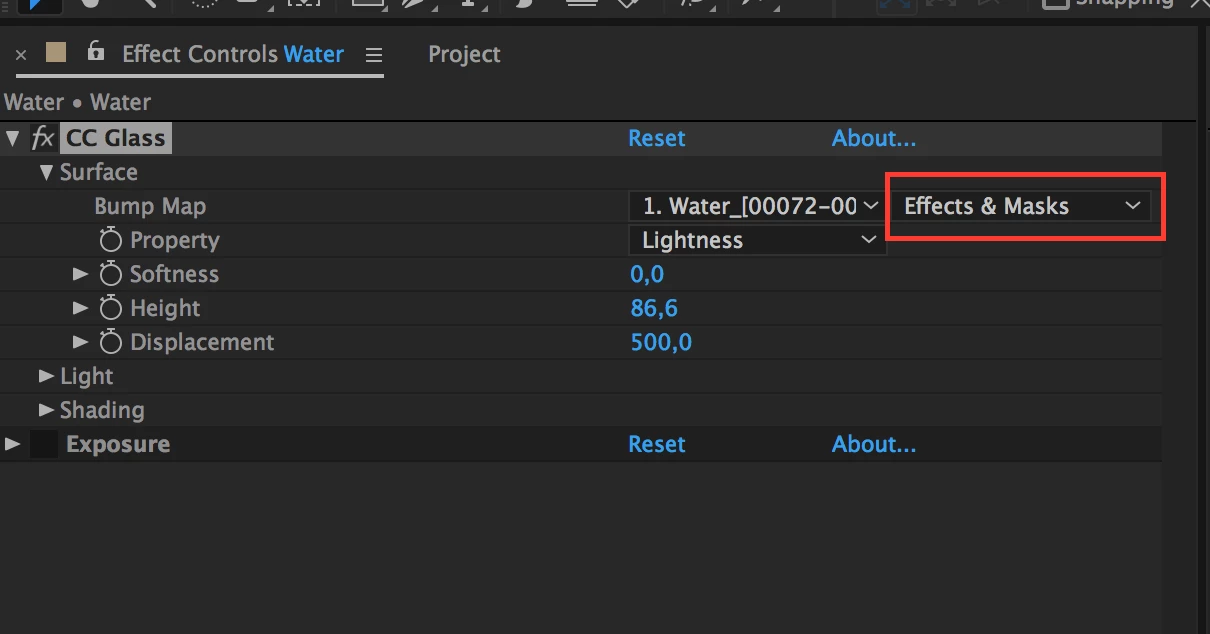
    2.- Use the new option in the latest release that allows you to refer to other layers including their masks and applied effects. This can be done in CC2017 v14.2. If you are not using the latest version, the only way to do it is step 1.

    Look at the attached image to understand what I'm trying to say.

    Hope this helps

    4 replies

    TimSx
    TimSxAuthor
    Inspiring
    September 1, 2017

    Hey Jose! Thanks for taking your time. You've been a life saver. Basically you are saying that when Water precomp is used as a bump map, levels are not taken into account at the time of making a bump map, but are applied after? That is because effects are added from bottom layer to top one, and because when glass effect is added, there is no levels at the precomp.   

    Second thing, I didn't really catch what needs to be precomped again to transfer effects.

    I rendered Water_texture composition without the levels effect, replaced Water_texture comp with the render and applied levels afterwards. That worked, but only if I used exr and 32 bit project, otherwise it seems that a lot of data is being lost and everyting is pixelated.

    Jose Panadero
    Community Expert
    Community Expert
    September 1, 2017

    Hi TimSx

    For your first question: yes. What I say, is that when you use effects that refer to other layers, these effects don't use any effect or mask applied on these layers in the same level composition. This is why when you try to use the water texture precomp, CC Glass effect is using the luminance values of the original precomp without effects (Levels) and differs a lot when you use the EXR files.

    If if you want that CC Glass take the effect applied to a layer, you can use that new option on the screen capture I uploaded. If you are not using the latest version 14.2, the only way to avoid this problem is to precomp again the Water Texture Precomp with the Levels (transfering all) effect applied so you force After Effects to use this effect as it was part of the layer.

    TimSx
    TimSxAuthor
    Inspiring
    August 31, 2017
    Jose Panadero
    Community Expert
    Jose PanaderoCommunity ExpertCorrect answer
    Community Expert
    August 31, 2017

    Hi TimSx. In your project, you have to understand the AE's render pipeline. As I have suspected, you have applied a Levels effect to your Water Texture precomp. After Effects, uses the original layer as it is: a comp without effects. If you want the effects to be part of your composition you have 2 option:

    1.- To precomp again transferring the effects to the new comp. Then CC Glass will look exactly the same using any of the sources.

    2.- Use the new option in the latest release that allows you to refer to other layers including their masks and applied effects. This can be done in CC2017 v14.2. If you are not using the latest version, the only way to do it is step 1.

    Look at the attached image to understand what I'm trying to say.

    Hope this helps

    TimSx
    TimSxAuthor
    Inspiring
    August 17, 2017

    Yep, they do have a black solid in the background.

    Kevin-Monahan
    Community Manager
    Community Manager
    August 30, 2017

    Hi Tim Sx,

    Sorry for this issue. Did you ever find a solution? Please let us know if you have or if you still need help.

    Thanks,

    Kevin

    Kevin Monahan - Sr. Community and Engagement Strategist – Adobe Pro Video and Audio
    Szalam
    Community Expert
    Community Expert
    August 17, 2017

    I can't see your example images due to restrictions on the network where I work. Can you instead just upload your images to this forum? There's an image attachment button right above the box where you type your post.

    TimSx
    TimSxAuthor
    Inspiring
    August 17, 2017

    I can't seem to find an edit button here. Must be because it is getting late.

    This are the images in the same order as in the OQ:

    WrEx9

    gjwzj

    Nmu4b

    TimSx
    TimSxAuthor
    Inspiring
    August 17, 2017

    Ah, it didn't insert them. This should now work:

    with footage bump map:

    with composition bump map:

    eye to eye bump map comparrisson: