
Participant
May 23, 2021
Question

CC Repetile creating a thin gap

  • May 23, 2021
  • 7 replies
  • 11824 views

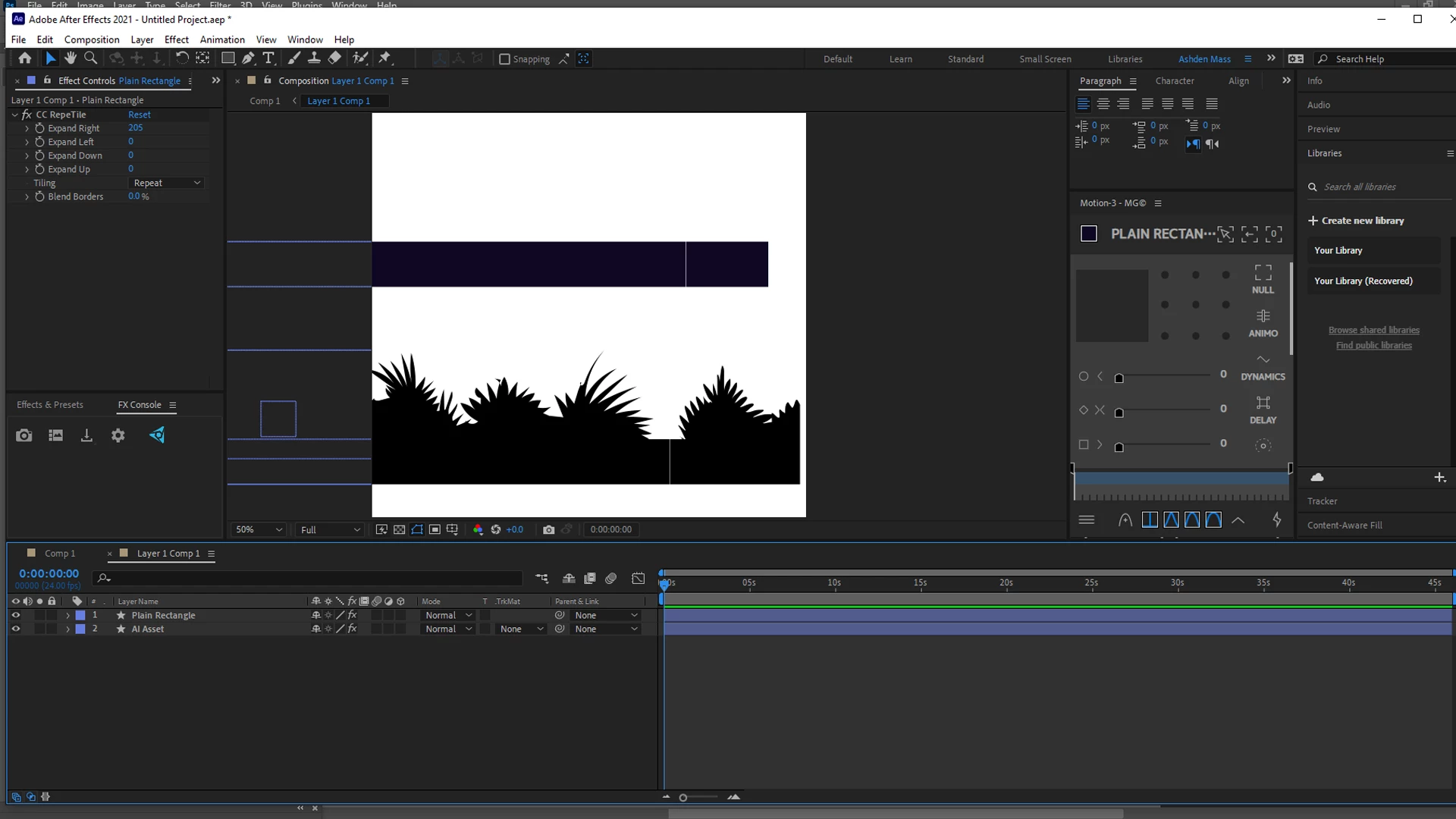
This is the screenshot of my project. You can see a basic rectangle and an 'asset' (Both imported from AI using overlord).

The only effect used is CC Repetile and the basic rectangle is just one single shape, the 'asset' is split into groups within the layer contents.When using CC Repetile effect on them, it creates a thin gap in between.

However it should be noted that, when I use a shape created within AE, this problem doesn't occur.

I tried to apply the effect after pre-composing, but that didn't remedy the issue. 

If you require anything more for a deeper diagnosis, I would be happy to provide.

(The same settings for effects are used for all the shapes, only that the Expand Right values  differ for each)

Thankyou for taking the time to assist.
7 replies

i_eat_karate
Participating Frequently
November 6, 2025

Just ran into this problem. It doesn't seem to happen when you import directly from Illustrator, especially if you line things up with the pixel grid in Illustrator as suggested. When it's not lined up to the pixel grid there's a really faint line.


It only seems to happen with editable vector layers. So, layers imported from Illustrator that have been converted to shapes, imported using Overlord and shapes drawn in After Effects. Each of them improve (very slightly) when they are exported, but not enough to fix the problem every time. In my specific case the gap was giant, not just a couple of pixels, so that wasn't helpful. 


This doesn't solve anything it's just information for anyone who ends up here. Maybe it will be helpful to someone.  


i_eat_karate
Participating Frequently
November 6, 2025

To clarify, when I said they improve when exported I mean rendered. 


Also, you can't edit posts? 

Community Expert
November 6, 2025

Here's how to edit posts:

  1. Click on More
  2. Press return
  3. Edit the post.

That's all there is to it.

Volition74au
Inspiring
February 28, 2025

I have a Composition with A Precomp Of AN image Inside it. Above I place AN adjustment layer with `CC Repetile` I too get thing gaps between the tiles.I tried scalling resizing images, the precomp etc with no success. Funnily If I scale the precomp to between 100.0 & 100.4 the gap seems to narrow. Then once past 100.4 it grows back to what it was at 100.
Note this was with `CC Repetile on an adjustment layer above the image i want to extend. 
If i apply the `CC Repetile` directly to the precomp layer it goes away! there. I don't know if that helps adobe look into solving this if they are interested. Hopefully. As I like the effect on an adjustment layer because i planned on rigging my project up so users can use opacity with a dropdown to select images, below it. But I;ll do that anyway but apply the `CC Repetile` to each image layer. Annoying but a suitable workaround for me at the moment

Participant
January 20, 2025

Hi Ashik,


Yes this is an unsolved problem, one work around I have done, is once the reptile is done, is to copy the layer and place it under the other ans shift it slightly over which covers the gaps. This does not work for all types of comp work, but its a quick fix in some instances.

Community Expert
January 15, 2024

Late to this thread, just ran into this in v23.6.2. Have not checked v24 or the Beta yet.

I tried all the methods listed on the page; Mask+Repetile worked at first but my shape layer is moving and I needed motion blur, which added the gap right back. So what finally worked was to pre-comp the shape layer and make sure it was cropped right to the artwork with no gaps on the edges, then Repetile it back in the main comp and add the transform+motion blur there. 

I met some of the After Effects team at MAX, I might try to bring this up as a bug to fix next time we chat.

-------------------------------------------------------------------------JVK | Editor/Designer/Software Instructor. Pr, Ae, Ch, Ps, Ai, Id
Participant
July 26, 2024

I am having this issue even with a pre-comp. The workarounds are not even working for me

Community Expert
August 14, 2023

If you are having a problem with Reptile when using AI files, then the problem is in the AI file. The artwork does not line up to the pixel grid, so the edges are interpreted.


The fix is to open the Illustrator artwork, go to the View menu, turn on Pixel Preview, and set the project to Snap to Pixel. Now set the viewing magnification to 400 or 800% and fix the alignment of all the horizontal and vertical edges in the artwork. That should solve your problem.

Fix the artwork and you fix the problem.

Todd_Morgan
Legend
August 14, 2023

Not using AI file

Community Expert
August 14, 2023

The same thing happens with a pixel-based file if it is not lined up with the pixel grid or if there are anti-aliased edges. If it is a video and the frame size is an odd number of pixels, you can end up with the same problem. 

Inspiring
October 14, 2022

I have the same issue with MotionTile and RepeTile and to fix it, I precomped (nested) the video layer (it could be any layer) and applied the Transform effect with Scale set to 101% (it won't show since the layer is already at comp size). Then in the parent comp I added the RepeTile effect and that got rid of the black/blank borders.


Adobe, PLEASE FIX THIS. I see posts about it from 2018. Seriously no new features just focus on no crashes and proper workflow.

Todd_Morgan
Legend
August 14, 2023

Still waiting for this fix!

Jose Panadero
Community Expert
Community Expert
May 23, 2021

Not sure why this problem occurs, I'm getting the same problem with my own AI files converted to shape layers. Anyway, you have an alternative. Shape layers can be cloned using the repeaters. If you expand your shape layer, select the content. and with that little drop-down at your right select repeater. The repeatear lets you create copies of your shapes and move them to the right avoiding that cc repetile issue.


I will try a couple of things with AI files and write later on.

Participant
May 31, 2021

Thankyou for that solution!. Will be happy to know what your findings will be later.