
Known Participant
March 1, 2015
Answered

Center anchor point?

  • March 1, 2015
  • 3 replies
  • 83061 views

I am trying to create a starburst using the scale property. Keyframe at beginning at 100% > keyframe at end - 200%.

But I can't figure out how to have it expand evenly in all directions - which it would do if the anchor point were in the center of the circular starburst ( at least I think that's the problem?) Is there a way that I can fix the anchor point in the center so that the star / starburst doesn't also seem to "wander off" sideways as it grows. Many thanks for the help!

AE CS5.5
Correct answer dcfreelancelot

To change the position of the anchor point:

1. Select the layer for which you want to change the anchor point

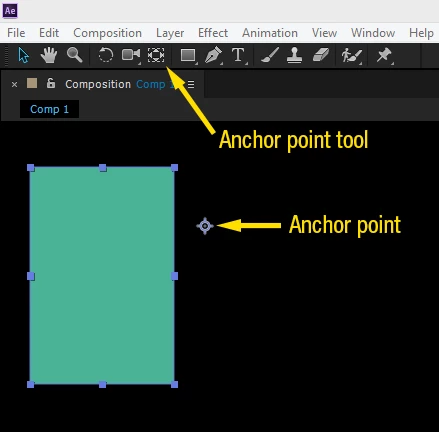
2. Select the anchor point tool from the toolbar or use the keyboard shortcut (y)

3. Position the anchor point (looks like scope crosshairs with a circle)

A frame grab is attached.

You can also automatically move the anchor point to the center of your layer with the keyboard shortcut (Ctrl + Alt + Home) if using Windows.

Hope that helps.

3 replies

thepixelsmith
Community Expert
Community Expert
September 5, 2024

Command + Double-click the Pan Behind Tool will also set the anchor point to the center of the layer.

Participant
April 29, 2021

home????

May 1, 2021

Just press Ctrl/ Cmd and double click the Anchor Point tool. It should go to the centre

dcfreelancelotCorrect answer
Inspiring
March 1, 2015

To change the position of the anchor point:

1. Select the layer for which you want to change the anchor point

2. Select the anchor point tool from the toolbar or use the keyboard shortcut (y)

3. Position the anchor point (looks like scope crosshairs with a circle)

A frame grab is attached.

You can also automatically move the anchor point to the center of your layer with the keyboard shortcut (Ctrl + Alt + Home) if using Windows.

Hope that helps.

karenf1Author
Known Participant
March 1, 2015

dcfreelancealot. Many thanks - this is perfection! I've written down those keystrokes! Again, many thanks for the generosity of your time!

Inspiring
March 1, 2015

You're welcome.  Also, I just realized that you are using version 5.5 in which case the Ctrl+Alt+Home keyboard shortcut will not work to automatically center the anchor point for your shape/mask layer.

Instead, you can hold the Ctrl (or Cmd) button and double-click the anchor point tool to center the anchor point for a selected layer.