

robinh49469832
Inspiring
August 15, 2023
Answered

Change Color Picker

  • August 15, 2023
  • 2 replies
  • 1555 views

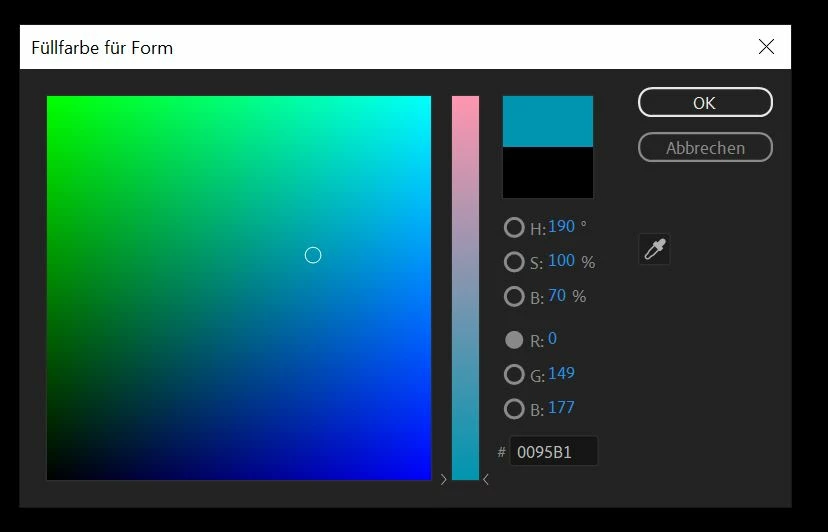
Hi everybody! Is there a possibilty to change the color picker in AE? Idk if this is new, or if I only noticed because recently I'm working with Illustrator a lot: There is no way to pick a color and then simply make it lighter or darker. I cannot chose grey, unless I put in exact numbers in the field... In Illustrator I can pick any shade of grey by simply staying on the left side of the picker. How can I change it to that picker? I'm pretty sure it hasn't been like this forever, since I change shades a lot...
 

Correct answer Mylenium

Select a different component in the numerical readouts to change the scratchboard appearance.


Mylenium

2 replies

Community Expert
August 15, 2023

Your color picker is set to work from the red channel. Try changing to H for Hue (that is my default choice). You can also select saturation or brightness. The large square and the vertical strip will cycle through different displays as you change the selection buttons. 


Take a look at the Color picker in Illustrator. It is probably set to Hue.

Mylenium
MyleniumCorrect answer
Legend
August 15, 2023

Select a different component in the numerical readouts to change the scratchboard appearance.


Mylenium

robinh49469832
Inspiring
August 16, 2023

OMG that was too easy. Thank you! I feel stupid now, but I will keep it for others to not feel stupid.