
Participant
July 8, 2024
Answered

Changing information in Properties Panel vs Essential Graphics panel causes elements to break

  • July 8, 2024
  • 2 replies
  • 444 views

I have a comp that has lower third elements that update just fine in another comp using the Essential Graphics panel to manipulate the Essential Properties. 

The minute I use the Essential Properties panel to edit on of the text properties (instead of the Essential Graphics panel) it breaks the animation.  The size changes, the alignment shifts, the expressions I'm using to match certain properties stop matching, etc.


I assumed it was a bug in my comp and did WAY too much troubleshooting before I realized it was a software bug.


If I undo the edit in the Properties Panel is goes back to working properly and I can make the update in the Essential Properties panel.  I'm also just noticing that ANY change I make in the Properties panel breaks the link between the two panels and the Essential Properties panel stops updating.  If I only make updates in the EP panel, the PP continues to show the changes, but any edits in PP causes errors and the EP no longer updates the changes.
This topic has been closed for replies.
Correct answer Theresa Rostek

After looking through the file, there is no bug, just some misunderstanding of how Essential Properties work.

The values in the Essential Graphics Panel are the Primary, their values move to the Properties panel but the Properties panel changed values does not move to the EGP unless overridden with the push/pull buttons. This was designed so the Primary template isn't changed unless specified.

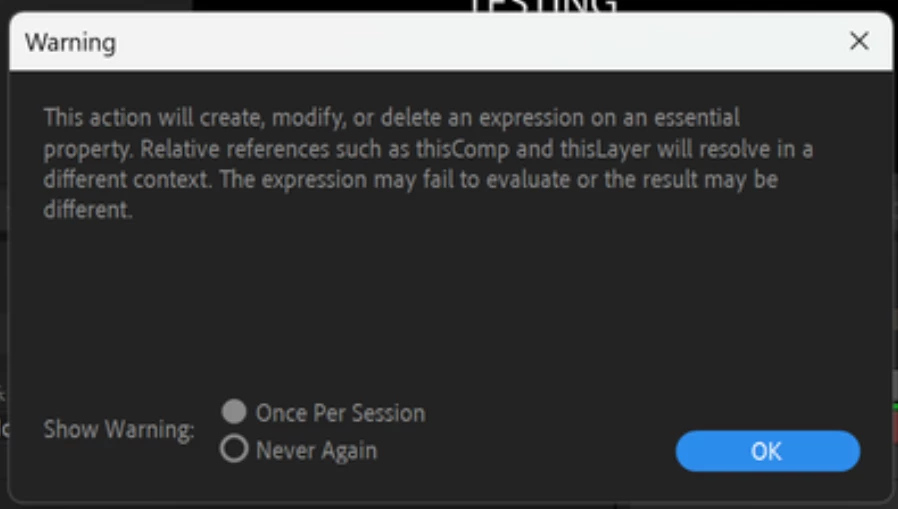
However, the text layers are using expressions on the sourceText, which conflict with the controls set up in this project. A quick expressions error /!\ triangle shows up on the EP and a warning dialog about the expressions conflict may show if it's not been disabled. Moving expressions from the Primary to the Child comps/pre-comping/etc are the solution to what's happening here.


 Moving post to Discussions.

2 replies

Theresa Rostek
Community Manager
Theresa RostekCommunity ManagerCorrect answer
Community Manager
July 22, 2024

After looking through the file, there is no bug, just some misunderstanding of how Essential Properties work.

The values in the Essential Graphics Panel are the Primary, their values move to the Properties panel but the Properties panel changed values does not move to the EGP unless overridden with the push/pull buttons. This was designed so the Primary template isn't changed unless specified.

However, the text layers are using expressions on the sourceText, which conflict with the controls set up in this project. A quick expressions error /!\ triangle shows up on the EP and a warning dialog about the expressions conflict may show if it's not been disabled. Moving expressions from the Primary to the Child comps/pre-comping/etc are the solution to what's happening here.


 Moving post to Discussions.

Motion Graphics, Premiere Pro
Theresa Rostek
Community Manager
Community Manager
July 8, 2024

Hi @Forrest Gump video 


Sorry you're running into issues. Could you please let me know the following:


Can you please attach or DM me the project file and if you have time, a video is always helpful.

Thanks!
Theresa

Motion Graphics, Premiere Pro