
Participant
April 25, 2022
Question

Character opacity overlapping

  • April 25, 2022
  • 2 replies
  • 649 views

Hello There,

So I am working on a project in Arabic, and I am doing a simple animation-in for the text using opacity and position. However, when the opacity is anything lower than a 100%, the overlapping characters appear darker between the intersections, because that is the approach After Effect uses to connect Arabic text. I can precompose the text and animate the composition, but what is the point? I will be giving up all of the text properties. This solution fails to work for more complex text animation. Is there a way to have a constant transparancy all throughout the text? I am thinking of something that subtracts the opacity of the overlapping sections, but I am not sure how to achieve that.


When the opacity is less than 100%:



Another Example:
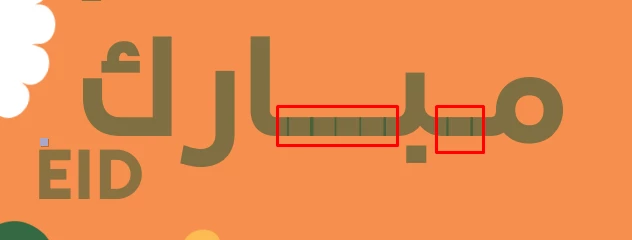


When the opacity is 100% it is seamless!

2 replies

Participant
August 18, 2025

Hello there! I'm running into the same issue with Arabic text today. Curious if you've found a workaround?

Mylenium
Legend
April 25, 2022

Nothing stops you from just using the layer's regular opacity. Conversely, you can apply an effect like Fill and manipulate the source opacity/ composite over original amount some of these effects have to achieve the same result.


Mylenium

MahmoudSNAuthor
Participant
January 30, 2024

The thing is, I'm using type_array to easily animate this stuff, and it uses character opacity instead of the regular layer opacity.

Participant
February 17, 2025

"Hi, in the case of my project, where I had opacity animation, I changed it to a green fill color, and left the opacity at 100, then I picked that color with the keylight, at least the transparency overlays disappeared."