
Inspiring
December 1, 2021
Question

Character Palette font menu not showing actual font samples for most Adobe fonts

  • December 1, 2021
  • 1 reply
  • 345 views

I'm using After Effects 2022 on Windows 10 64 bit.


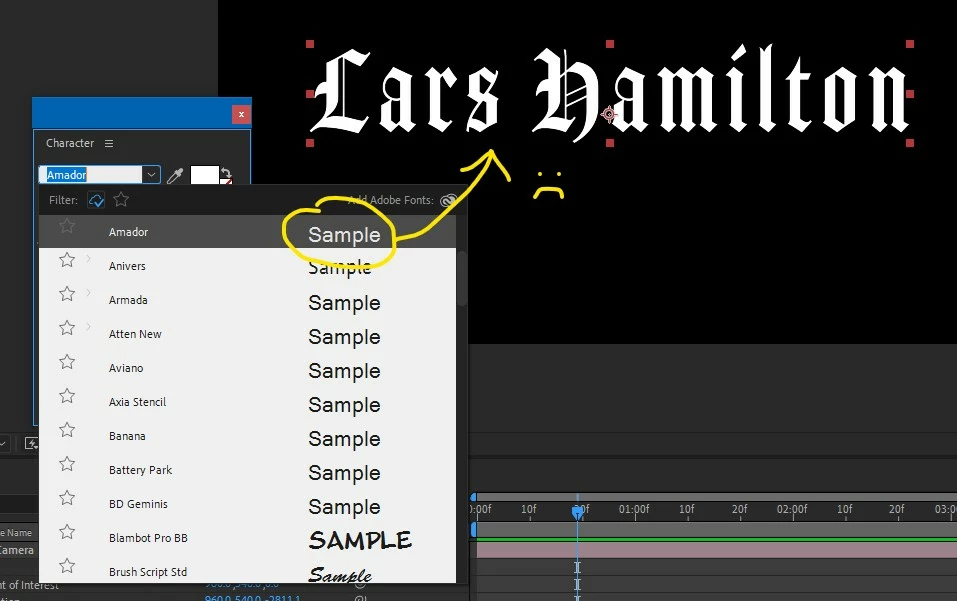
For most of the Adobe fonts I have installed, the samples in the Character Palette's drop-down font menu don't show samples of the actual fonts listed. T\Instead, they show up using a generic font.


System fonts do show actual samples, as well as a small minority of the Adobe Fonts, for example Blambot and Brush Script in my screenshot below.


I am connected and logged in to my Adobe account. The fonts are active in the Creative Cloud app, and samples of the fonts work properly in that app.


I have reset my preferences and restarted After Effects, but the problem persists.


Any ideas? I don't recall this being a problem in AE 2021.


See screenshot for example.
This topic has been closed for replies.

1 reply

emdiarAuthor
Inspiring
December 1, 2021

Eventually After Effects thre this error:


"After Effects warning: The font dictionary can't be read. Please restart your computer. If this problem persists, please go to http://www.adobe.com/go/learn_ae_fonterror ( 83 :: 3 )"


That link redirects here: https://helpx.adobe.com/after-effects/kb/error-font-dictionary-cant-read.html


I tried Solution1 which had no effect. Then I tried Solution 2, which resulted in more of the Adobe font samples using the actual fonts, but not all.


I guess I'm down to Solution 3, although I haven't installed any fonts recently, and have never had any problems like this with AE in the past. Oh, and none of my other installed CC apps are having this problem.


I'm still open to other ideas.


-Mike