naomic73815306
Participant
September 13, 2018
Answered

chromatic aberration stretchy text

  • September 13, 2018
  • 2 replies
  • 1693 views

hi do you know how to create text thats able to stretch flexibly like this? Behance

i tried several things but all of it was manually was wondering if theres any presets i can use

This topic has been closed for replies.
Correct answer OussK

It's very easy, a Turbulent Displace effect can do this stretch but you need to play with parameters little bit and animate the offset point, now for color you can add a 4-color gradian and change the color to the color you want and to get this smooth effects a cc motion blur can help. please check the picture below
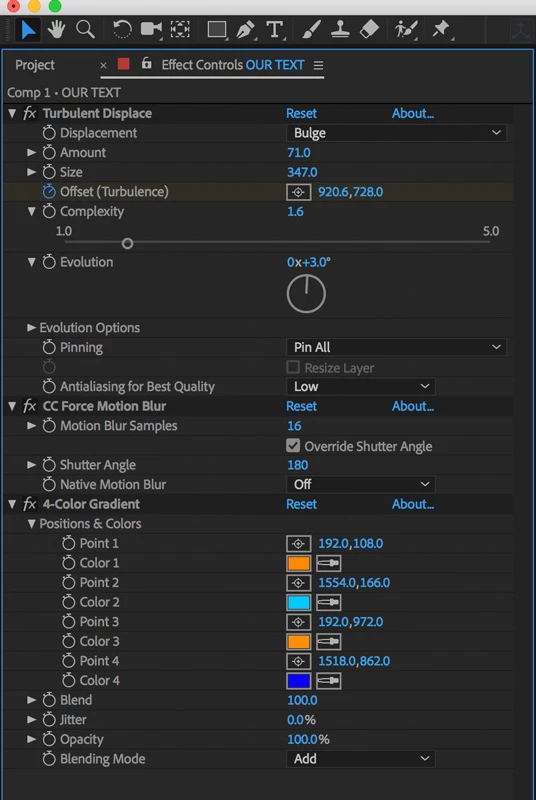
also check this small example to get a better idea, and you can create your preset from this effects and use it anytime

https://www.dropbox.com/s/k2fcttl2o4wv373/text.aep?dl=0

2 replies

OussK
Community Expert
OussKCommunity ExpertCorrect answer
Community Expert
September 13, 2018

It's very easy, a Turbulent Displace effect can do this stretch but you need to play with parameters little bit and animate the offset point, now for color you can add a 4-color gradian and change the color to the color you want and to get this smooth effects a cc motion blur can help. please check the picture below

also check this small example to get a better idea, and you can create your preset from this effects and use it anytime

https://www.dropbox.com/s/k2fcttl2o4wv373/text.aep?dl=0

naomic73815306
Participant
September 13, 2018

thank you so much!!!!

Roland Kahlenberg
Legend
September 13, 2018

The Effect>Distort>CC Flo Motion is what you'll want to use to get this sort of distortion. Here's an AEP for you to play with - take note that a text layer had to be precomped first. This is to allow the CC Flo Motion effect to work its magic across the entire size of the composition. Without precomping, CC Flo Motion's distortion will only work with the text layer's original layer boundaries.

There are lots of Chromatic Aberration effect tutorials out there. It's quite a simple effect to follow along; to replicate the effect.

Download the AEP here -

http://www.broadcastGEMs.com/mediascreamer01/CC_FloMotion_TextFX_01.zip

Very Advanced After Effects Training | Adaptive & Responsive Toolkits | Intelligent Design Assets (IDAs) | MoGraph Design System DEV
Mylenium
Legend
September 13, 2018

What presets should there be? The example you linked to uses extensive 3D-rendering tricks and lots of additional compositing. For this type of stuff there simply cannot be something like slapping on a single preset. It really requires pre-composing and multiple layers with specific distortion and colorization treatments.

Mylenium