
Brique
Inspiring
June 30, 2016
Answered

Cinema 4d grid lines showing in After Effects

  • June 30, 2016
  • 2 replies
  • 19299 views

Hey guys, I'm having a problem with Cinema 4d in AE.  I have a simple cube with some textures that I'm using in a comp.  I had it working before when I was building the rough cut for the client.  Now that the client likes it, I'm moving forward. Added some detail and animation to the cube and now the grid lines are showing in After Effects regardless of the cinema 4d options I'm applying.  I can't figure it out and I'm hoping for some help.

I googled the issue using as many different ways of wording the problem as I can, and haven't found a satisfactory answer.  The only replies I've seen online are a link to this article:

details of CINEMA 4D integration with After Effects CC (12.0) | Creative Cloud blog by Adobe

Which I've read, but doesn't seem to address the problem at all.
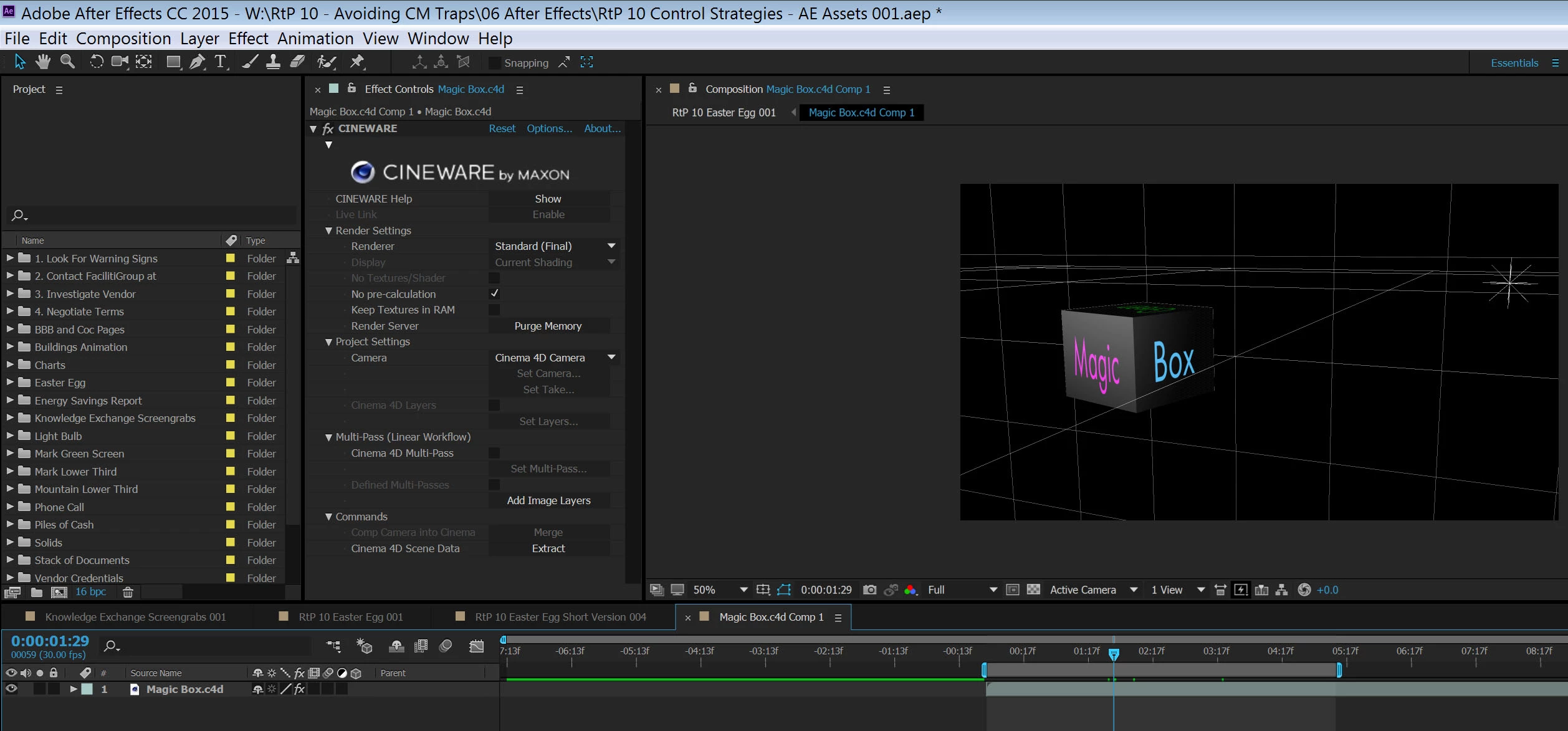
Here's a screenshot of my AE and the settings.  Please let me know if you have any ideas.

Thank you!

    This topic has been closed for replies.
    Correct answer Brique

    I also just updated C4d to the new version and things haven't changed.  I'm perplexed.  Is there a specific mode I have to be in in C4d?


    FOUND IT!!!

    So, for anyone else who might have this problem, I'll post the solution to my particular situation: 

    In addition to having the renderer in the C4d plugin settings within AE set to "Standard (Final)", which I did, it is also necessary to have the renderer set to "Standard" within C4d itself.  This can be accessed under Render> Edit Render Settings, and in the upper left hand corner of the window is the "Renderer" option with a drop-down menu next to it.  Make sure it is set to Standard.  I had it set to Hardware, which was apparently the cause of the problem,

    2 replies

    Nicholas J Leach
    Known Participant
    April 8, 2020

    I had to come look for this post again. After updating After effects it did it once again. Time for a sticky note on my monitor. LOL

    Participant
    April 21, 2020

    I Got. Just In the After effects On the left side on CINEWARE and in render setting Change it to Standard(Draft) or Standard(Final)

    Brique
    BriqueAuthor
    Inspiring
    June 30, 2016

    Also, I've tried disabling the grid through the viewport filters within C4D itself, and that removes the grid in C4D, but not after effects.

    Brique
    BriqueAuthor
    Inspiring
    June 30, 2016

    Also, I've tried trashing my preferences and that hasn't solved it either

    Szalam
    Community Expert
    Community Expert
    June 30, 2016

    Have you tried purging your cache?

    What, exact version of AE are you running?