
alfredoa35666801
Participant
January 10, 2023
Answered

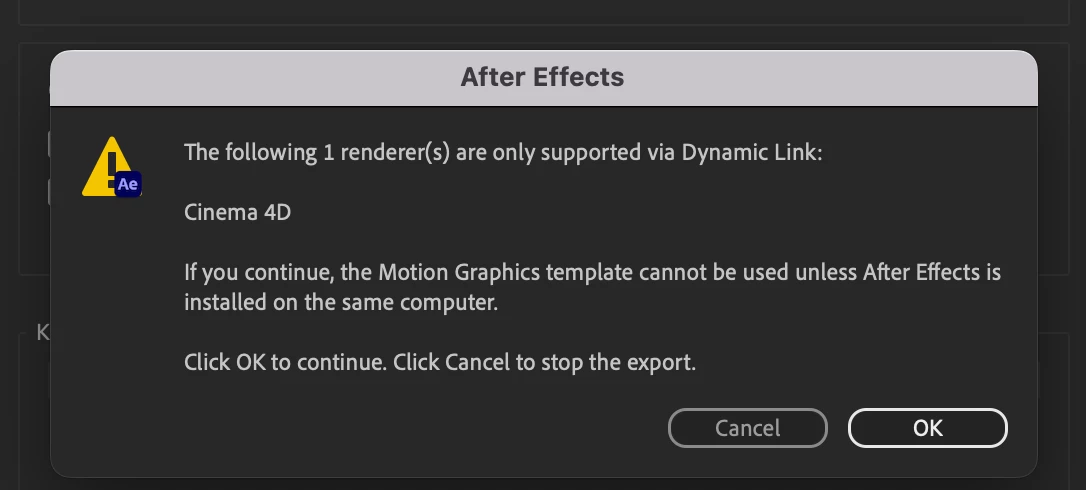
Cinema 4D renderer causes .mogrt export issues

  • January 10, 2023
  • 5 replies
  • 1104 views

Hello, 

While exporting a mogrt template a pop-up message I'd never seen before came up (see attachments). Basically, the person receiving the template I made needs to have After Effects installed in order to use it, or the mogrt won't work.  


Does anyone have a solution for this or is this what making templates in After Effects will be like in the future? 


Thank you!


This topic has been closed for replies.
Correct answer Mylenium

Well, do you actually need the C4D renderer because you have e.g. created an extrusion somewhere? If not, comb through the compositions and switch them to the Standard 3D renderer.


Mylenium

5 replies

Participating Frequently
June 10, 2024

Hi everyone,


I´m having the same issue, except I´m not using any cinema, or any extrusion, or 3d elements. And I have combed through my project and have classic 3D renderer on ALL my compositions. As a matter of fact I was able to export the mogrts with no issue before. Now I made a small change, one image for another. And now I´m having this cinema 4D issue.


Help!

alfredoa35666801
Participant
January 10, 2023

I do not, actually 🙂 I thouught I switched back to the Classic 3D rendered in all comps but it turns out I had missed one which was nested quite well haha. It works as usual now. Thank you very much for the help!

Kyle Hamrick
Community Expert
Community Expert
January 10, 2023

Glad you found this! 
I have noticed this as well - sometimes if you had used the C4D Renderer in a previous project, it can "stick" and actually be selected in comps that don't have 3d layers - which normally doesn't present a problem, unless you're exporting Mogrts! 

Mylenium
MyleniumCorrect answer
Legend
January 10, 2023

Well, do you actually need the C4D renderer because you have e.g. created an extrusion somewhere? If not, comb through the compositions and switch them to the Standard 3D renderer.


Mylenium

alfredoa35666801
Participant
January 10, 2023

Hi, 

Sorry, I will be more specific. The project contains text, textures, and shapes animated in the 2D space. I am sending this MOGRT to a video editor who, supposedly, doesn't have AE installed. As I said, I made many mogrt before and it's the first time I get this message, or that someone's telling me they can't open it. Also, being the project in 2D I was surprised that the issue falls with the Cinema 4D renderer. 


I am not sure if there is any other solution other than them installing AE. 


Thnks anyways.

Alfredo 

Mylenium
Legend
January 10, 2023

It would probably be more useful if you actually told us what the project contains. That said of course it pretty much means what it says. Without an AE installed MOGRTs/ Essential Graphics will always be limited, not just because of the renderer.


Mylenium