Aytze
Known Participant
September 9, 2018
Answered

"CLick to begin analyse" won't go away.

  • September 9, 2018
  • 4 replies
  • 1159 views

I cancelled an analysis and it just stays there and it doesnt go. I clicked anaylysed, cancelled, and like stuff.
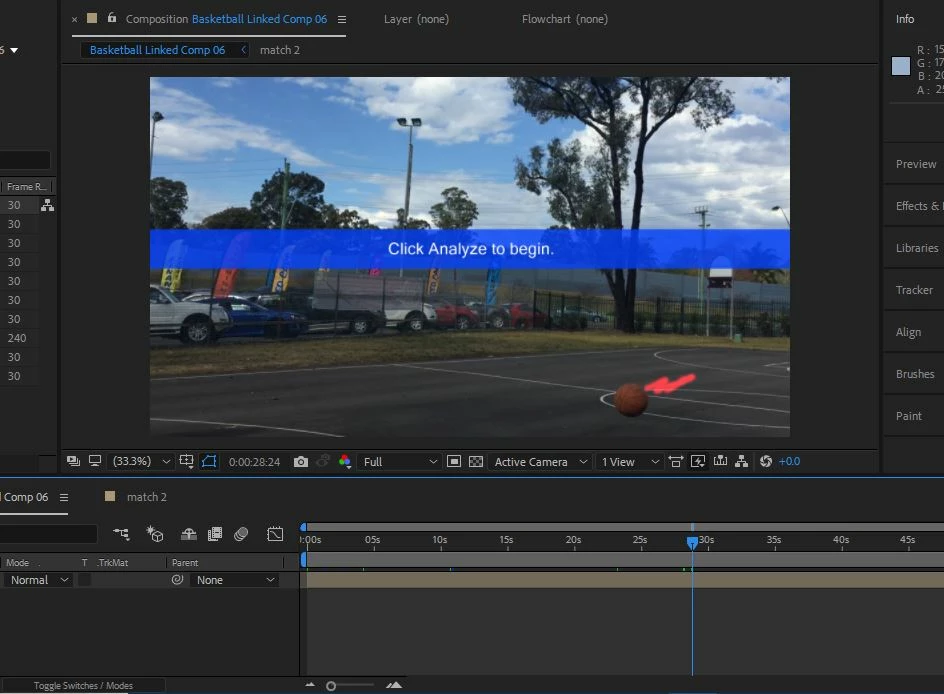
I am actually so pissed right now

    This topic has been closed for replies.
    Correct answer Jose Panadero

    You have 2 options:

    - It looks you have used the Warp Stabilizer VFX to the Camera Tracker 3D. So select the layer, open the Effects Control Panel and delete the effect.

    - If you wat to maintain the effect but this banner to disappear select the layer, open the Effects Control Panel and enter into the Advanced category. You will see an option called Hide Warning Banner.

    4 replies

    Participant
    May 29, 2022

    I had the same issue, but I found a way that might help you...my video was pre composed and the 3d tracking effect was applied to the composition. I just double click on the composition, and it took me inside my composition where my video footage, and I realized the I have added the 3d tracking effect on my video without clicking analyses... so I just deleted the effect from my video

    Roland Kahlenberg
    Legend
    September 9, 2018

    Which version of AE are you using? There was a hiccup with the 3D Camera Tracker in an earlier release of AE CC15. This has been fixed in the latest AE CC15 which is 15.1.2 x69.

    Very Advanced After Effects Training | Adaptive & Responsive Toolkits | Intelligent Design Assets (IDAs) | MoGraph Design System DEV
    Jose Panadero
    Community Expert
    Jose PanaderoCommunity ExpertCorrect answer
    Community Expert
    September 9, 2018

    You have 2 options:

    - It looks you have used the Warp Stabilizer VFX to the Camera Tracker 3D. So select the layer, open the Effects Control Panel and delete the effect.

    - If you wat to maintain the effect but this banner to disappear select the layer, open the Effects Control Panel and enter into the Advanced category. You will see an option called Hide Warning Banner.

    Community Expert
    September 9, 2018

    Are you analyzing a Pre-composition within another Pre-composition?

    In case it is a video and not a Pre-composition: your video has the same characteristics of your Pre-composition?

    What are you doing exactly?

    Byron.