stevebrig
Inspiring
Dec 22, 2023 4:00 PM UTC
Answered

Clipping? - ACES Workflow with Red Giant Universe Glow

I have an EXR file in After Effects in OCIO color management.


The render displays as expected but as soon as I apply any exposure to it my RG Glow effects clips.

What do I need to do to prevent this? I have linked an example file so you can see my setup.


Any help is much appreciated!


https://www.dropbox.com/scl/fi/7eh37dx12ik3ern6o8acj/forum-files.zip?rlkey=dciqvh2tk6v1gyxofm2f0sxj6&dl=0 


This topic is closed to new replies. Start a new post to keep the conversation going.
stevebrig
stevebrigCorrect answer
Inspiring
Jan 10, 2024 5:54 PM UTC

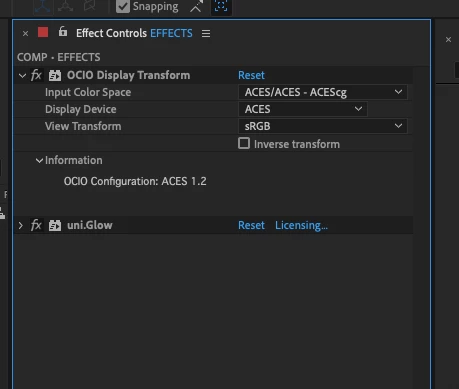
So I have found that adding a OCIO Display Transform effect resolves the clipping.


8 replies

Participating Frequently
Sep 10, 2024 9:55 AM UTC

Hello! I'm having trouble working with Red Giant Universe in ACES as well. Can I ask how you usually export your effects so they look correct? Thank you!

Translate
stevebrig
stevebrigAuthor
Inspiring
Sep 10, 2024 11:42 AM UTC

I am now using ACES 1.3 for CG content.

If this is the case for you you need to make sure your display and export color space is set to sRGB - Display/ACES 1.0 - SDR Video. This should get you the best results when working and exporting. 


Hope this helps.


Translate
Participating Frequently
Sep 10, 2024 2:27 PM UTC

I am using ACES 1.2 now because of the studio's requirements. But thank you very much for your advice. Tt's very helpful, I will give it a try! Thanks, Steve!!

Translate
ToolfarmJP
Community Expert
Community Expert
Dec 26, 2023 1:17 AM UTC

Would you check the the color setting in Project Settings (File menu > Project  Settings > Color tab)? You find the setting of OCIO there.


Translate
stevebrig
stevebrigAuthor
Inspiring
Dec 26, 2023 3:19 AM UTC

Yes I am in OCIO color mode. If you take a look at my example link. All my settings are proper.


Here are some screens showing the project settings and the image settings...


Translate
stevebrig
stevebrigAuthorCorrect answer
Inspiring
Jan 10, 2024 5:54 PM UTC

So I have found that adding a OCIO Display Transform effect resolves the clipping.


Translate