
Participant
July 30, 2019
Question

clipping mask problem in After Effects?

  • July 30, 2019
  • 1 reply
  • 5544 views

     I have a ball and I want to apply an inner shade to the ball but i'm having a problem

     How can I hide anything that's outside the red ball

     I want the blue circle to only appear inside of the red ball
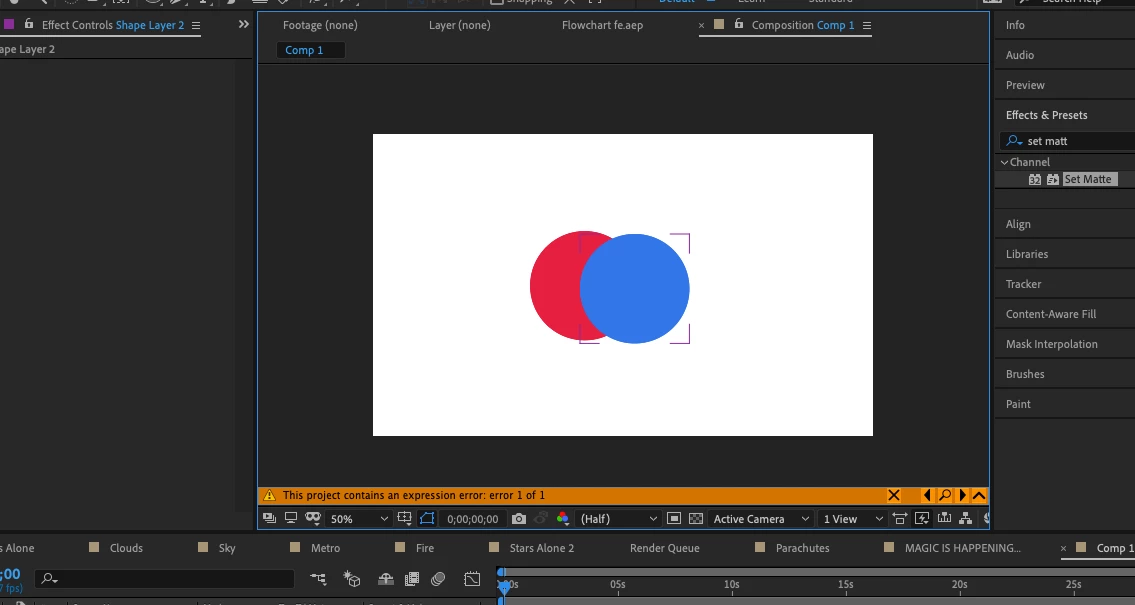
  (also I want to keep the colors the same)

This topic has been closed for replies.

1 reply

Kyle Hamrick
Community Expert
Community Expert
July 31, 2019

Depending on how you're attempting to apply the shading, you could use track mattes (How to use Track Mattes in Adobe After Effects - Tutorial - YouTube) or if these are built with shape layers, you could use Merge Paths to isolate the portion of the shapes you want visible. Let me know if you need further direction on this.

Participant
July 31, 2019

Regarding the Mattes: In the video tutorial the color of the text goes away and is replaced entirely by the other layer. I want to keep the red circle the same and show the portion of the blue circle that's inside the red circle.

I'm using shape layers. how could i isolate the portion of the blue circle that's inside the red circle and cut out the rest? I'm unfamiliar with Merge Paths.

Kyle Hamrick
Community Expert
Community Expert
July 31, 2019

You can have multiple shapes within a single shape layer, and all will continue to have their own internal Transform controls, if you need to animate them.

The red circle will be in its own shape group, then you can duplicate that, add another ellipse & scoot it over, and use Merge Paths (you get this from the little Add flyout menu) (set to intersect) to trim this new circle to display only where they overlap. Set the fill to blue, and voila.


If you need additional direction on that, I'd suggest looking up some tutorials on shape layers and/or merge paths.

Shape layers are the easier way to approach this in my opinion - doing this with mattes means you'll need an extra copy of the red circle to get the look you're after.