
glennv75908928
Participant
August 27, 2017
Question

clips

  • August 27, 2017
  • 2 replies
  • 267 views

hello, just a simple question i dont understand right. when i edit clips in premiere pro and place them in after effects the whole clip is still there and not the edited clips as you can see in the photo those "more colored" bars are those edit
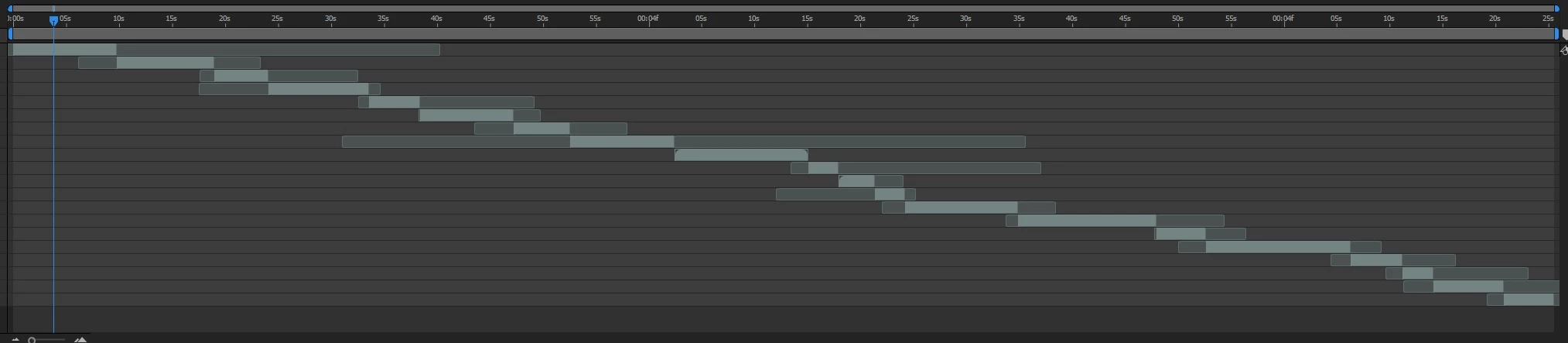
When i put in a adjustment layer and put in that layer a color lut it doesnt apply to my clips how is that possible?

    This topic has been closed for replies.

    2 replies

    Kevin J. Monahan Jr.
    Community Manager
    Community Manager
    September 6, 2017

    Still having trouble, Glenn? Let us know what's going on.

    Thanks,
    Kevin

    Kevin Monahan - Sr. Community and Engagement Strategist – Adobe Pro Video and Audio
    Community Expert
    August 27, 2017

    Your screenshot doesn't show an adjustment layer or anything you have done to the clips brought in from Premiere Pro. This does not look like an efficient workflow to me.

    If you put an adjustment layer on top of all of those clips and apply an effect it will apply that adjustment to all the layers beneath it. If it does not then there is something else going on in the comp that you are not showing us.

    I am not sure you should be using this workflow in the first place. I don't know what you are doing in the comp because you have not given us any details but here is something to think about. I ran a test on a recent project to see how much additional rendering time dynamic link would add to one of my typical compositing and graphics projects.

    The project - 12 comps with compositing, color corrections, 3D layers, lights and some motion graphics - total running time of the 12 comps 5:38.

    First workflow, render 12 comps to a suitable Digital Intermediate (Cineware 10 bit in this case) - Render time 31 minutes. Drop those rendered comps into Premiere Pro, sequence the layers and add transitions between shots and edit as necessary, total time 5 minutes. Cue up the project in the AME using Premiere's export function and render a h.264 deliverable using one the Vimeo preset for HD modified only to do multi pass rendering. 14 minutes. Total production and rendering time after the comps were complete: 50 minutes.

    Second workflow. Import the 12 comps into Premiere Pro as dynamic linked files and sequence the layers as in the first workflow - Total time 9 minutes because you can only do one comp at a time. So far I'm 3 minutes behind. Cue up the Premiere Sequence in the AME and render the final with the same settings in the first workflow - render time: 2:38 or 158 minutes. An increase of about 150%.

    Third workflow, just for fun I nested my 12 original comps in a new master comp in AE, put in the same transitions and edits and rendered two ways. Directly to a digital intermediate - render time 30 minutes (saved one minute) and rendering a DI which was dropped into the AME and rendered. Total rendering and production time - 55 minutes.

    I also tried dropping the main comp into the AME and rendering to the same settings I used in the Premiere Pro exports to see how that worked. Total render time 2:25 minutes. I saved about 10 minutes over the second workflow but it still took about 150% longer than the first workflow.

    This proved to me what I always expected. Using dynamic link in Premiere Pro is incredibly inefficient for any comps that do not render extremely quickly. Dynamic link works fine for simple animated graphics and titles, and I'm liking the ability to use AE to design lower thirds and titles that you can edit in Pro. But for things like color grading, compositing, masking, keying and other effects work Dynamic link is incredibly inefficient. You are better off rendering a suitable visually lossless DI and moving on to the next phase from there.

    glennv75908928
    Participant
    August 28, 2017

    Here's a full screenshot. what about the bars i shown you how can i transfer only the "working bar"

    Community Expert
    August 28, 2017

    You have the footage panel open not the composition panel. You need to study up on the After Effects UI.