ti.s.cavalcanti
Inspiring
June 29, 2015
Answered

Collect Files - Script

  • June 29, 2015
  • 1 reply
  • 1134 views

I need of a Script which do the following:

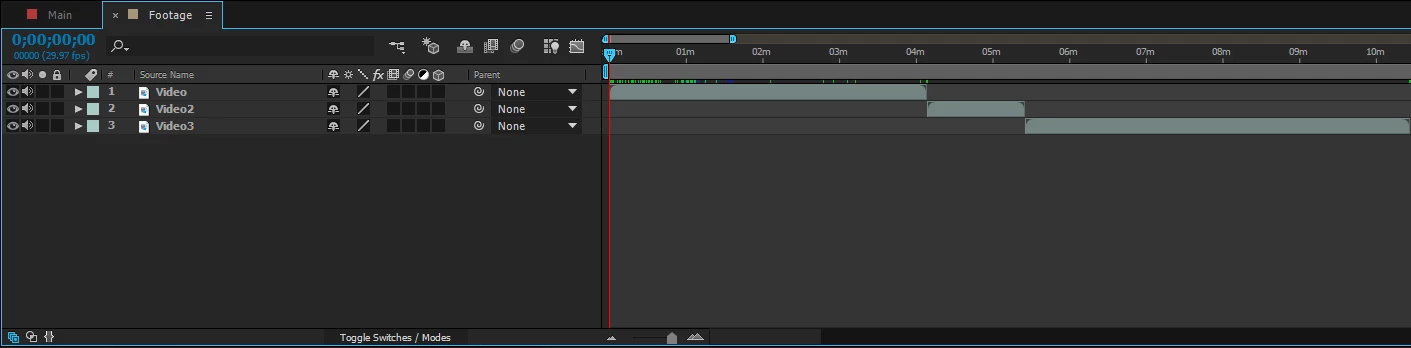
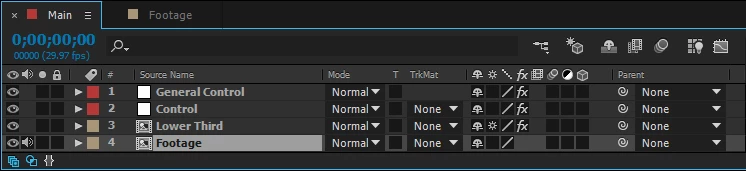
  1. Search Footage composition in active item;
  2. Within Footage composition, search the number of items that exist within (the number of items may vary);
  3. Collect all these items to use in the Script.
  • Then;
  1. Sum the time duration of all the items that are within the Footage composition.
  2. And apply this calculated time, in time duration of the active composition.

Thanks.

This topic has been closed for replies.
Correct answer David Torno
  1. Search Footage composition in active item;
  2. Within Footage composition, search the number of items that exist within (the number of items may vary);
  3. Collect all these items to use in the Script.
  • Then;
  1. Sum the time duration of all the items that are within the Footage composition.
  2. And apply this calculated time, in time duration of the active composition.

var currentlyOpenComp = app.project.activeItem;

if(currentlyOpenComp instanceof CompItem){     //1. This verifies that the current active item is a comp

     var allMyLayers = currentlyOpenComp.selectedLayers;     //2. Grabs selected layers

     var allMyLayersLength = allMyLayers.length;

     var timeDurationValue = 0;     //Generic variable to collect time to

     var checkTheseLayerDurations, checkTheseLayerDurationsLength;     //Variables for later

     for(var i=0; i<allMyLayersLength; i++){     //Loop through selected layers

          if(allMyLayers instanceof AVLayer && allMyLayers.source instanceof CompItem){     //Verify that layer is AVLayer and then check it's source to make sure it's a CompItem

               checkTheseLayerDurations = allMyLayers.source.layers;     //Grabs the layers inside the comp

               checkTheseLayerDurationsLength = checkTheseLayerDurations.length;

               for(var d=1; d<=checkTheseLayerDurationsLength; d++){     //Loop through layers to grab time durations

                    timeDurationValue += checkTheseLayerDurations.source.duration;     //Assumes each layer is an AVLayer that has a source, and grabs it's duration and adds it to the previous time total

               }

               allMyLayers.source.duration = timeDurationValue;     //Sets the comp duration to the final duration total.

          }

     }

}

1 reply

David TornoCorrect answer
Legend
June 29, 2015
  1. Search Footage composition in active item;
  2. Within Footage composition, search the number of items that exist within (the number of items may vary);
  3. Collect all these items to use in the Script.
  • Then;
  1. Sum the time duration of all the items that are within the Footage composition.
  2. And apply this calculated time, in time duration of the active composition.

var currentlyOpenComp = app.project.activeItem;

if(currentlyOpenComp instanceof CompItem){     //1. This verifies that the current active item is a comp

     var allMyLayers = currentlyOpenComp.selectedLayers;     //2. Grabs selected layers

     var allMyLayersLength = allMyLayers.length;

     var timeDurationValue = 0;     //Generic variable to collect time to

     var checkTheseLayerDurations, checkTheseLayerDurationsLength;     //Variables for later

     for(var i=0; i<allMyLayersLength; i++){     //Loop through selected layers

          if(allMyLayers instanceof AVLayer && allMyLayers.source instanceof CompItem){     //Verify that layer is AVLayer and then check it's source to make sure it's a CompItem

               checkTheseLayerDurations = allMyLayers.source.layers;     //Grabs the layers inside the comp

               checkTheseLayerDurationsLength = checkTheseLayerDurations.length;

               for(var d=1; d<=checkTheseLayerDurationsLength; d++){     //Loop through layers to grab time durations

                    timeDurationValue += checkTheseLayerDurations.source.duration;     //Assumes each layer is an AVLayer that has a source, and grabs it's duration and adds it to the previous time total

               }

               allMyLayers.source.duration = timeDurationValue;     //Sets the comp duration to the final duration total.

          }

     }

}
ti.s.cavalcanti
Inspiring
June 30, 2015

Oh, great, it works correctly!

I'll try, just make some adjustments to adapt to my project, because I forgot to tell some details.

  • I need the script use not only videos files, but also any type of media, audio and pictures too, if possible.
  • And I want which activeItem, that is, "Main Comp" get this duration calculated in Script. "Main Comp" = The duration of the items added within the composition "Footage".

David Torno

I am very grateful!