December 21, 2025
Question

Color correction in after effects

  • December 21, 2025
  • 3 replies
  • 188 views

Is it possible to use color correction to turn the first image into the second one? If possible, how do I do it?
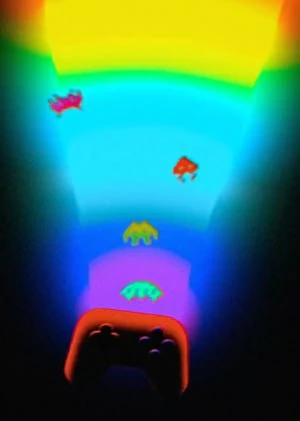
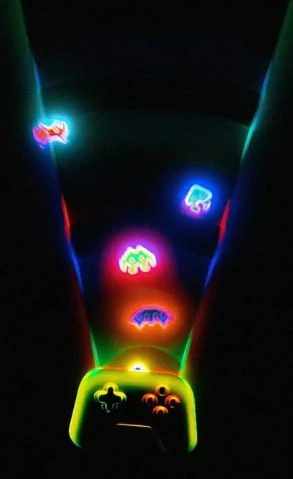
276.jpg

277.jpg


3 replies

ToolfarmJP
Community Expert
Community Expert
December 23, 2025
Participating Frequently
December 22, 2025

You can get close with color correction, but the second image isn’t just a color shift—it has contrast remapping, glow, saturation changes, and selective color isolation that go beyond simple correction.


Use Levels or Curves:

  • Pull the black point inward hard

  • Slightly lower midtones

  • Keep highlights bright

    2. Increase saturation selectively

    Use Hue/Saturation or HSL:

    • Increase saturation only on:

      • Cyans

      • Greens

      • Magentas

    • Avoid oversaturating yellows (they’ll blow out fast)

      3. Isolate colors (key step)

      Use one of these:

      • Selective Color

      • Color Range selection

      • HSL secondary (in Resolve / Premiere)

        Add glow (this is what makes it neon)

        Duplicate the layer:

        • Apply Gaussian Blur

        • Set blend mode to:

          • Screen, Add, or Linear Dodge

        • Lower opacity until it blooms, not washes out

        Optional:

        • Mask glow so it affects only bright areas

        Boost highlights

        Use:

        • Curves → lift highlights slightly

        • Or Glow / Bloom effect (AE, Resolve)

        This gives the light-emitting look.

        Fine-tune with Color Balance

        Push:

        • Highlights → cooler (cyan/blue)

        • Midtones → slightly magenta

        • Shadows → neutral or slightly blue

        This helps match the color mood of image 2.


Community Expert
December 21, 2025

Instead of color correction maybe you could stack them in the timeline and keyframe the top transparency down to Zero.
