Known Participant
October 23, 2021
Answered

Color in UI + Vertical Penels

  • October 23, 2021
  • 2 replies
  • 413 views

Hey,

So I'm currently working on a script and it's now 99% done.

The only thing missing is a good UI, I can't find any ways to add colors in a UI or how to do good-looking vertical panels like that
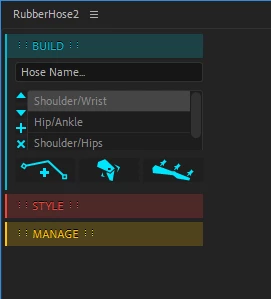


It currently looks like that and I really wanna take it to the next level
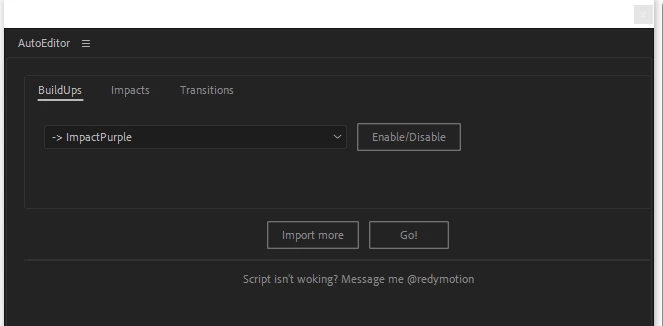

So if anyone knows how to do that I'd really appreciate the help!

Thanks,
RedyMotion

This topic has been closed for replies.
Correct answer Mathias Moehl

The options to customize the UI of panels are very limited. Essentially you can use

- icon buttons for custom buttons and

- brush objects for custom colors

see https://extendscript.docsforadobe.dev/user-interface-tools/graphic-customization-objects.html


If you write a CEP panel instead of a script, you have much more flexibility (but it is much more complex, too).


2 replies

Mathias Moehl
Community Expert
Mathias MoehlCommunity ExpertCorrect answer
Community Expert
October 23, 2021

The options to customize the UI of panels are very limited. Essentially you can use

- icon buttons for custom buttons and

- brush objects for custom colors

see https://extendscript.docsforadobe.dev/user-interface-tools/graphic-customization-objects.html


If you write a CEP panel instead of a script, you have much more flexibility (but it is much more complex, too).


Mathias Möhl - Developer of tools like BeatEdit and Automation Blocks for Premiere Pro and After Effects
Known Participant
October 23, 2021

Yessss, thanks!

I tried using the brush, it worked but not as I wanted to. You gave me an idea, how can I make 3 icon buttons but you can only click one at the time? ( like radio buttons )

I found that tutorial that basically shows how to make a button that hides/shows stuff from the UI. So I'll use the buttons as some sort of pannel, but it will look way better since it's icon buttons
tutorial : https://youtu.be/gWTfihMFmgY

Thanks again,
RedyMotion

Mylenium
Legend
October 23, 2021

You can of course use graphical buttons and text fields can have BG images plus of course you can go all fancy with the custom formatting options provided by the panel engine itself. Never bothered much with any of that, though, so my knowledge is limited. I'm sure you can find it somewhere in the ESTK/ CEP docs...


Mylenium