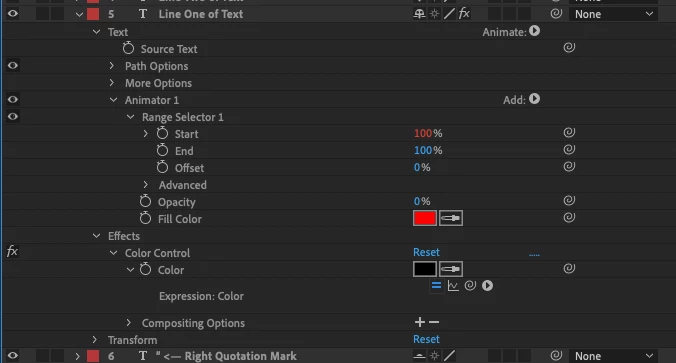
Colour control effect being over-ridden by the range selector animation.
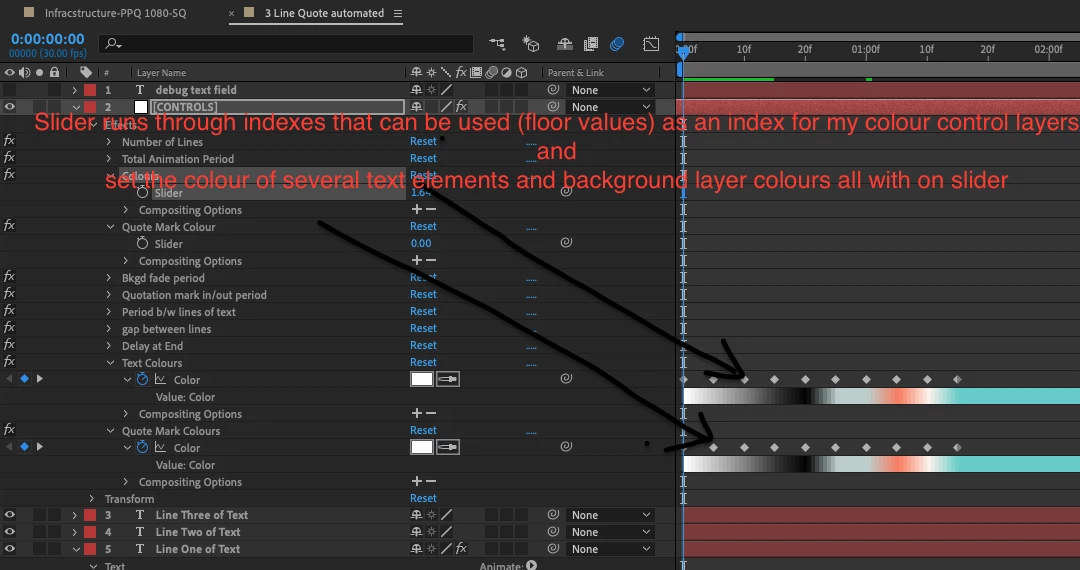
So I've made a slider to control a bunch of comp colourway attributes various text elements mainly. I want slider to have 10 positions for ten colour ways (combinations of colours on different elements).
Slider control object effect has been created. (SC)
A few Color control effects have been created. (c1, c2, c3,…)
I then want to go into my text elements an set the colour through the Text Layer> Property> Fill Color> RGB effect and write an expression to control it with the slider control (SC) as an index to the value keys in the look up table color control effects. Make sense?
The expression I use for static text layers works fine, looks like this:
thisComp.layer("[CONTROLS]").effect("Quote Mark Colours")("Color").key(thisComp.layer("[CONTROLS]").effect("Quote Mark Colour")("Slider"));
But where I have a range selector animation on the text to mark it animate out left to right char by char it doesn't let me set the color effect, completely ignores that color attribute and the one shown as red (default color) presumably because base opacity is set to zero.

 AdChoices