
Participant
August 23, 2023
Question

Colour select issues

  • August 23, 2023
  • 1 reply
  • 198 views

Hi, 

I've been having issues with importing footage into After Effects and being over exposed, so I've been poking around in the colour settings. 


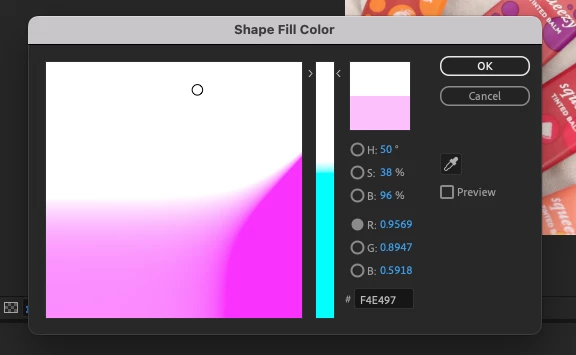
But now I have a bigger issue where I do not have full range of colour selection and I'm unsure how to restore it. Please see attached image. 
How do I restore to normal colour functions?

Thanks for your time
 

This topic has been closed for replies.

1 reply

Andrew Yoole
Inspiring
August 24, 2023

It looks like your colour management is set to some kind of Log color space.


Go to File > Project Settings > Color.  The default colour management settings look like the image below.  Unless there's a specific reason, the safe setting for Working Color Space is "None".


I have also posted in the other thread you've created.  Might be wise to stick to one thread.