
Participant
June 13, 2025
Question

como mudar o comportamento padrão das keyframes de rotação de uma layer 3d?

  • June 13, 2025
  • 1 reply
  • 228 views

Hoje me deparei com a seguinte situação. Criei 30 shape layers em 3d para rotacionarem em sequência de 12 graus até completar 360 graus. No entanto, as keyframes que rotacionam mais de 180 graus estão seguindo o trajeto mais curto, ou seja, dos 360 até qualquer valor maior que 180. Como eu posso alterar esse comportamento para que todas as layers comecem em 0?
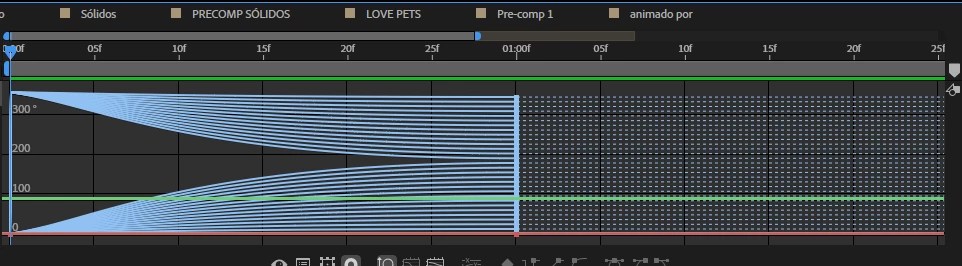


1 reply

Kevin J. Monahan Jr.
Community Manager
Community Manager
June 13, 2025

Hey Ivan,

Can't you use expressions to control the rotation to ensure that all layers start at 0 degrees and rotate the way you are envisioning?


Unfortunately, I don't have the experience to come up with an expression to do just that, but I hope a community member or product team person can assist. Sorry for the delay and frustration on this unique issue.


Thanks,
Kevin


Kevin Monahan - Sr. Community and Engagement Strategist – Adobe Pro Video and Audio
Participant
June 14, 2025

Hello Kevin,


Yeah I could do that, I was just trying to avoid expressions because they're also not my specialty. It was also worth asking in case there was an alternative solution to this issue.


Anyway, thanks for the reply

nishu_kush
Legend
June 16, 2025

Doesn't happen on my end. Do you mind sharing a few screenshots or a screen recording to help us understand your workflow better? 


Thanks,
Nishu