Participant
November 19, 2021
Question

Comp text jagged vs sharp pre-comp text

  • November 19, 2021
  • 1 reply
  • 187 views

I have typed text in a pre-comp and it looks great, but when viewed in the main comp (the comp it's nested within) it becomes jagged. Here's a screenshot comparison:
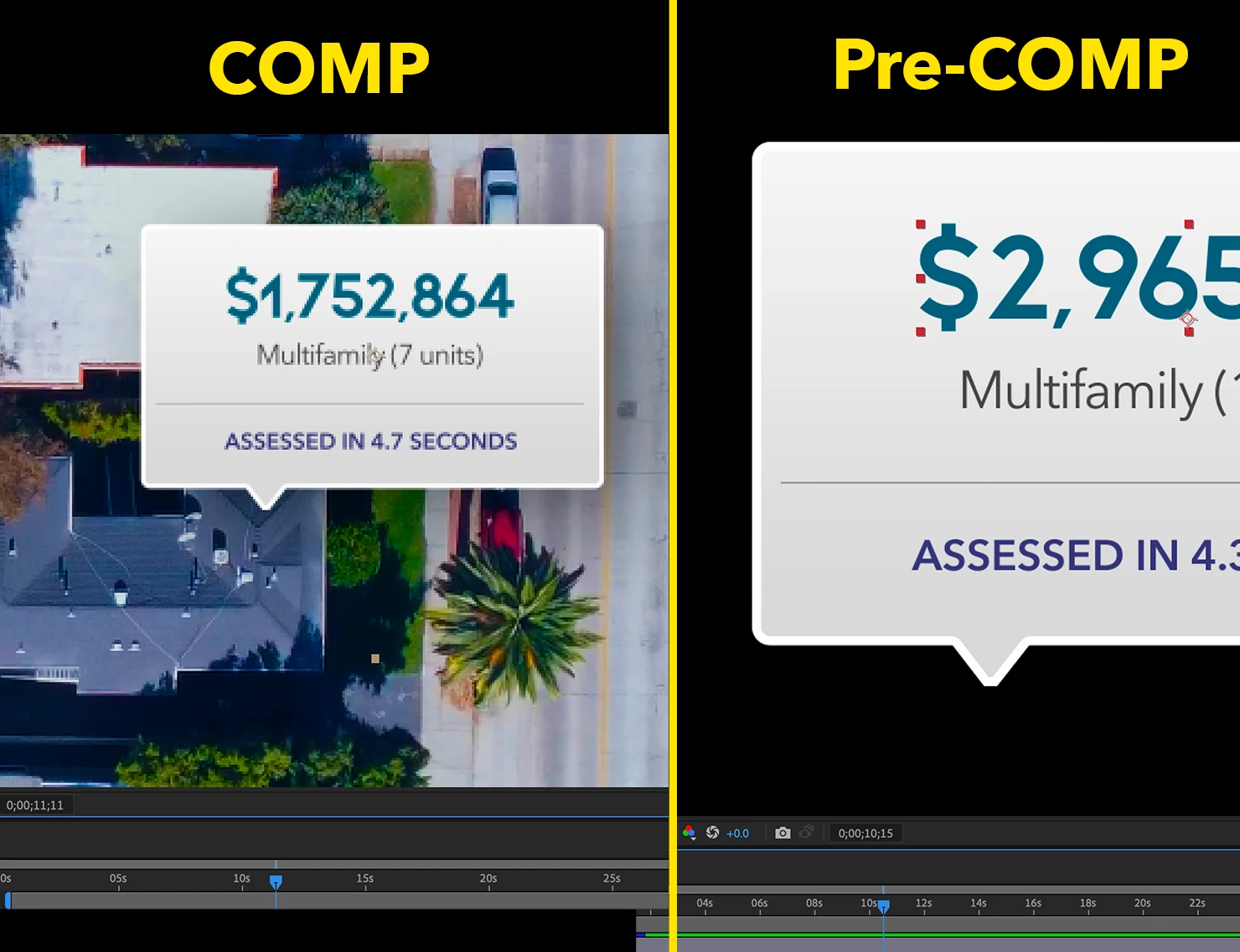
 

I have "continuously rasterize" on in both comps and the only difference I know of is that the text in the main comp has been reduced from 100% to 25%. However, even when I keep them both scalled to 100% I get the same results; sharp text in pre-comp, jagged text in main comp.


Thanks in advance for your help.

This topic has been closed for replies.

1 reply

Roland Kahlenberg
Legend
November 19, 2021

The Shapes/Graphics from the pre-Comp are jagged AS WELL AS the background image. What view settings do you have in the Main Comp? If set too high, imagery will pixelate and you will see such issues in your Comp Panel.

Very Advanced After Effects Training | Adaptive & Responsive Toolkits | Intelligent Design Assets (IDAs) | MoGraph Design System DEV
Ben5E60Author
Participant
November 19, 2021
Thank you for responding, Roland.

As you can see in the screenshot below the main comp is currently set to
100%. As I mentioned, the shape/text element in the main comp has been
scaled down to 25% of its size in the pre-comp, but even when I keep them
at 100% in the main comp the problem persists.

[image: image.png]

Ben Siegler
Creative Director
(310) 977-6199
bsiegler@aqueous.com
10960 Wilshire Blvd. Suite 1060 Los Angeles, CA 90024

This message, and any attachments, is for the intended recipient(s) only,
may contain information that is privileged, confidential and/or proprietary
and subject to important terms and conditions. If you are not the intended
recipient, please delete this message. Attachments to this message may have
additional important disclosures and disclaimers, which you should read.
Additional messages may be sent from various affiliates.
Roland Kahlenberg
Legend
November 19, 2021

Hi Ben, it looks like you've attached an image but it's not appearing. As suggested earlier, look at your Composition's View Resolution. Such issues are usually related to a high zoom level > = 400% Zoom Level.  

Very Advanced After Effects Training | Adaptive & Responsive Toolkits | Intelligent Design Assets (IDAs) | MoGraph Design System DEV