Participant
November 25, 2019
Question

Comp window glitch in AE 2020

  • November 25, 2019
  • 5 replies
  • 1193 views

Hi, Im having some issue with my comp window view since I updated After effects to version 17. Since then my comp window preview glitchs like this when previewd, any idea how to fix this?
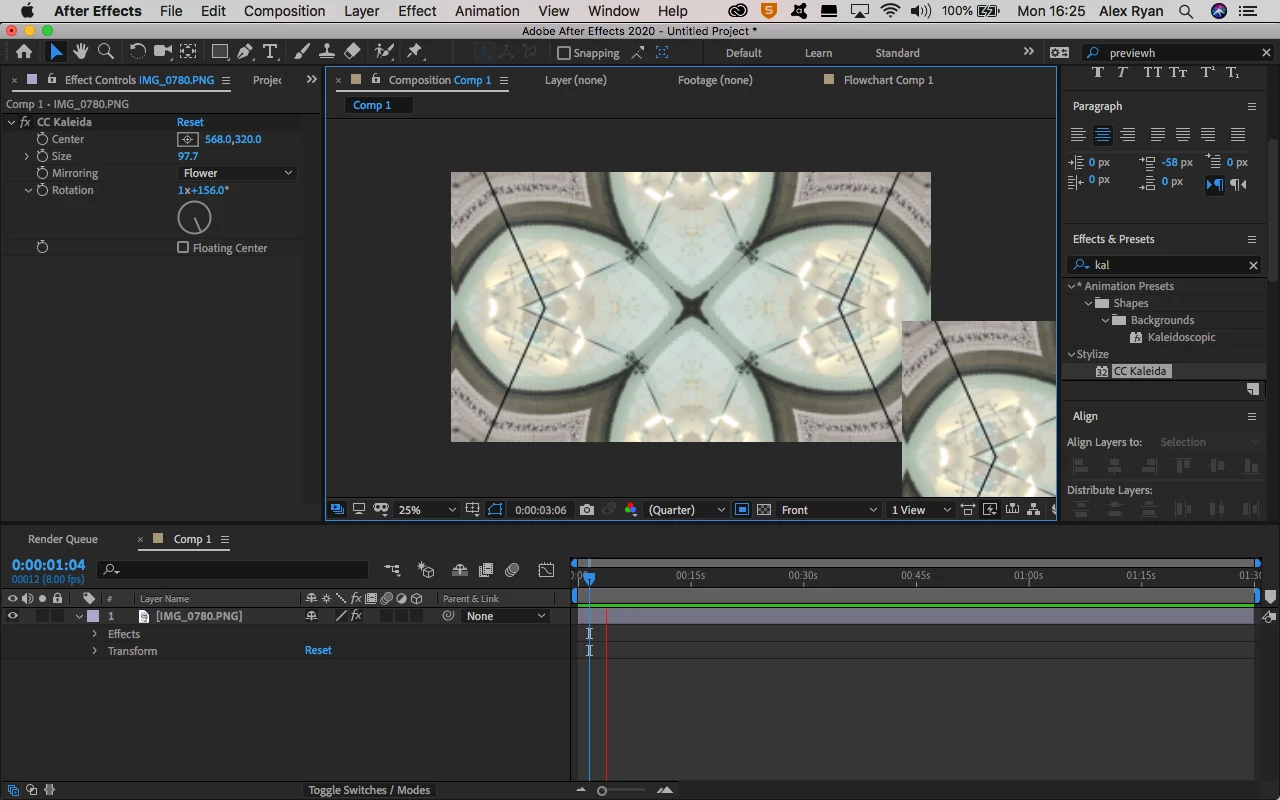

This topic has been closed for replies.

5 replies

Participant
May 22, 2020

For me, I fixed it by going to File > Project Settings, and then under Video Rendering and Effects tab change GPU Acceleration to Mercury Software Only. It wont change immedietaly! You have to then exit the program and restart After Effects. Good luck!

Sue_Zan404
Known Participant
November 28, 2020

I was having a glitch as well, but mine would pixellate and jolt from frame to frame, even jumping backward, and your solution fixed the issue!  You are awesome!

Shivangi_Gupta
Legend
December 11, 2019

Hi there,


Thanks for your patience. Adobe After Effects has released a patch update which provide a fix for the duplicate preview issues. For more information, please check https://helpx.adobe.com/after-effects/kb/fixed-issues.html


Let us know if you have any other questions.


Thanks,

Shivangi

Participant
November 26, 2019
Kyle Hamrick
Community Expert
Community Expert
November 25, 2019

Can you please post your system specs? There's really no way to diagnose what's going on without knowing what hardware you're running on.
Have you tried disabling GPU rendering? (File > Project Settings > Video Rendering and Effects)
I see the other commenter is having the same issue and this hasn't made a difference, but it's a good first step in troubleshooting.

Participant
November 25, 2019

I'm also having this same issue with my preview window in After Effects 17 on Catalina 10.15.1. No changes to preview settings (mercury rendering, resolution, etc, etc) have corrected it.