Inspiring
August 2, 2021
Answered

Composition and playback problem

  • August 2, 2021
  • 1 reply
  • 976 views

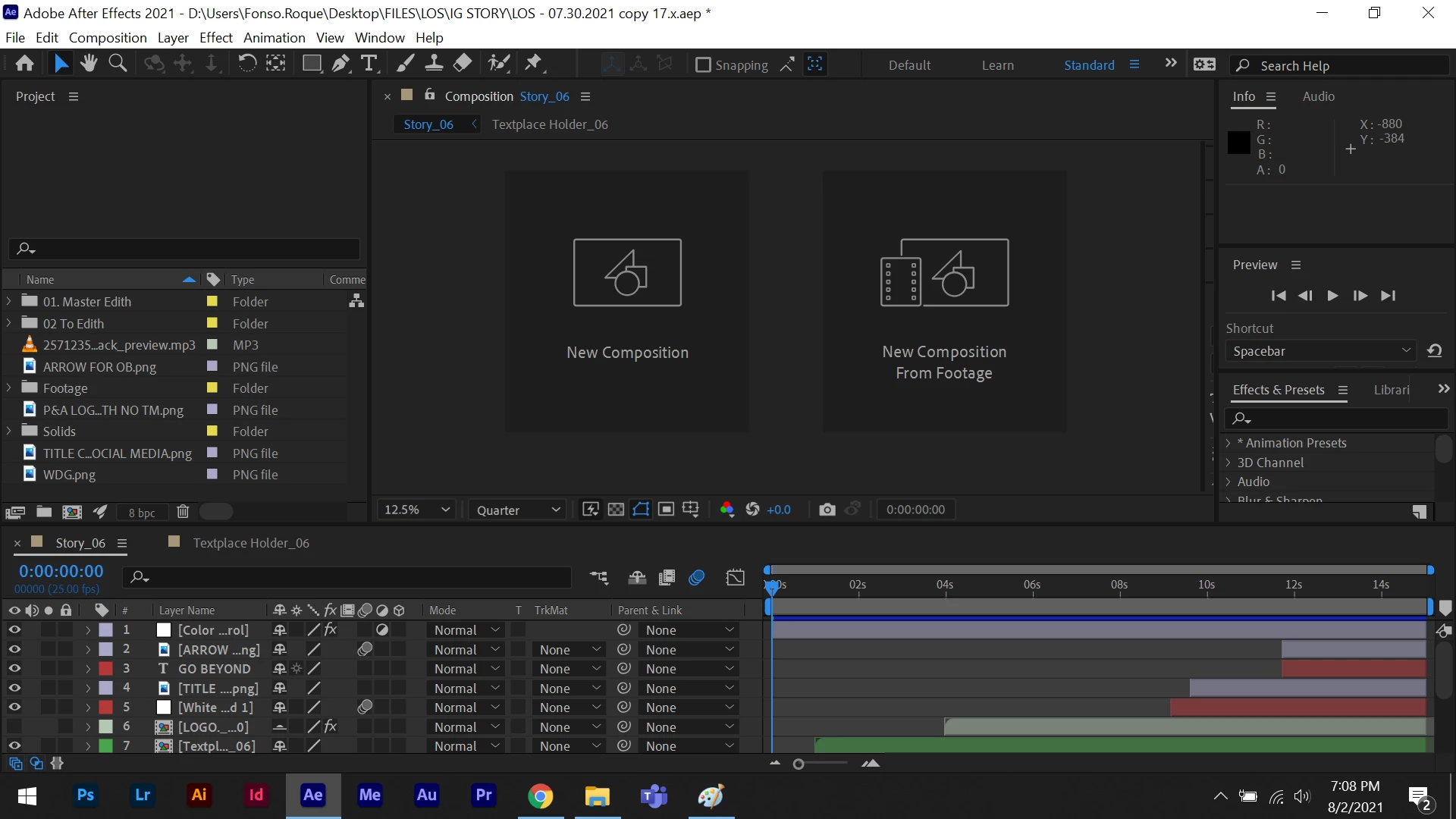
I am having issues with the composition and playback everytime I open my file it's always like this. I don't know if its a bug due to the update 18.4. I cannot preview my work. I tried restarting my laptop multiple times and it didn't work at all. I already tried cleaning the cache, nothing at all. This is annoying. Anyone who has a similar problem? 

This topic has been closed for replies.
Correct answer Fonso5CD2

Did you check your GPU drivers? Did you try changing the composition settings for GPU Acceleration? (Shift + Alt/Option + Ctrl/Cmnd + K). Did you try changing the Preferences settings in the Display/Hardware Accelerate or changing Video Preview/Enable Mercury Transmit? You can get there easily by pressing Alt/Option + Ctrl/Cmnd + ;


I suspect that you are experiencing GPU issues. I have 3 versions of After Effects running on my systems at all times. Beta (if you have access), The latest, and the previous (18 and 17). There is nothing wrong with having more than one version installed at the same time. It will provide you with options if you run into problems. 


Hi Rick! I checked my composition settings for GPU Acceleration and change a few settings and tried restarting after effects. I'm still having issues. Nothing seems to work, and I guess my office laptop needs to be check. I'll contact my office IT support but for now i'll stick with version 17 since I'm not having issues with that version. Thank you for the support Rick!

1 reply

Community Expert
August 2, 2021

Your composition panel is not open. Close the timeline, reset the workspace, then open the composition again from the Project Panel. You can reset your workspace by double-clicking on Standard in the toolbar and choosing Yes or use the Window/Workspace/Reset current workspace menu.

Fonso5CD2Author
Inspiring
August 3, 2021

Hi Rick, thanks for the info but I tried downgrading my after effects back to version 17 and resetting the workspace did work but after updating it to 18.4 and resetting the workspace the issue comes back again I can't see my work at all. It's plain black.


Fonso5CD2Author
Inspiring
August 3, 2021

And also the playback doesn't work at all.