

s.despins
Known Participant
December 14, 2021
Question

Composition Scale Shift Issue 3D

  • December 14, 2021
  • 1 reply
  • 478 views

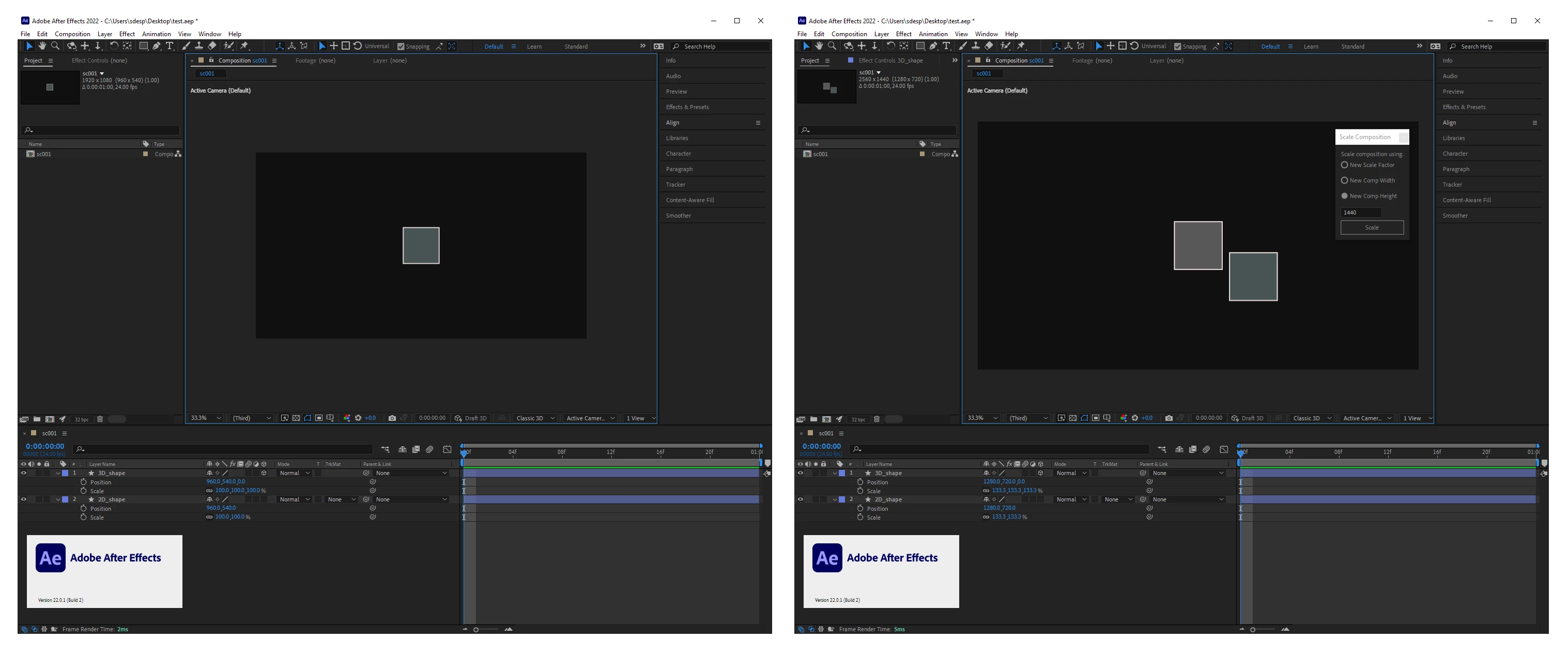
If you resize the composition using the "Composition Scale.jsx" script, there will be a difference in the display between 2D and 3D layers with the same X and Y numbers. I just updated to version 22.1.1 (Build 73) still an issue.


Supplied Screen Grab illustrating the issue.
 

This topic has been closed for replies.

1 reply

Mylenium
Legend
December 15, 2021

Have you checked the layer anchor points? Looks like it's offset...


Mylenium

s.despins
s.despinsAuthor
Known Participant
December 15, 2021

Just checked, it's not the anchor points. It's definitely a bug, i've seen similar posts else where. I wanted to post here to get attention. Thanks for the suggestion tho.


s.despins
s.despinsAuthor
Known Participant
December 15, 2021

I came across a similar post, it was just cropping the region of interest. Which ended up offsetting the 3D layer, giving a similar result as my shared issue. Feel free to try it. AE Current Version 22.1.1 (build 73)


Steps:

1. Create a Composition

2. Create two shapes or nulls one being a duplicate

3. Centered the anchors points and align to the Center of the Compositon

3. Make one of the duplicates a 3D layer

4. Select a Region of Interest

5. Crop Comp to Region of Interest


End Results 3D Layer shifts from the 2D duplicate