
Participant
April 24, 2018
Answered

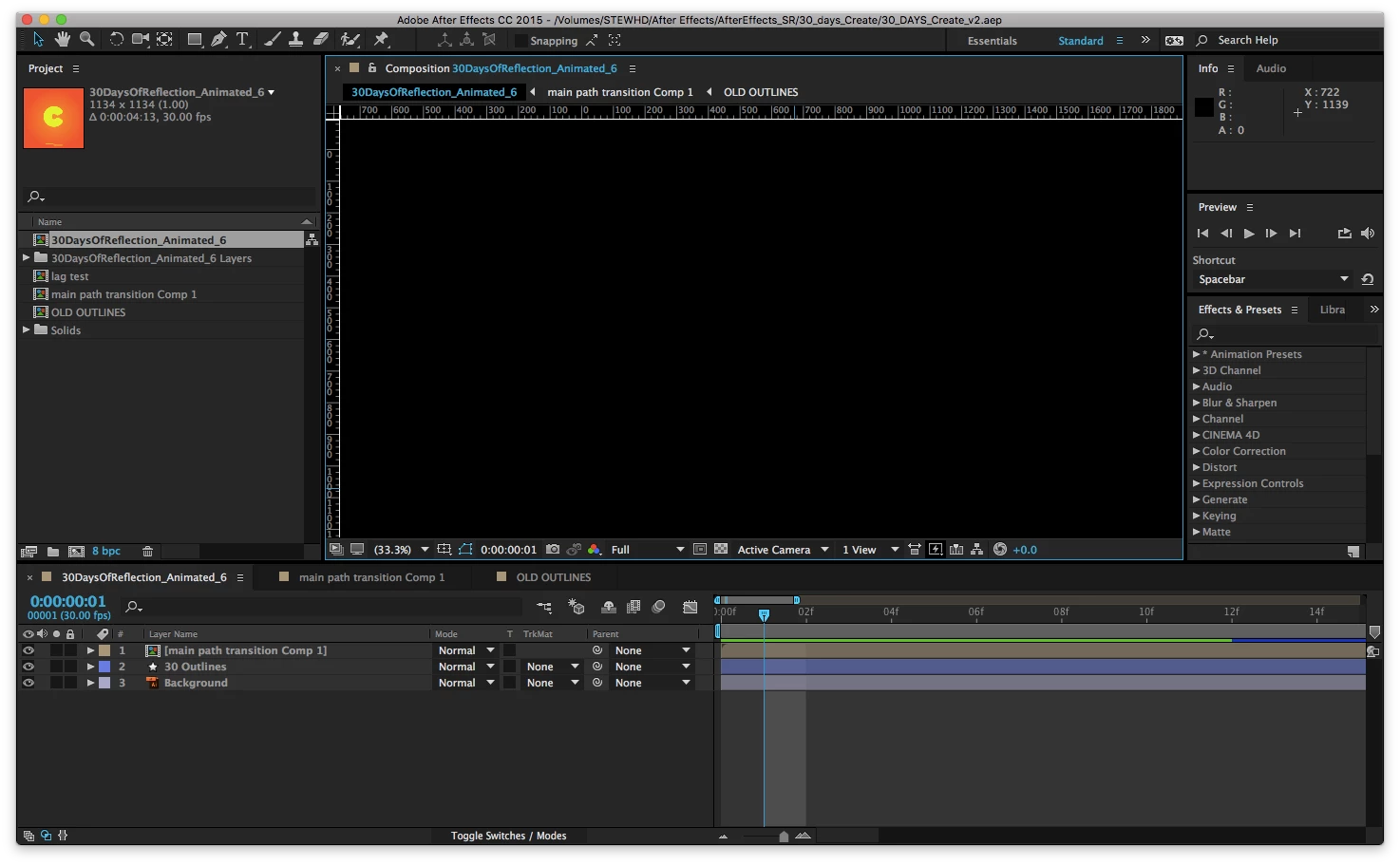
Composition window black — any suggestions?
  • April 24, 2018
  • 5 replies
  • 23272 views

Hi all,

I've recently returned to After Effects and am having trouble viewing anything in my composition window. I've uploaded a screen grab of a short animation I did a while ago here, and you can see the preview of the project in the Project window, but I can't get anything to appear in the composition window.

I thought it was just having the caps lock on, but that's not sorted it. I can't think of anything else, so wondering if anyone has any ideas?

    Correct answer Vishu_Aggarwal

    Are you facing the same issue with a new project or only with one of the projects and did you try to export and see the output in the rendered file.

    What version of After effects you're using, if it is not updated then update to the latest version ver 15.1.1 and also update your graphics card drivers.

    5 replies

    Participant
    July 15, 2025

    A Method that just worked for me is to add a random layer make it 3d and then add a 2nd view to the composition , Youd notice its now visible but glitches with the black screen when you move your mouse over it , Then with it still like that you save and close then immediatel restart your pc and thats what fixed it for me .

    F.Andras
    Participating Frequently
    May 4, 2025

    Hey all,

    I had a similar problem. I was working in Classic 3D when after rotating one of the 2 views, the main view became black. I a saw the rulers, and that I'm moving around, but couldn't see the composition. Tried to change the view from 'Custom View' to any other, but it didn't do anything. I restarted AE, purged memory and cache, nothing changed. Then, I tried to hide the rulers with the shortcut Ctrl+R, it didn't worked - it looked like that part of the window was freezed.

    What solved for me was turning off the rulers from the view menu. Don't know why, but it worked.

    Participant
    September 20, 2023

    Was there ever a fix found to this? I've got the same issue. Tried all solutions here, and un-installed and re-installed still facing same issue. 

    Participant
    December 6, 2023

    For Windows 11 try going into the display settings and scroll down to Graphics and select Change Default Graphics settings and turn off Hardware-Accelerated GPU Scheduling.  This will require a reboot.  If the setting or location is not quite like that on our OS, you just want to turn off hardware acceleration or the Hardware-Accelerated GPU Scheduling if you have that option and see if that fixes this issue after reboot.  Cheers. 

    Participant
    December 13, 2023

    Hi, thank you for your reply. I've just looked into this and I've already got Hardware-Accelerated GPU turned off. Do you know of anything else I could try? 

    Participant
    February 10, 2023

    try to create a new camera, i had the same issue and it fixed mine

    Participant
    March 21, 2023

    Bottom right of the viewport, change it back to active cam, that was the trick for me! Acicentally changed it using some unkown hotkey:)

    Vishu_Aggarwal
    Participating Frequently
    April 24, 2018

    Try purge memory from the main menu > Edit > Purge > All memory and disk cache...

    If still, you get the issue than you can try resetting the preferences of AE as follow -

    To restore the default preference settings, press and hold the following keys while the application is starting.

    • Ctrl+Alt+Shift (Windows)
    • Command+Option+Shift (Mac OS)
    • To restore default keyboard shortcuts, Alt-click (Windows) or Option-click (Mac OS) the OK button.
    Vishu AggarwalAdobe Certified Instructor, Professional and Expert
    stewdeaneAuthor
    Participant
    April 26, 2018

    Thanks Vishuagg,

    This didn't seem to fix the issue — appreciate the help though.

    I don't really know why it's viewing like this, I can't figure it out at all. Do you have any other thoughts about what it could be? I'm wondering if I have a button switched on/off that's causing it?

    Vishu_Aggarwal
    Vishu_AggarwalCorrect answer
    Participating Frequently
    April 26, 2018

    Are you facing the same issue with a new project or only with one of the projects and did you try to export and see the output in the rendered file.

    What version of After effects you're using, if it is not updated then update to the latest version ver 15.1.1 and also update your graphics card drivers.

    Vishu AggarwalAdobe Certified Instructor, Professional and Expert