

Rebel Squadron
Inspiring
August 3, 2021
Answered

Compound Blur Incorrect Placement

  • August 3, 2021
  • 6 replies
  • 1975 views

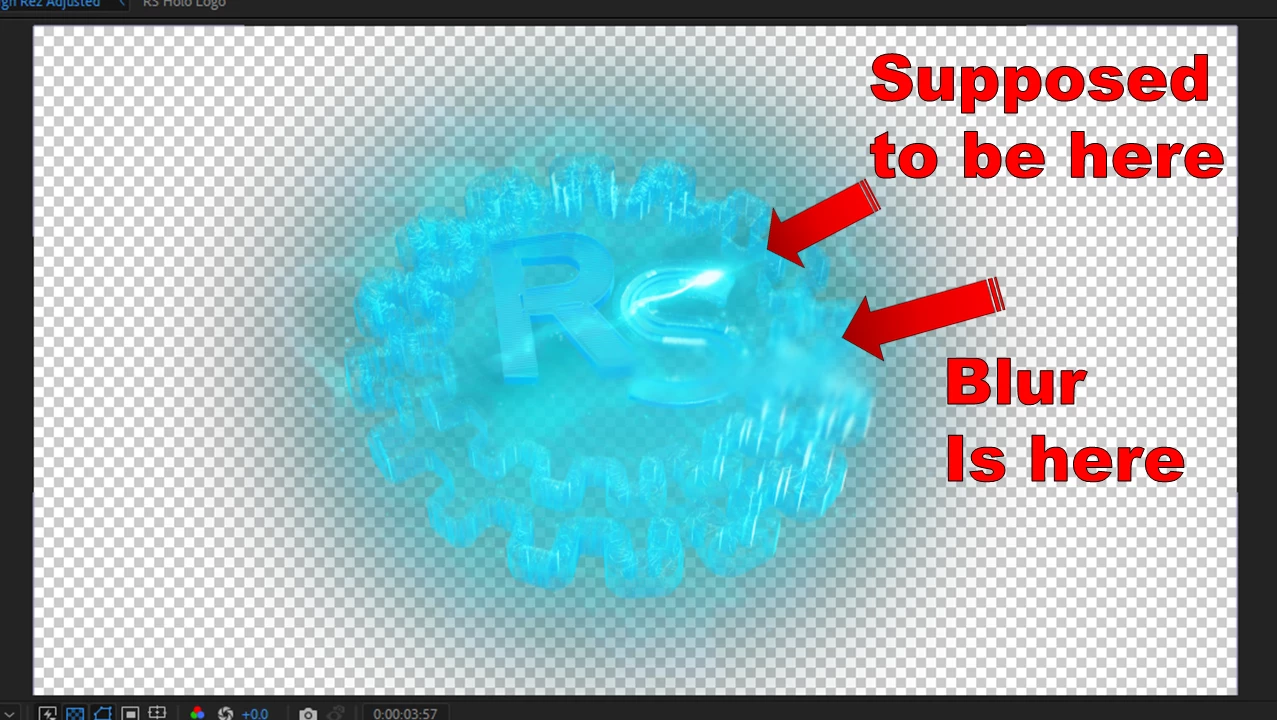
I'm attempting to add a Compound Blur for a short asset that I'm building. It works perfectly for what I need, except for one glaring issue. I've watched tutorials using the exact same method and mine is doing something different in the final step. 


The blur is being added as it should be, connected to and mimicking the energy effect properly. The problem is that it's not lining up with the actual location of the energy effect that I've added to the scene. It's adding the blur to the original location of the energy effect instead. In the tutorials that I've watched, the Compound Blur Adjustment Layer would apply the blur effect to the new location for the energy effect, without any additional manipulation. I've tried everything and can't find a work around or any reason as to why it's not functioning the same way as in the tutorials.
 

This topic has been closed for replies.
Correct answer Rebel Squadron

Update: After talking to Adobe tech support, it has been confirmed that this is a glitch in the program itself. It is not user error. It is not because I "made a mess of things". It's not because I'm incompetent. The problem is After Effects. The Blur effects are not functioning as intended.


Adobe software engineers are aware of the problem and are working to fix it. Hopefully they'll have a fix ready by the end of the month. Don't quote me on that, but at least they're working on a solution. As for Mylenium, you do not have a professional attitude and should not have "Adobe Professional" attached to your name. The moderator, whoever he or she is, is no better. I am screenshotting this for my personal records. Y'all need to stop treating your paying customers like garbage.


This post is officially solved.

6 replies

Rebel Squadron
Rebel SquadronAuthorCorrect answer
Inspiring
August 11, 2021

Update: After talking to Adobe tech support, it has been confirmed that this is a glitch in the program itself. It is not user error. It is not because I "made a mess of things". It's not because I'm incompetent. The problem is After Effects. The Blur effects are not functioning as intended.


Adobe software engineers are aware of the problem and are working to fix it. Hopefully they'll have a fix ready by the end of the month. Don't quote me on that, but at least they're working on a solution. As for Mylenium, you do not have a professional attitude and should not have "Adobe Professional" attached to your name. The moderator, whoever he or she is, is no better. I am screenshotting this for my personal records. Y'all need to stop treating your paying customers like garbage.


This post is officially solved.

Rebel Squadron
Inspiring
August 5, 2021

I've done some additional experimenting with the blur effect. Anyone who is able to respond to this in an intelligent, civil, and productive manner, your knowledge on this is welcome. I managed to figure out a workaround solution for anyone interested. If you know of a more efficient manner of doing this, please let me know.


As stated, I already attempted various methods for adding the blur effect before posting the original post here on the forums, including the use of precomps. So I stripped away all of the extra assets and experimented with only the energy effect and the blur. 


In this image, the Blur effect is placed underneath the energy effect. With the Energy effect set to Screen. The blur completely disappears. It might be difficult to see, but in the actual scene, there's no blur at all.

Actual scene:

 In this image, the Blur effect is placed on top of the Energy effect. It completely obscures the Energy effect in the process.

In the actual scene, the Blur effect actually appears, but again, the Energy effect is obscured.

Here's the workaround that I was able to figure out. By placing the Blur effect on TOP of the Energy effect and then PreComping, it made it possible to manipulate and move the Blur effect around the scene, which isn't possible when you simply drop it in the main project file (if you attempt to move the Blur frame around, the actual Blur sits in one spot and vanishes if  the edge of the frame is moved beyond the Blur). At least not in my version of AE 18.2.1 (Build 8). The problem is that the actual Energy effect is not visible. So after PreComping the Blur on top of the Energy effect, I then added the Energy effect to the main project file and was able to manipulate it's placement on top of the PreComped Blur effect. 


This method is far more cumbersome and complex than what was in the tutorial that I got the idea from. It's the Super Power Energy Effects (After Effects Tutorial) from Film Riot. They're a great channel with some great tutorials. These guys are top notch to say the least. I followed the tutorial to a T, but for some strange reason, my Compound Blur is not functioning like theirs did. Hence, this workaround. 

Rebel Squadron
Inspiring
August 5, 2021

Forgot to include the final workaround solution. As you can see, I was finally able to get the desired effect, in a more complex and cumbersome manner.

Mylenium
Legend
August 4, 2021

Since you haven't provided the link to the tutorial, neither of your claims can be verified. The rest is beside the point. The simple and very obvious answer is that you are still missing something/ doing something wrong. All your insults don't change that.


Mylenium

Rebel Squadron
Inspiring
August 5, 2021

Maybe I wasn't clear enough. I'm not interested in talking to you anymore.

Time for you to move along.


[abuse removed by moderator]

Rebel Squadron
Inspiring
August 6, 2021

It also looks like the moderator altered my reply. There was no abuse in this comment. Nothing was deleted or removed. Whoever is running this forum has got serious psychological issues.

Mylenium
Legend
August 4, 2021

Of course rotating the "Ghost" layer does not rotate the effect matrix. This is simply wrong within AE's very own logic. Never has been any different. Either you missed a step or the tutorial is garbage. The "Ghost" will have to be pre-composed, rotated inside the pre-comp and the resulting layer be fed into the blur effect.


Mylenium

Rebel Squadron
Inspiring
August 4, 2021

As previously stated, I attempted to precompose and it didn't change anything.

Mylenium
Legend
August 4, 2021

The effects are probably working just fine and you made a mess somewhere. Effects don't just randomly shift positions and within AE's logic everything is very likely just fine. Since you have neither offered a link to the original tutorial nor a screenshot of your actual timeline with all the relevant properties revealed we can't tell you more than that, but from having moved an adjustment layer inadvertently to simply having missed a critical step like pre-composing something there could be any number of issues here. Go back and check for these things while re-watching the tutorial to trace your steps. Anything else will require more info.


Mylenium

Rebel Squadron
Inspiring
August 4, 2021

Read the post. I followed the tutorials exactly. Went over them repeatedly, researched the effect, for hours before posting here. It's a very simple process. You add the adjustment layer. Add the compound blur to the adjustment layer. Adjust the blur effects as needed. It's not complicated at all. If you need more info than that, then I don't know what to tell you, because there's literally nothing else to tell. I already tried precomposing, even though it's a single layer with nothing to compose it with, and got the same result. The fact that it's such a simple effect is the whole reason why it doesn't make any sense.


It's literally a single energy effect with the blur added to it in an Adjustment Layer. All I did was rotate the energy effect, while the Blur stayed in the original position, instead of following the positioning of the effect. Just like in the tutorial. What more do you need to know?


Try not to be a douche, especially when you clearly don't understand such a simple effect.

Rebel Squadron
Inspiring
August 4, 2021

After testing out various other Blur effects, it's not just the Compound Blur. None of the blur effects are giving the proper location placement when assigned to the Energy Effect.