
Answered
Connecting font to drop down menu
Hi all, I have looked all over for an answer and haven't found it. Sorry if it was overlooked. I'm sure this is a super simple item I am missing.
I am trying to create a text layer that changes the font based on a Dropdown Menu control. The below code is the example code that Adobe gives to begin exploring this tool but I always get the error I've placed beneath that. Can anyone point me in the right direction?
Expression:
var dropDownMenu = thisComp.layer("LayerName").effect("Dropdown Menu Control")("Menu");

switch (dropDownMenu.value) {

    case 1 :

        text.sourceText.style.setFont("Georgia");

        break;

    case 2 :

        text.sourceText.style.setFont("Impact");

        break;

default :

        text.sourceText.style.setFont("Tahoma");

}
Error:
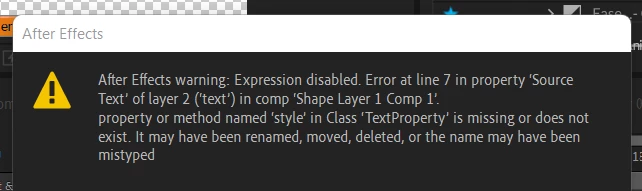
Thanks for any help.


 AdChoices