

Participating Frequently
February 29, 2024
Answered

Consolidate footage (comps) does NOT work

  • February 29, 2024
  • 1 reply
  • 917 views

Hello 🙂

Consolidate footage does NOT get rid of similar comps - isnt it supposed to do this?? 🙂
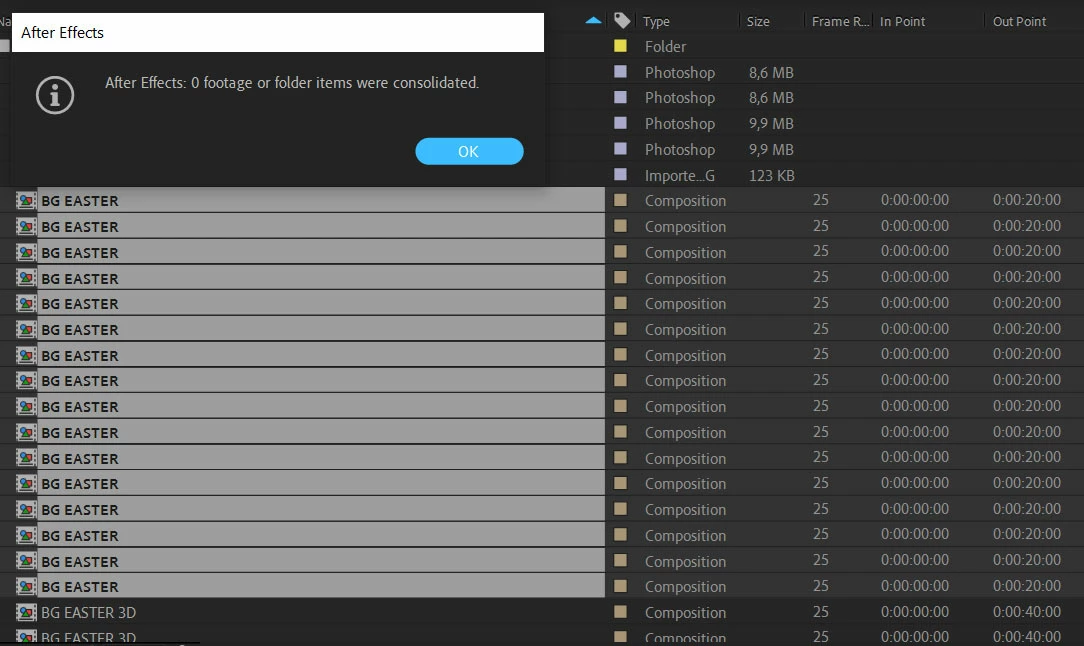

Im on AE 2024 latest version. Strong PC.

Regards
Jonas

This topic has been closed for replies.
Correct answer ShiveringCactus

I think I understand your issue.  You've imported multiple projects into an overall project, but now have identical comps.

I don't think there is an automatic way to remove these comps, but you can select a comp layer, hold ALT and drag a replace in from the project panel.  This would allow you to manually consolidate comps.

You might also want to explore Essential Graphics, which would enable you to reuse a comp multiple times and just change any properties or text you specify.


1 reply

nishu_kush
Legend
February 29, 2024

"Consolidate Footage" works only for media. If you want to remove comps, you may use the "Reduce Project" feature. In the project panel, highlight the comps you want to keep and use the Reduce Footage command. It'll keep the comps you highlighted, sub comps, and media used.

Hope it helps.

Note: Moving this thread from Bugs to Discussions for troubleshooting.


Thanks,

Nishu

Participating Frequently
March 1, 2024

Does not work. This is just ridiculous. Just wow. So I basically I have to manually remove all the duplicate comps?? They are identical?? Isn't there a 3rd party plugin to solve this? 

Also I can't reduce footage because if i select all the main comps that have all these lessser duplicate comps inside them - then it will keep all comps - bacause they are in all the main comps. And we're back to square one.

This is a huge pain when having imported several AE files into your project 😞


ShiveringCactus
Community Expert
ShiveringCactusCommunity ExpertCorrect answer
Community Expert
March 1, 2024

I think I understand your issue.  You've imported multiple projects into an overall project, but now have identical comps.

I don't think there is an automatic way to remove these comps, but you can select a comp layer, hold ALT and drag a replace in from the project panel.  This would allow you to manually consolidate comps.

You might also want to explore Essential Graphics, which would enable you to reuse a comp multiple times and just change any properties or text you specify.
