
Participant
August 12, 2022
Answered

Content Aware Fill - Cannot Create Reference Frame

  • August 12, 2022
  • 1 reply
  • 663 views

Hi there, I'm trying to use the Content Aware Fill feature in After Effects 22.5.0 and for some reason, whenver I click "Create Reference Frame" I get this error message:
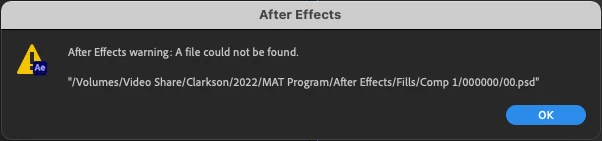


But then when I check the file path I find that AE actually did create the file correctly, but no Reference Frame appears in my AE project.

 

How can I get AE to recognize the .psd it created and use Reference Frames?


I'm working on a 2020 27" iMac with Monterey 12.0.1

All my project files are on a Synology server that is hardwired into my computer.


Thanks

This topic has been closed for replies.
Correct answer taylorj38960759

Welp, I actually just figure it out myself! I'll just leave the answer here just in case anyone else has this problem.


Apparently your file path for Reference Frames has to lead to somewhere actually on your computer and not to an external source. I told AE to send Reference Frames to a folder on my desktop instead of to the Synology and that worked. 

1 reply

taylorj38960759AuthorCorrect answer
Participant
August 12, 2022

Welp, I actually just figure it out myself! I'll just leave the answer here just in case anyone else has this problem.


Apparently your file path for Reference Frames has to lead to somewhere actually on your computer and not to an external source. I told AE to send Reference Frames to a folder on my desktop instead of to the Synology and that worked. 

warwickj52349404
Known Participant
March 2, 2023

How did you change the file path for reference frame files?