
Participant
September 15, 2021
Question

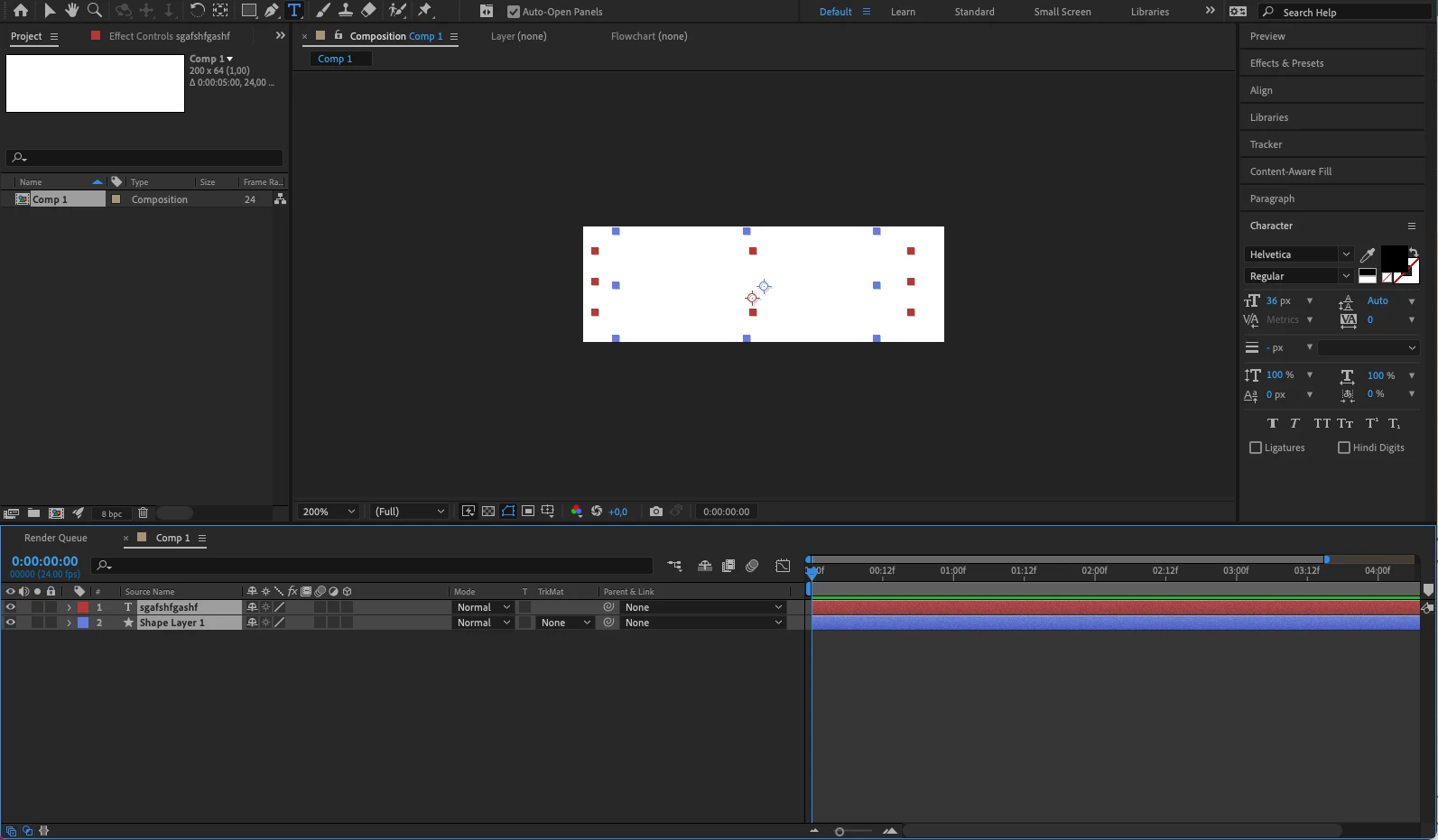
Content doesn't show up in composition, only visible on preview

  • September 15, 2021
  • 2 replies
  • 151 views

Hi guys, 


I just opened AE and added some text and a shape layer to my composition. For some reason the text and shape layer are not visible unless I preview. 


The text is on the composition, there are no keyframes set, and the font colour is black.

The same for the shape layer. It has a fill colour and a stroke.


See screenshot 
This topic has been closed for replies.

2 replies

Mylenium
Legend
September 15, 2021

This stuff is in constant flux, so I wouldn't simply assume it works from version to version. Maybe it gets fixed for good one day, but currently they are messing with so much stuff in the render pipeline, you may consider other options such as always designing larger and cropping later in a second pass, possibly even in another tool.


Mylenium

Mylenium
Legend
September 15, 2021

Such small composition sizes don't work with hardware acceleration due to hoew this stuff works. Switch to software-only rendering or use larger compositions.


Mylenium

Participant
September 15, 2021

Thanks for the fast reply. Increasing the size of the comp solves the problem but switching to software rendering doesn't. It's just strange since I used even smaller composition in the past to animate UI-icons and it has always worked so far.