Participant
October 18, 2020
Question

Coordinating Images via JSON file Dropdown Manu Control

  • October 18, 2020
  • 2 replies
  • 240 views

Hi I have this question about how can I get the "Logo.png" coordinates via "TEAM" (ANGEL ALLIANCE) to show the image using Dropdown Menu Control.


I'm currently using the "TN" for it's value 1-16 teams and each number coordinates with a specific logo.

[
 {
   "RANK": "1st",
   "TEAM": "ANGEL ALLIANCE",
   "KP": 158,
   "WWCD": 8,
   "TOTAL": 265,
   "TN": 1
 },

 but the problem is all of the data that I'm using are automatically gathered but I have to jump in the script and manually put "TN" : 1-16 for the "Logo.png" in the Dropdown Menu Control to coordinate it.


Here's the layout
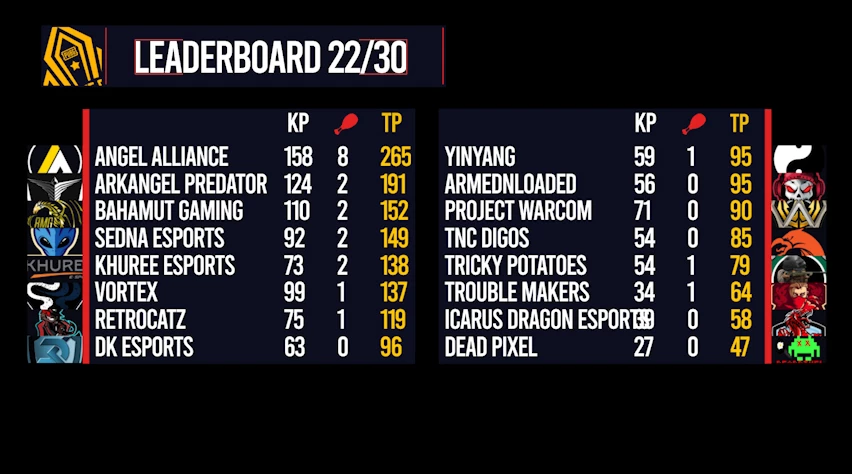
The Dropdown Menu Control
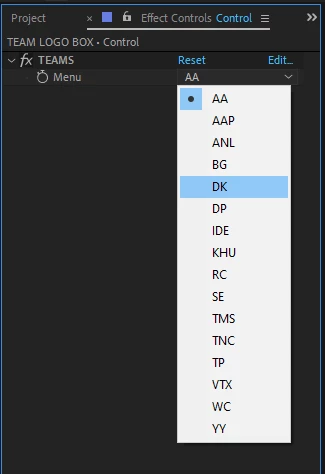
 

team = thisComp.layer("Control").effect("TEAMS")("Menu").value;

if (team == index - 1) {
	100
} else {
	0;
}

 Thank you very much for your time.

This topic has been closed for replies.

2 replies

Roland Kahlenberg
Legend
October 18, 2020

Without seeing how you are actually using the JSON for the other variables, I can only suggest the following algorithm -


1) use the Red Vertical Bar's (RVB) x-position as Landmark for offseting the x-Position of each logo


2) use TN to decide if a logo should be placed to the left or right of the RVB - for example,

if TN<=8 then xPos Offset == -offsetValue

else xPos Offset == offsetValue


3) Now, check for the y-position of each Team's name and use this to get the y-position to place each logo.


Make sense?


Very Advanced After Effects Training | Adaptive &amp; Responsive Toolkits | Intelligent Design Assets (IDAs) | MoGraph Design System DEV
carl98A7Author
Participant
October 18, 2020

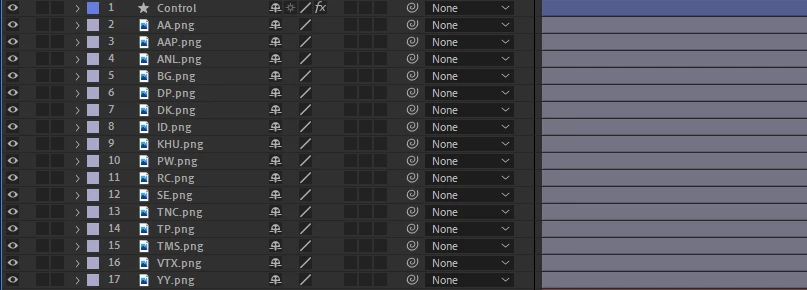
I forgot to show this one

The composition here I coordinated to json