



Answered
Copy/paste effects behave weird
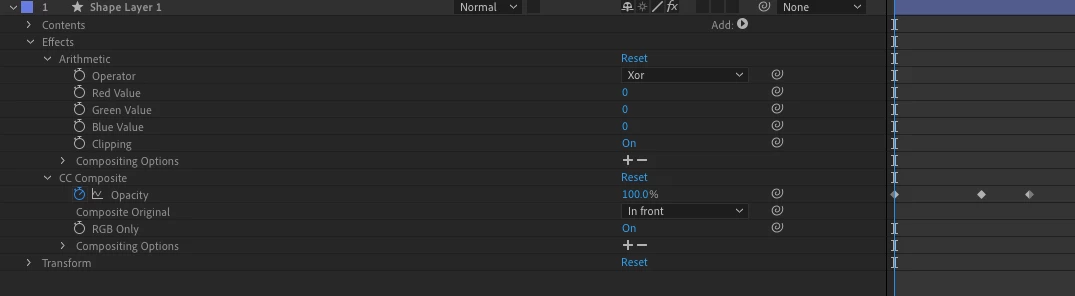
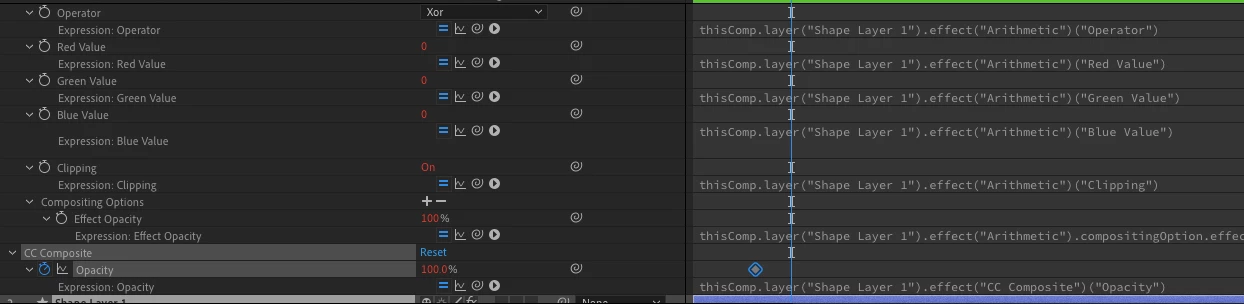
Hi guys, I am trying to implement some simple copy-paste function to copy effects from one layer to another using executeCommnad in AE, however it doesn't paste keyframes and adds expressions to all properties 'baking' only one value if the keyframe was applied to a property, what can be the reason and the best way to achieve what I am trying to do? I feel I can go with standard copy/adding effects properties and settings the values for each property with keyframes, but I feel this can be done easier:
//save selected layers
    var reservedSelection = [];
    activeComp.selectedLayers.forEach(function (layer) {
      reservedSelection.push(layer);
    });

    //select the effect and copy it
    app.executeCommand(2004); //deselect all
    storageComp.openInViewer();
    var effects = storageComp.layer(1).property("ADBE Effect Parade");
    for (var i = 1; i <= effects.numProperties; i++) {
      effects.property(i).selected = true;
    }
    app.executeCommand(10313); //copy

    activeComp.openInViewer();
    //restore selection
    reservedSelection.forEach(function (layer) {
      layer.selected = true;
    });
    app.executeCommand(20); //paste
source:
result:
 AdChoices