Participant
Aug 31, 2021 10:09 PM UTC
Question

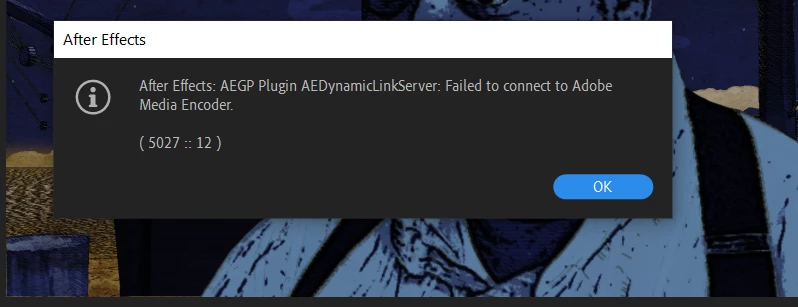
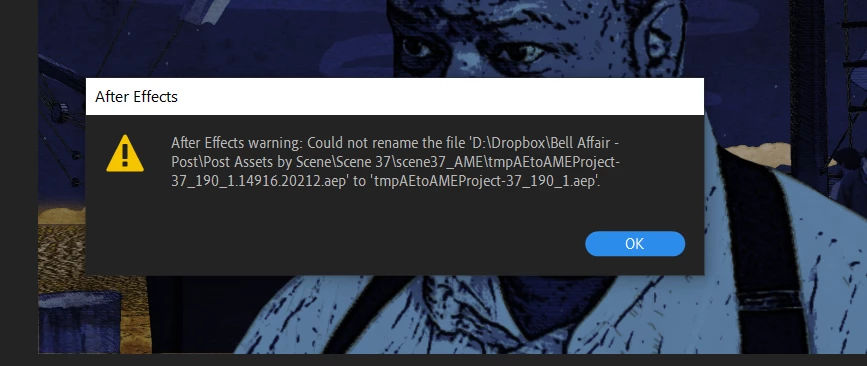
Could not rename file error- Media Encoder

Hi All,

I've been getting this error pictured below for some of the comps in my After Effects projects when I export to ME.  There's no clear logic other than some comps export to ME no problem while others pop these 2 error messages up.  Thanks for your insights


Details:

  • Running latest version of AE 18.4.1 and ME 15.4.1
  • Files locally stored with no missing asstes
  • Using Dropbox local
  • Autosave set to "next to project" save every 18 minutes (have tried running project off desktop and leaving asstes on D:drive)
  • Sometimes multiple attempts allows export to ME
  • Deleted all temp AEP files in Autosave 
9 replies

Participant
May 4, 2025 6:45 PM UTC

Here in 2025 still having the same issue.  I use to get the AEDynamicLinkServer error only but now I get both when using ME.
I has to definitely be a Dropbox or any cloud storage issue along with using Media Encoder.   I'm not sure if Adobe has found a way around this issue but I think that it may be due to the file being in mid-transit between backing up or a temporary permission issue.  Because after restarting, I am sometimes able to run ME without that name save issue.  I've also experienced this with One Drive  and never found a solution online yet either. 

One thing that I tried doing was "unlinking" my cloud service programs so it is disabled completely but I have to remember to enable it again to back up my work.  I don't think you can just pause the cloud service and it will fix it.  It could still be some permission thing.  The only problem with this is I hate doing this because when I enable my cloud service again it has to run for a while to see if there was any "changes" as it's trying to link back up.  

Translate
Participant
Nov 14, 2024 3:39 PM UTC

Same issue here, updated Media Encoder, unable to use it within AE. Only Solution is rendering via oldschool AE Render Queue. Has anyone a fix for this?

Translate
japanesedad
Participant
Mar 19, 2024 7:21 PM UTC

This has been happening for our entire team who all use dropbox. Hoping for a solution!

Translate
Participant
Mar 28, 2024 4:42 AM UTC

same
seems like a dropbox conflict

Translate
Participant
Jan 25, 2024 2:10 PM UTC

same problem here - does anyone know a solution?

Translate
Participant
Jan 8, 2024 8:44 PM UTC

Same issue here, sometimes it dissapears when I delete the AME folder, but not always works

Translate
Inspiring
May 13, 2022 5:51 AM UTC

Did you ever get a solution for this? I have the same problem and a very boringly named filename.

Translate
Community Expert
Sep 1, 2021 2:39 AM UTC

My first guess is a funky character in a file name. Try simplifying.

Translate
Participant
Sep 1, 2021 3:35 AM UTC

Thanks Rick but I don't think that's it.  Team uses standard naming conventions without characters.  We use png sequences for everything in post so there's a lot of files. Any other ideas?  


Translate