I fixed it, try deleting the plugin folder entirely, and try reinstalling the aftereffects, It will recreate the deleted plugin folder by itself and the problem will be solved, if you keep the folder "plugins" without deleting it will result in the same error, so you have to delete the "plugin" folder before trying to reinstall the aftereffects setup.
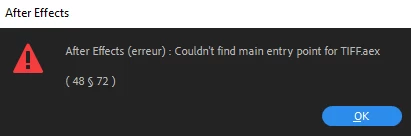
I have been stuck on this merry-go-round for weeks now. I get the entry point error, I uninstall AE and wipe plugins and preferences, I reinstall everything and then after a while the errors recur. It's never for the same plugin each time and I even get this error for built-in effects, so it's not like you can blame it on a third party. Having said that I do have a lot of plugins, and having to reinstall all of them every time I reinstall After Effects means the whole thing takes half my day... and it's a huge pain. I am using AE 2022 LTS on a Xeon W-2155 workstation with a Quadro P5000, 64gb RAM.
I fixed it, try deleting the plugin folder entirely, and try reinstalling the aftereffects, It will recreate the deleted plugin folder by itself and the problem will be solved, if you keep the folder "plugins" without deleting it will result in the same error, so you have to delete the "plugin" folder before trying to reinstall the aftereffects setup.
I get the same error for After Effects 2020 and 2021 (latest update on both). Removing the TIFF.plugin file from the plugins folder is the only thing that seems to stop it from happening. I also don't see that plugin in the After Effects 2022 plugins folder. Removing it doesn't appear to hinder my work or cause any problems, same with clicking OK. I'm using a late 2013 Mac Pro.
I get the same error message and same results when I click ok. Doesn't seem to affect my work, however it is annoying in that AE wont open until I click ok.




 AdChoices