

Crash while editing, restarted, now project is empty
Hello,
I am working on a project alone for a few days with the last version of After Effect 2022 (22.0.0 Build 111).
It crashed while doing some random edition : I had an error message telling me the project could not be saved for the last 2 seconds, and I had to restart it. I proceeded with restart, but now my project is empty. All my work is gone 😨
I don't have any local copy since I work with the "Team Projects" feature. I pushed my work every day.
I would like to recover the last pushed version (I don't have much hope for today's work). Does someone have any clue about the procedure to come back to the last pushed version? It is still empty when I close the project and I try to reopen it. I don't find any option to navigate through my commit history and restore a previous version.
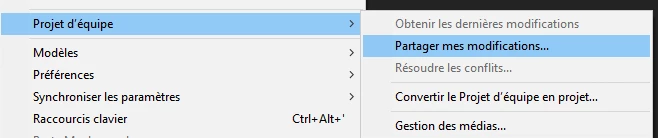
Edition > Team project > Share my updates. I cannot pull : I am up-to-date with server changes
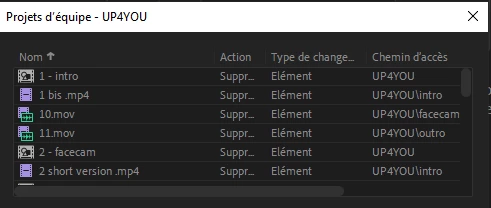
All the files/comp are pending for deletion
When I use the "share with team" options, it shows all the project content is deleted. Does it means AE has deleted everything, and I should find a way to discard all my local changes so it does not override the server version anymore?
Thank you for your help,
Alexis
My config:
Windows 10 x64, i7, RAM 24 Go
AE 22.0.0, French locale
 AdChoices