


TrifilmEdit
Participating Frequently
May 14, 2020
Answered

create shadow from invisible object

  • May 14, 2020
  • 2 replies
  • 6669 views

I have a person on green screen comped on a virtual stage. I want to make a duplicate of the person and use that layer to cast a shadow onto the floor using a 3D spot. I can get the shadow but I need to hide the duplicate "person" that I'm using to cast the shadow since I rotated it in 3D. I see in older versions of AE you could select "cast shadow only", which would hide the layer source, similar to adding a drop shadow on text and selecting "drop shadow only"...but in current versions that option is no longer there. How now to create a cast shadow from an object that you don't want to see? Thanks!
Correct answer Rick Gerard

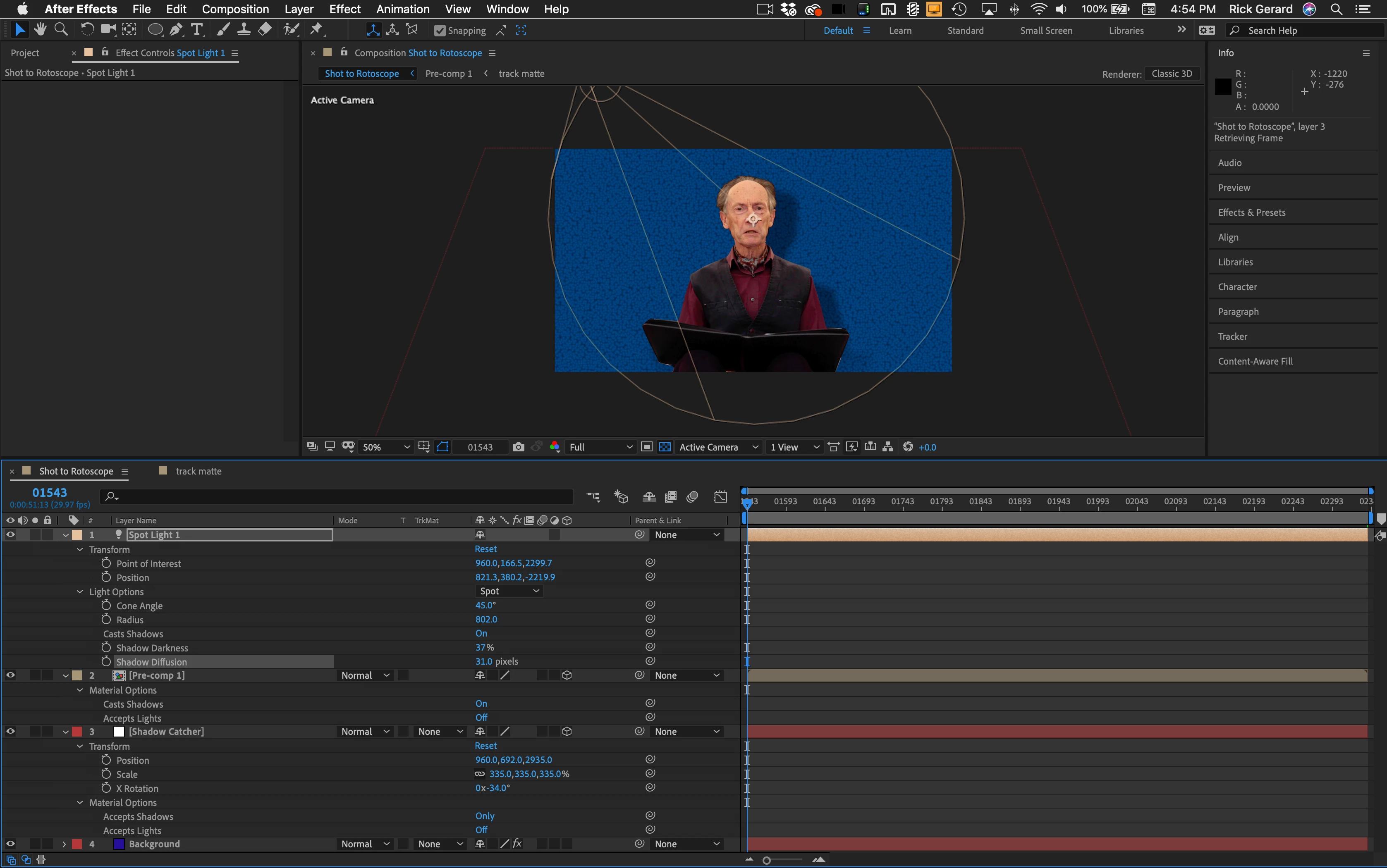
You can set a layer to cast a shadow only. That is probably the easiest solution if you have used a standard workflow. 


Personally, I would make the layer with the actor 3D, set up a shadow catcher using a white solid, rotate the white solid -90º in X and position it so that it matches your virtual floor (or position it like it was a wall) then add a light to the scene that matches the direction of the lighting in the scene. Now all you have to do is select the shadow catcher and the keyed layer with the actor, press aa to reveal the properties, and set the keyed layer to cast shadows on and receive lights off, then set the shadow catcher to receive shadows only. If you have the Shadow Catcher in the right position it should take about 2 minutes and you don't have to monkey with anything else.

2 replies

TrifilmEdit
Participating Frequently
May 15, 2020

Thanks Rick for the quick reply. The odd thing is that in AFX (2019 mac os) I don't have the option on the solid to accept shadows ONLY, it's either On or Off. What I am thinking is to rotate the keyed talent in the Y to give the light source

more surface to create a shadow from, but want to hide this source to put the talent over the top...and then hide the shadow catcher to have the shadow on the virtual stage floor. May be going about this incorrectly.

Community Expert
May 15, 2020

You are using the C4D rendering option. You need to be using Classic 3D. Check the options that are disabled when using the C4D rendering engine. The warning is not read or understood by most users.

TrifilmEdit
Participating Frequently
May 15, 2020

Yeah, thought about that and checked before but it's on basic3d like it usually is. Not sure why shadow only is not an option.

Rick GerardCommunity ExpertCorrect answer
Community Expert
May 14, 2020

You can set a layer to cast a shadow only. That is probably the easiest solution if you have used a standard workflow. 


Personally, I would make the layer with the actor 3D, set up a shadow catcher using a white solid, rotate the white solid -90º in X and position it so that it matches your virtual floor (or position it like it was a wall) then add a light to the scene that matches the direction of the lighting in the scene. Now all you have to do is select the shadow catcher and the keyed layer with the actor, press aa to reveal the properties, and set the keyed layer to cast shadows on and receive lights off, then set the shadow catcher to receive shadows only. If you have the Shadow Catcher in the right position it should take about 2 minutes and you don't have to monkey with anything else.