
andrespeleta
Participant
May 27, 2016
Question

Create shape from vector layer problem

  • May 27, 2016
  • 6 replies
  • 35416 views

Good night,

So, I'm with a problem that I couldn't solve so far.

I've done my work on Illustrator and released all layers into sequence, for Afx.

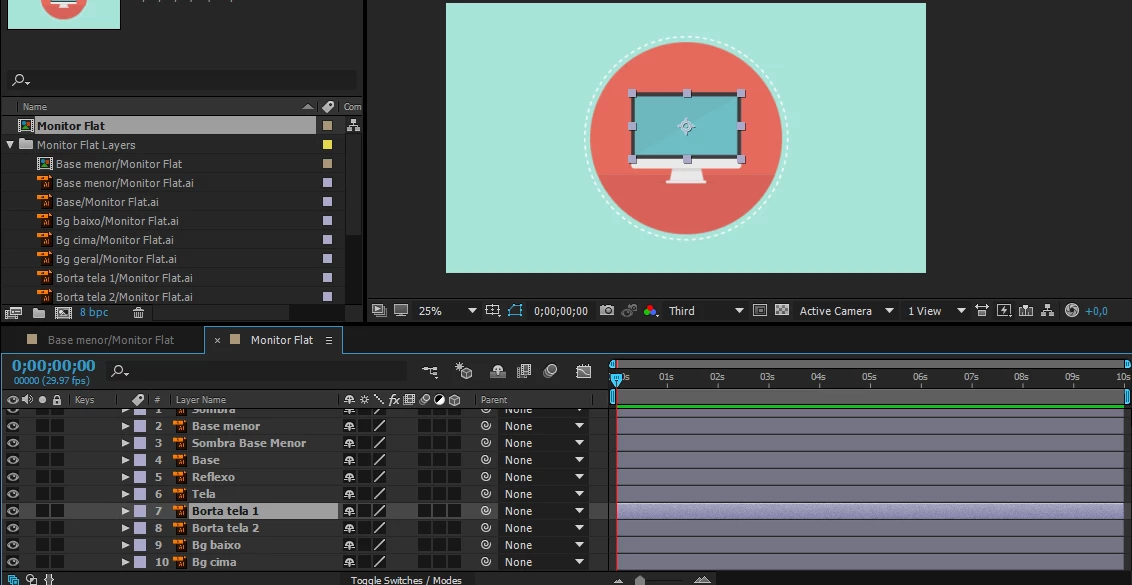
The problem is: When I import the .ai file to afx and choose "retain layer size", works fine:
But, when I "create shape from vector layer" (the .ai files, in this case), they all lose its source size, like the image below:
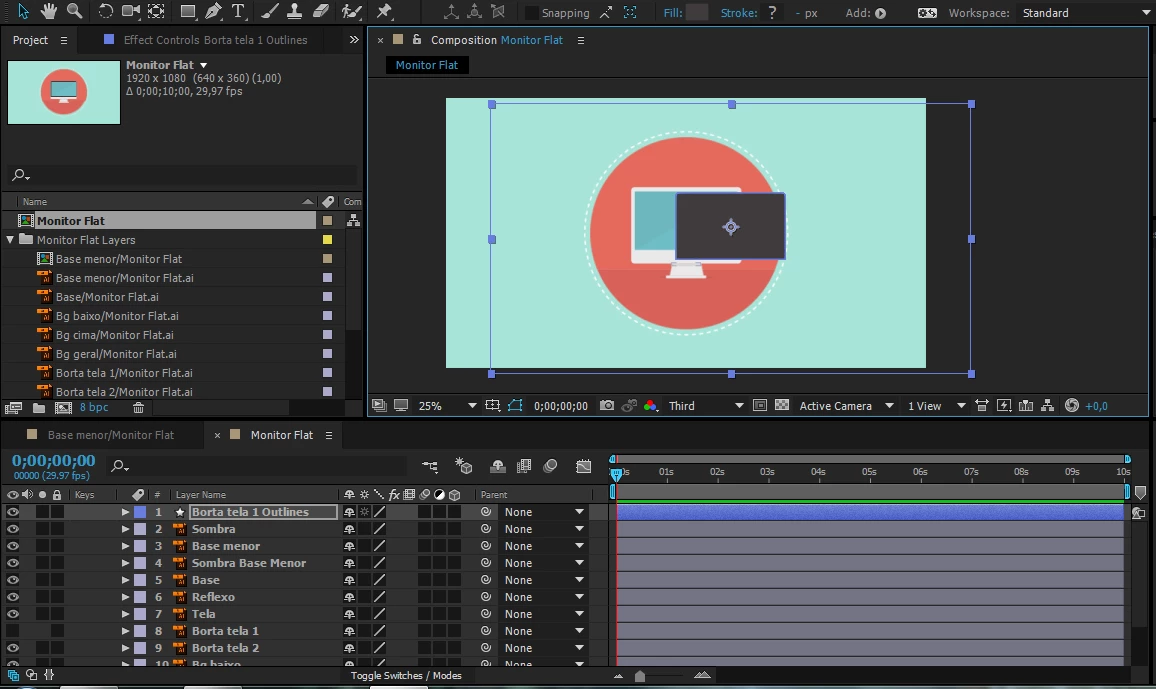
The weirdest thing is that few files only retain the same size when I create shape from layer.

Hope you guys can help me. Thank you

    This topic has been closed for replies.

    6 replies

    KaduAlves
    Participant
    April 4, 2023

    Salve illustrator file as "Illustrator CS" version.
    Problem solved here.

    Roland Kahlenberg
    Legend
    January 15, 2021

    Most often, it's Adobe AI's artboard(s) that creates issues in AE. For the most seamless workflow between AE and AI, look into purchasing Overlord. It may seem pricy but it's worth every cent AND MORE. I combine Overlord with Explode Shape Layers and they cut down an hour's work into less than 10 minutes with most of it being an automated process.

    https://www.battleaxe.co/overlord
    https://aescripts.com/explode-shape-layers/

    Very Advanced After Effects Training | Adaptive & Responsive Toolkits | Intelligent Design Assets (IDAs) | MoGraph Design System DEV
    Participating Frequently
    December 6, 2018

    I had the same issue only with gradient overlays - when I removed them - shapes where created perfectly.

    Participant
    March 11, 2020

    This worked perfectly for me. I had Image layers in my Artboard, after I removed them I was able to get the correct shape vector size on AE. Tnx.

    Participant
    August 10, 2018

    This happens because you have an extra artboard in your Ai file, however, even when you delete the extra artboard Ae still will make that extra shape for the original artboard. I don't know why tho.

    I'll appreceate if someone can tell the reason of why that happens with the artboard.

    Regards,

    PD: sorry for the bad english.

    June 21, 2016

    I've been having the same issues as you, and I think I found the solution. Ignore what these guys have said, their advice, which basically amounts to 'the way you work is incorrect', is worthless and doesn't solve anything. I use this function constantly and have times when this problem occurs, and other times when it doesn't. It's nothing to do with gradients etc because I have this problem with flat shape layers too. Going into each layer and ungrouping inside AE is just not viable when you're dealing with hundreds of layers.

    The solution I've found is to use Release to Layers (Sequence) on every layer in your illustrator file which is causing issues. It's really as simple as that. Let me know if this works for you.

    Will

    ananggadipa
    Participating Frequently
    September 14, 2016

    Thanks for your answer, if release to sequence is what causing it what was the solution to separating layer?

    Is it to separate manually? (release to build doesn't do what we need to do)

    Edit:

    I've just tried to separate layer manually, and the problem still exist?

    Roei Tzoref
    Legend
    September 14, 2016

    you should prepare your Ai file to Ae and if you still have problems we can investigate. the good advice you got before was solid and important and you should take all of it into account even if could or could not be related to you specific problem.

    about preparing your Ai file to Ae you should read here: Preparing and importing still images in After Effects

    I've just tried to separate layer manually, and the problem still exist?

    let's examine this further. try to isolate the problem: what layer of all your layers is coming as the comp dimensions? show a screen shot or share this Ai file with just that layer.

    Rick has many good observations and this is one you should listen too very carefully:

    Unless you specifically need to use shape animators on your illustrator files there is absolutely no reason to covert the vectors to shapes.

    still let's examine this. we wait for your feedback

    Mylenium
    Legend
    May 27, 2016

    Twirl the groups open and ungroup. This is perfectly normal, since as per your initial screenshot you have a gradient or something like that in your image and AE can't recreate it, thus producing an empty comp/ artboard sized group. The flaw is with your AI work in teh first place. You need to study up on what actually carries over to AE when converting to shape layers.

    Mylenium

    Community Expert
    May 27, 2016

    Unless you specifically need to use shape animators on your illustrator files there is absolutely no reason to covert the vectors to shapes. Gradient fils, multiple gradient fils, gradients along a stroke, and about a zillion other useful illustrator techniques will not translate directly to shape layers in AE. If all you need is the ability to continuously zoom without pixels fouling up the image then just turn on the Continuous Rasterization switch.

    If you do need to use shape animators for your project then you have to simplify you Illustrator art or take the time to recreate gradients and other effects on the shape layer.

    For example this fine illustrator artwork:

    Turns into this mess because of all the groups and gradients:

    At the present time there's nothing you can do about it except redesign in AI without gradients or live without the shape animator tools.

    Participant
    December 1, 2019

    I did merge path and it worked!! But I have 16 layers so it's a bit time consuming to adjust them manually....