

Question
Create Shape Layer with Script in After Effects
I wrote a simple script for After Effects and it works well but there is a weird problem.
My script creates a shape layer which includes group, ellipse path, stroke and fill. Why does the "Group 1" have "Material Options: Group 1" property group? It's empty and it disappers when I click on its eyeball button. I don't want to display the property group. It seems like this problem doesn't happen on CS5.
Are there any solutions to avoid this? Is this a AE CC bug?
OS: Windows8.1
After Effects: version 12.2.1.5
Here's my script code.
app.beginUndoGroup("Add new shape layer");

 var curComp = app.project.activeItem;

 if(curComp){ var shapeLayer = curComp.layers.addShape();
 var shapeGroup = shapeLayer.property("Contents").addProperty("ADBE Vector Group");
 shapeGroup.property("Contents").addProperty("ADBE Vector Shape - Ellipse");
 shapeGroup.property("Contents").addProperty("ADBE Vector Graphic - Stroke");
 shapeGroup.property("Contents").addProperty("ADBE Vector Graphic - Fill");
 }

app.endUndoGroup();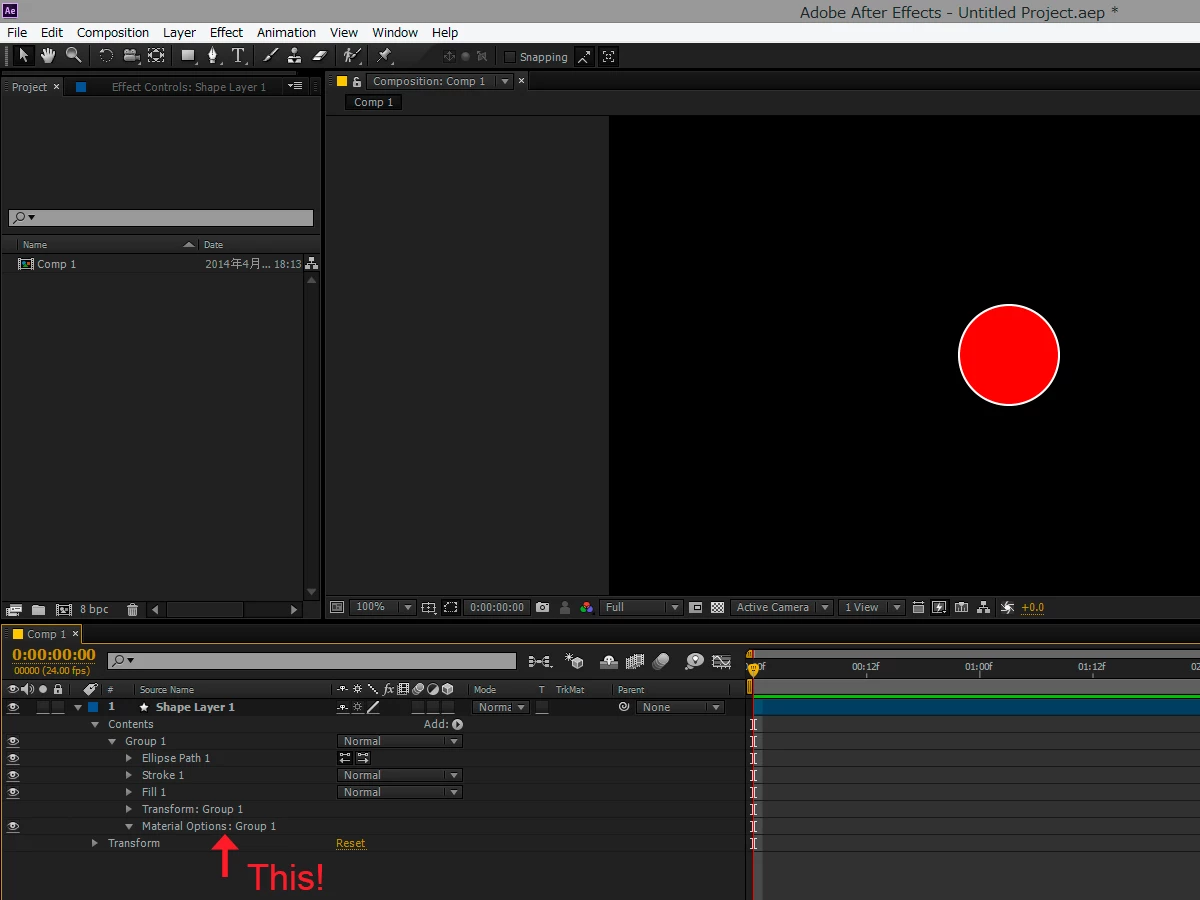
 AdChoices