Known Participant
January 19, 2012
Answered

Create sphere on keyframes with expression

  • January 19, 2012
  • 1 reply
  • 3025 views

Hi,

I've just begun to learn after effects and could use a little help.

I have a small solid wich is moving around on the comp. This is done using expressions.

What I would like to do is first to replace it with a 3d sphere.

And secondly, instead of moving it, create a new sphere on each keyframe.

First I imagined using trapcode particular, setting the particles count to 1. But that is per second, not per keyframe.

Any ideas are appreciated.

/Lars
This topic has been closed for replies.
Correct answer Dan Ebberts

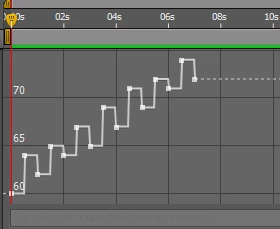
Oh, thank you. The keyframes only hold a single value so I already have an expression for the position. So the keyframes are in a separate layer.

x=time*20;

note=thisComp.layer("midi").effect("ch_0_pitch")("Slider"); //this is the keyframes

y=linear(note, 60, 74, 0, -100);

centre=[50, 180, 0];

add(centre,[x,y]);


I guess you'll need to combine the two expressions. I don't have time to test it, but this should be close:

note=thisComp.layer("midi").effect("ch_0_pitch")("Slider"); //this is the keyframes

t = time;

if ((note.numKeys >= index) && (time > note.key(index).time))

  t = note.key(index).value;

x=t*20;

y=linear(note, 60, 74, 0, -100);

centre=[50, 180, 0];

add(centre,[x,y]);

Dan

1 reply

Known Participant
January 20, 2012

My understanding right now is that there probably isn't a "create" method for creating shapes or objects in expressions. Please correct me if I'm wrong.

Instead I should create my shape and then use expressions for duplicating that layer while repositioning it. Does this sound like the correct method?

It would make sense that a keyframe couldn't hold an object. On the other hand it seems you could easily end up with a trillion layers in a comp..

Dan Ebberts
Community Expert
Community Expert
January 20, 2012

An expression can't create layers. You'd need a script for that. Also, AE doesn't have spheres. I'm not sure what you mean by that.

Dan

Known Participant
January 22, 2012

Hi Dan,

afraid that only shows my unfamilarity with AE. More used to 3D than 2,5D. So now I've found out that you can use the effect CC sphere and orient it towards the camera to make it look like 3D.

Let me see if I understand you correctly.

I have hundreds of keyframes with a single value in them. Then I use them to move a circle around the screen. But what if I would like to leave a copy of that circle everyplace it has been. Are my only options to either manually create lots of layers or do that with a script. No easier way?