


Known Participant
November 15, 2023
Question

createPath expression succeeded, but crashed with inTangents & outTangents

  • November 15, 2023
  • 1 reply
  • 534 views

Dear Community, I have studied everything I could find on this subject. 


This expression works as desired by connecting the points of a path with the corresponding number (16) of null objects by linking the position:


points = [

thisComp.layer("Null [1.1.00]").transform.position - [1000, 1000],
thisComp.layer("Null [1.1.01]").transform.position - [1000, 1000],
thisComp.layer("Null [1.1.02]").transform.position - [1000, 1000],
thisComp.layer("Null [1.1.03]").transform.position - [1000, 1000],
thisComp.layer("Null [1.1.04]").transform.position - [1000, 1000],
thisComp.layer("Null [1.1.05]").transform.position - [1000, 1000],
thisComp.layer("Null [1.1.06]").transform.position - [1000, 1000],
thisComp.layer("Null [1.1.07]").transform.position - [1000, 1000],
thisComp.layer("Null [1.1.08]").transform.position - [1000, 1000],
thisComp.layer("Null [1.1.09]").transform.position - [1000, 1000],
thisComp.layer("Null [1.1.10]").transform.position - [1000, 1000],
thisComp.layer("Null [1.1.11]").transform.position - [1000, 1000],
thisComp.layer("Null [1.1.12]").transform.position - [1000, 1000],
thisComp.layer("Null [1.1.13]").transform.position - [1000, 1000],
thisComp.layer("Null [1.1.14]").transform.position - [1000, 1000],
thisComp.layer("Null [1.1.15]").transform.position - [1000, 1000]]

createPath (points, inTangents = [], outTangents = [], isClosed = true)
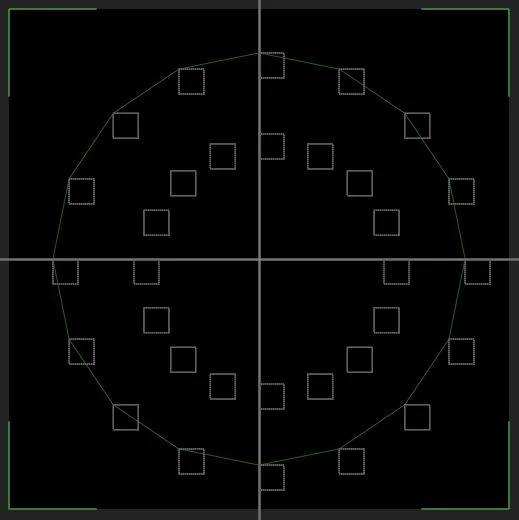


For the life of me, I can't get a perfect circle. 🙂

This topic has been closed for replies.

1 reply

Known Participant
November 15, 2023

How do I adjust the above-mentioned expression using inTangents & outTangents?


This is what I mean by a perfect circle: 


Known Participant
November 15, 2023

Solved!  I referenced the in & out tangents by another circle with the same number of points.


myPath = thisComp.layer("Effector | Path | Resizer").content("Ellipse 1").content("Path 1").path;

points = [
thisComp.layer("Effector | Path | Resizer: Path 1 [1.1.0]").transform.position - [1000, 1000],
thisComp.layer("Effector | Path | Resizer: Path 1 [1.1.1]").transform.position - [1000, 1000],
thisComp.layer("Effector | Path | Resizer: Path 1 [1.1.2]").transform.position - [1000, 1000],
thisComp.layer("Effector | Path | Resizer: Path 1 [1.1.3]").transform.position - [1000, 1000],
thisComp.layer("Effector | Path | Resizer: Path 1 [1.1.4]").transform.position - [1000, 1000],
thisComp.layer("Effector | Path | Resizer: Path 1 [1.1.5]").transform.position - [1000, 1000],
thisComp.layer("Effector | Path | Resizer: Path 1 [1.1.6]").transform.position - [1000, 1000],
thisComp.layer("Effector | Path | Resizer: Path 1 [1.1.7]").transform.position - [1000, 1000],
thisComp.layer("Effector | Path | Resizer: Path 1 [1.1.8]").transform.position - [1000, 1000],
thisComp.layer("Effector | Path | Resizer: Path 1 [1.1.9]").transform.position - [1000, 1000],
thisComp.layer("Effector | Path | Resizer: Path 1 [1.1.10]").transform.position - [1000, 1000],
thisComp.layer("Effector | Path | Resizer: Path 1 [1.1.11]").transform.position - [1000, 1000],
thisComp.layer("Effector | Path | Resizer: Path 1 [1.1.12]").transform.position - [1000, 1000],
thisComp.layer("Effector | Path | Resizer: Path 1 [1.1.13]").transform.position - [1000, 1000],
thisComp.layer("Effector | Path | Resizer: Path 1 [1.1.14]").transform.position - [1000, 1000],
thisComp.layer("Effector | Path | Resizer: Path 1 [1.1.15]").transform.position - [1000, 1000]]

inTangents = myPath.inTangents();
outTangents = myPath.outTangents();

createPath(points, inTangents, outTangents, isClosed = true)
Known Participant
November 16, 2023

 I want to learn it and be able to have full control over the tangents via the createPath property like in Illustrator.

My solution does the job, but is faaaar beyond what you can call "control".


There are only a few tutorials that go into the details, but they skip the part with the tangents and fall back on alternative solutions, as in my case; such as generating additional points to create an illusion of roundness.