It is possible, it's just a lot of work.
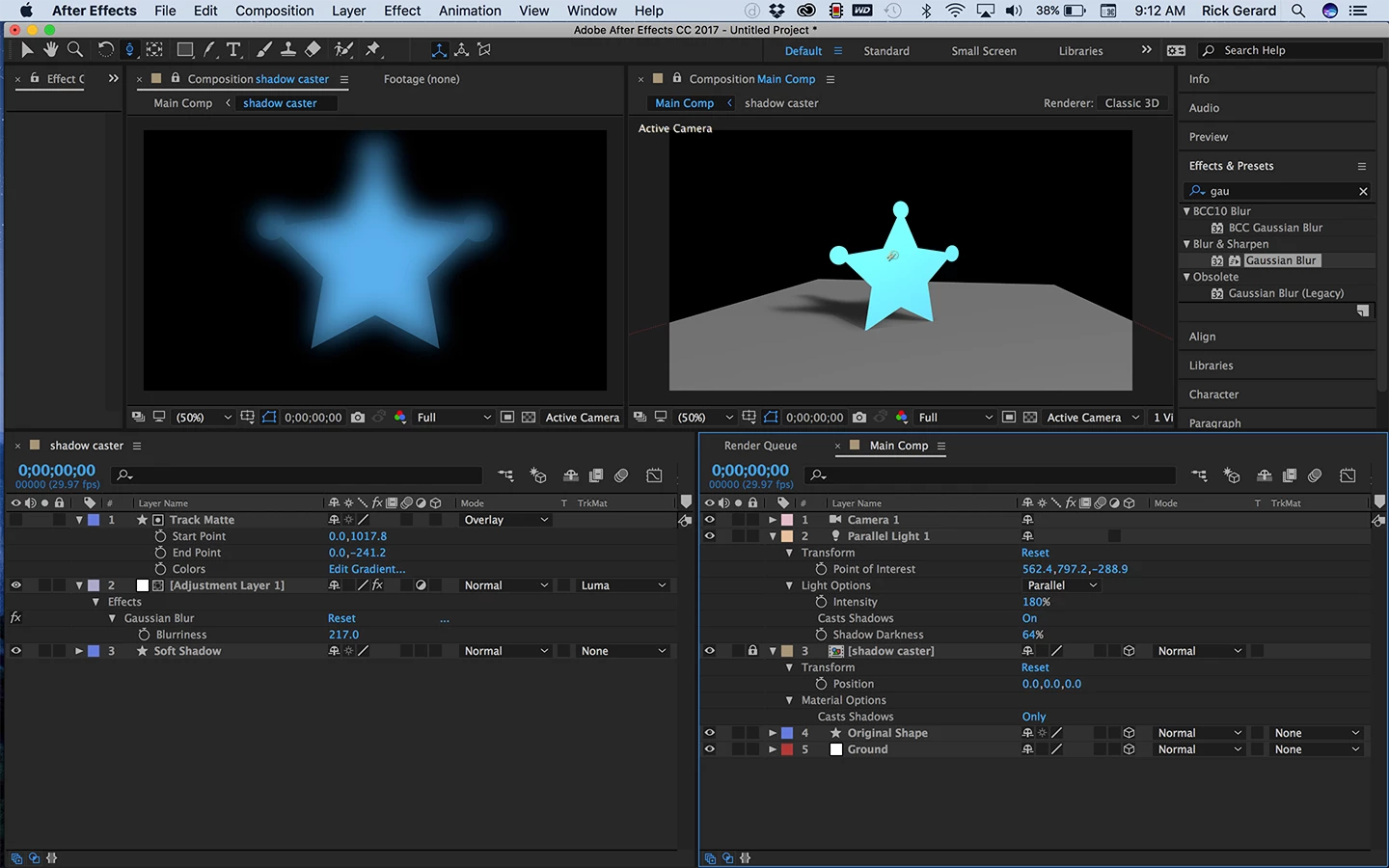
- Before you make the layer casting a shadow 3D duplicate it and name the duplicate soft shadow
- Add an adjustment layer on top of the soft shadow layer
- Add a gradient filled shape layer above the adjustment layer with a black to white vertical gradient extending from the bottom of the layer to the top of the layer and name it track matte
- Set the gradient filled shape layer as a luma track matte for the adjustment layer
- Add a significant Gaussian blur to the adjustment layer so that the shadow layer has little blur at the bottom and a lot of blur at the top
- Pre-compose the soft shadow, adjustment and track matte layer and name the pre-comp shadow caster
- Make the shadow caster pre-comp and the layer you want to cast the shadow 3D
- Add a solid to the comp, name it ground, make it 3D and rotate it into position
- With all 3 layer selected press the A key twice to reveal the material options
- Set the shadow caster pre-comp to cast shadows only
- Set the original layer, the one casting the shadow to Cast Shadows off
- Set the ground layer to receive shadows
- Add a parallel light and adjust the point of interest to make the light fall where you want it to fall
- Press AA to reveal the light options of the parallel light and make sure it is set to cast shadows and the fall off is set to none or adjust it to the setting you want to use
- Make final adjustments of the soft shadow in the pre-comp by adjusting the amount of blur and the gradient to get the look you want
The second option is to add a point or a spot light and adjust the light....
Here's a project file for you to play with: Dropbox - softShadowParalellLight.aep (note: your browser may add a .txt extension to the file when it is downloaded. Just delete it and things should work just fine)



 AdChoices