Danny51
Inspiring
September 1, 2023
Answered

Crop effect to shape layer and not entire artboard?

  • September 1, 2023
  • 2 replies
  • 1435 views

Okay I have no idea how to better formulate this or even search for this:

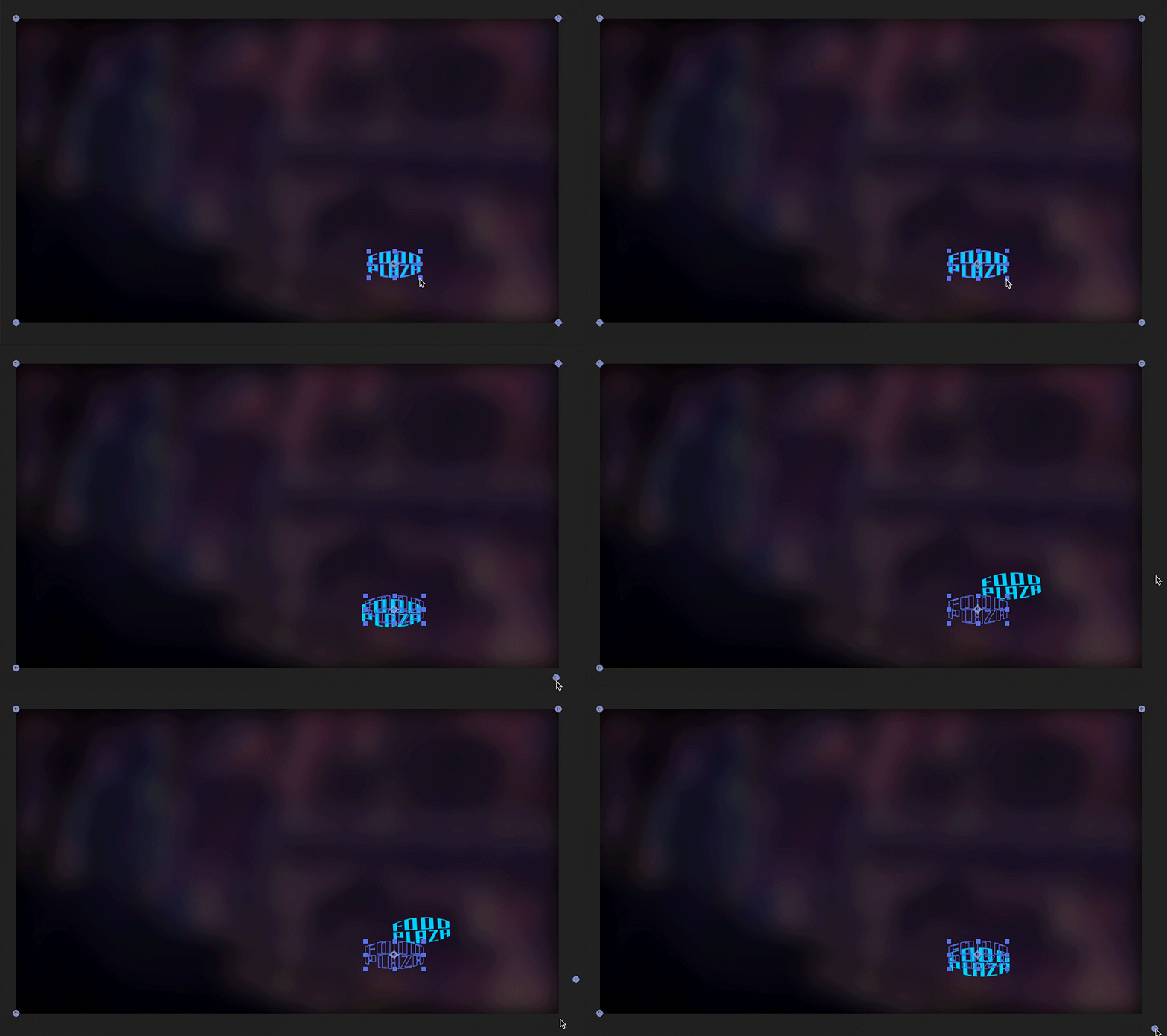
I have several vector shapes that I turned into shape layers in After Effects. And the bounding boxes of those shapes are only surrounding the shape, as they should - but when I want to apply an effect, for example corner pin, the bounding box is suddenly the size of the whole canvas.

How do I get the pins to be on the outside corners of the shape and not the canvas?


I hope the gif clarifies what I mean....


This topic has been closed for replies.
Correct answer Rick Gerard

The problem with Corner Pin and shape layers is that a shape layer has no dimensions for Corner Pin to look at, so it chooses the comp frame size. 


The only reason to convert a vector layer (Illustrator file) to a shape layer is to use shape layer animators, animate the vector path itself, or extrude the layer. If you are not doing any of those things, don't convert the layer to a shape layer. Converting fouls up brushes, blends, gradients, a bunch of other Illustrator tools, and render time actually increases a little bit. 


If you absolutely need to create a shape layer from an Illustrator layer and you want to use Corner Pin, the only option is to pre-compose the Shape layer, open the Pre-comp, use the Region Of Interest tool to include only the shape layer boundaries, then choose Composition/Crop Composition to Region of interest menu.  This will put the corners at the corners of the nested comp, but as soon as you Collapse Transformations, the corners will revert to the corners of the composition. The position of the pre-composed shape layer will also change when you crop the comp. 



2 replies

Rick GerardCommunity ExpertCorrect answer
Community Expert
September 1, 2023

The problem with Corner Pin and shape layers is that a shape layer has no dimensions for Corner Pin to look at, so it chooses the comp frame size. 


The only reason to convert a vector layer (Illustrator file) to a shape layer is to use shape layer animators, animate the vector path itself, or extrude the layer. If you are not doing any of those things, don't convert the layer to a shape layer. Converting fouls up brushes, blends, gradients, a bunch of other Illustrator tools, and render time actually increases a little bit. 


If you absolutely need to create a shape layer from an Illustrator layer and you want to use Corner Pin, the only option is to pre-compose the Shape layer, open the Pre-comp, use the Region Of Interest tool to include only the shape layer boundaries, then choose Composition/Crop Composition to Region of interest menu.  This will put the corners at the corners of the nested comp, but as soon as you Collapse Transformations, the corners will revert to the corners of the composition. The position of the pre-composed shape layer will also change when you crop the comp. 


Danny51
Danny51Author
Inspiring
September 2, 2023

Thank you! I didn't need to do path animation and went with just the shape layers instead and everything worked out nicely.

Mylenium
Legend
September 1, 2023

You have to pre-compose and adjust the size of the pre-comp. Effects always use layer bounds. That's just how AE works.


Mylenium