Inspiring
May 21, 2020
Question

CUDA / GPU Render Not Working

  • May 21, 2020
  • 2 replies
  • 5357 views
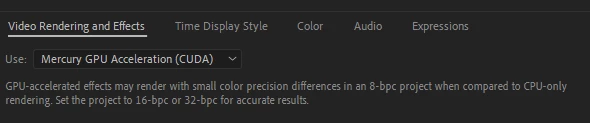
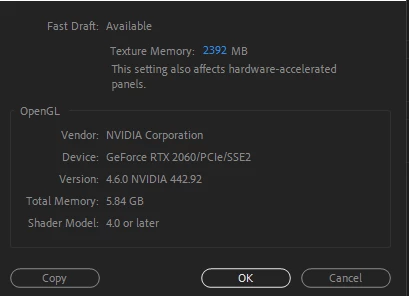
Hi, When rendering in Ae 2020 on my Windows 10 PC (Nvidia RTX 2060, I7-9750, 32gb) the GPU is not being used and the render times are super slow.  I've updated my GPU Studio Driver from Nvidia's site and added my GPU to the retracer.txt file.  Still no change.  Any suggestions to get GPU rendering to work here in Ae?   


This topic has been closed for replies.

2 replies

Inspiring
May 21, 2020

After Effects doesn't use the GPU in the same way that you see it used in, say, Premiere. You don't enable an option and everything automatically becomes faster.


Several parts of AE are GPU-accelerated and many effects are, but many more aren't. Read this article for a bit of info about GPU acceleration in AE: https://helpx.adobe.com/after-effects/using/basics-gpu-after-effects.html


You don't need to add your GPU to a text file, that was related to a part of AE that doesn't even exist anymore called the Ray-traced 3D Renderer. The fact is, After Effects doesn't use the GPU as much as you would like it to, but it gets faster with every release as more functions are rewritten to use the GPU. There are a number of ways to improve playback or to be efficient with 2D animation and that includes not previewing at full resolution in your Comp panel, skipping frames during preview (expand the entire Preview panel to see all the options you have available), disabling certain effects until final render, turning off motion blur (although in certain circumstances Motion Blur is now rendered on the GPU), and many other things. 

Participant
August 10, 2021

But its normal in the final render the usage of the GPU in 0%? On my jobs in premiere pro, the usage its up to 100%.

sorry for my bad english! it's not my main language.

Mylenium
Legend
August 10, 2021

Impossible to say anything without any info about your system and the contents of the project. As the others tried to explain, the conditions under which AE will even use GPU acceleration are very specific and even then it's limited. Due to how AE works it's more likely that indeed it will simply revert to software-only rendering many, many times based on how projects may be structured. Everything else depends on the details.


Mylenium

ToolfarmJP
Community Expert
Community Expert
May 21, 2020

After Effects seems to recognize RTX 2060. Just in case, would you check (or change) Manage 3D setting in Nvidia control panel?


3D Settings > Manage 3D setting > Program Setting tab > Choose Adobe After Effects > CUDA - GPU

Crewman1Author
Inspiring
May 21, 2020

I did this.  There were 2 choices 1) Use global settings (RTX 2060) which is the default and 2) Use these GPUs (RTX 2060).  I changed it #2 but still no change, just using the GPU 2-3%.  Is that normal for 2D animation project?