Participating Frequently
August 11, 2019
Question

Cursor issues

  • August 11, 2019
  • 3 replies
  • 5395 views

Hi,

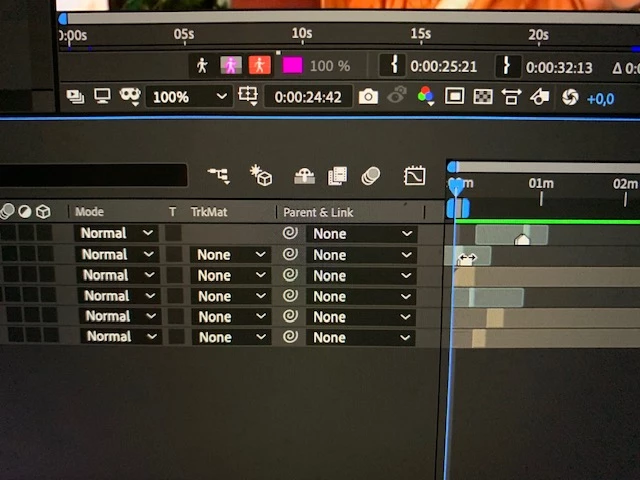
i cant seem to get back the usual mouse cursor in after effects, it shows some kind of double headed arrow, maybe for time remapping but unsure. How could i just get back to the normal selection cursor?

This topic has been closed for replies.

3 replies

Dave_LaRonde
Inspiring
August 12, 2019

That comp's at least 2 minutes long!  Yow!  Zoom in on the timeline.

gerikp
Community Expert
Community Expert
August 11, 2019

Some other ideas. Zoom in on your timeline. It looks like you are zoomed out quite a bit and what you are working on is so small that all your cursor is doing is recognizing the handles whats trimmed on your layer. If that doesn't work try switching to a new workspace.

Morgan Cynic
Inspiring
August 12, 2019

Yup that happens to me all the time; zooming in fixes it.

gerikp
Community Expert
Community Expert
August 11, 2019

Press the "v" key on your keyboard? That should take you back to the Selection Tool. You may have the Pan Behind tool selected.

Participating Frequently
August 11, 2019

i tried but it doesnt do anything.,.. i also restarted and reopened the project but that didnt help either..