
Participating Frequently
April 3, 2024
Question

Custom Easing for Keyframe-less Animation

  • April 3, 2024
  • 2 replies
  • 564 views

I’m building an expression for a keyframe-less animation, but I need a specific easing curve. The basic linear, easeIn, and easeOut functions do not give me as much easing control as I need. Right now I’m using the linear function and pulling the easing properties from a Slider Control, however I would like to hardcode a specific ease into the expression, so that it runs without the need of the Slider.

I need the easing to match the curve from the attachment. (I pulled both bezier handles as far to the left as I could.)

I’ve tried many different options, but none have been able to replicate this curve exactly. Any help would be greatly appreciated!
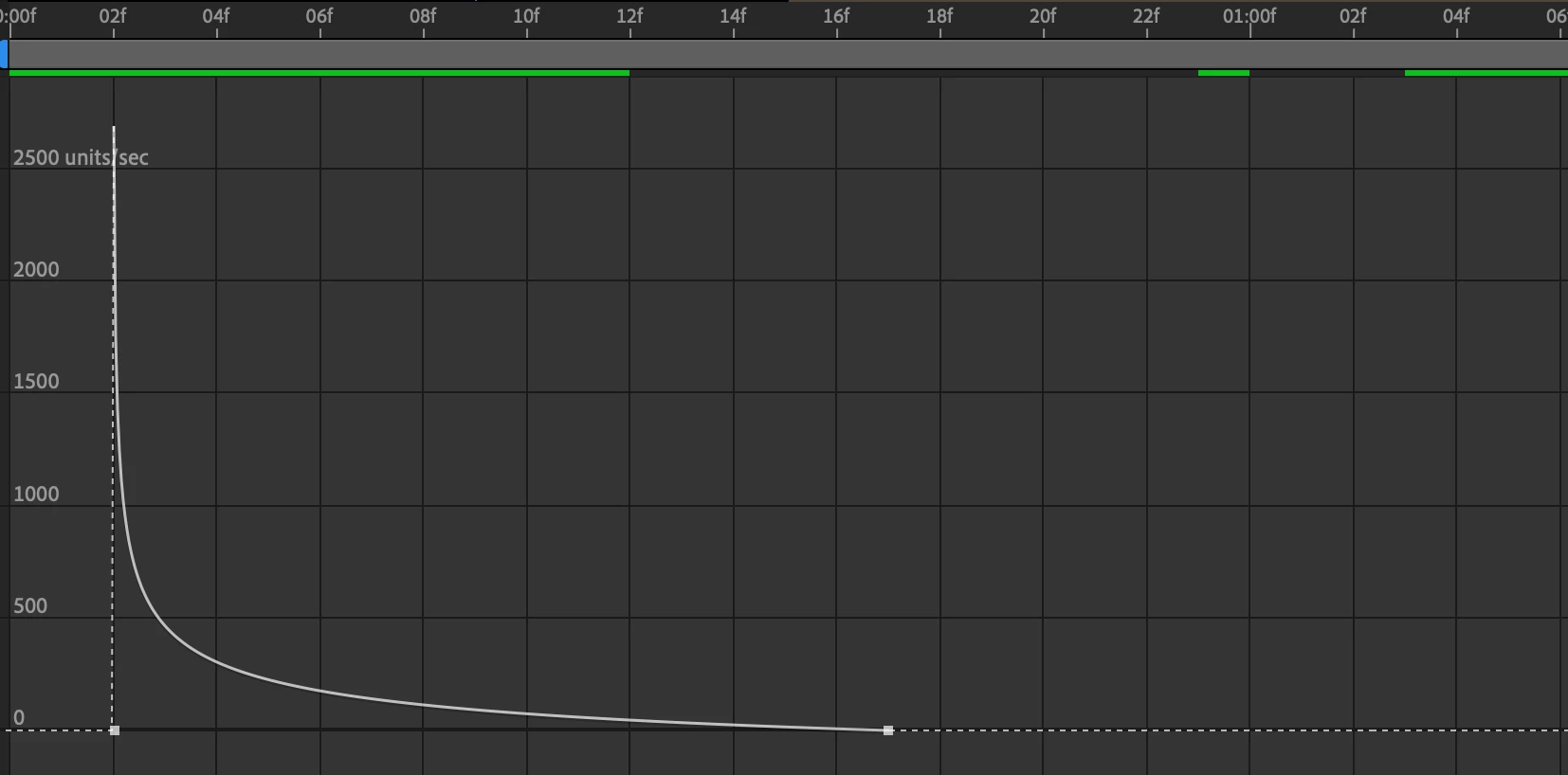
This topic has been closed for replies.

2 replies

Mylenium
Legend
April 3, 2024

Just grab the formula from a free JavaScript reference and insert the data. You already have your three points: [timeA,valueA][0,0][timeB,valueB]. Should be easy enough if you assume that the t interval is a frame. Values can be derived from key frames, in- and out-points or whatever you fancy. The real trick then is to tweak it and account for some oddities in AE that may affect the curve. You may need to include some extra multiplier to control the bias.


Mylenium 

Mylenium
Legend
April 3, 2024

It's just a Bèzier curve with the tension set to 1/ -1, respectively and you would need to recreate that, which is possible, but tricky. We've discussed this a number of times for spatial curves, so if you look it up you should find soem info. Otherwise it would probably a lot simpler to just create a "reference curve" on a dummy layer and use valueAtTime() in conjunction with a linear() function to remap the timing.


Mylenium

Participating Frequently
April 3, 2024

I am trying to avoid using a reference curve, so that there will be no keyframes present. This will be part of a larger script that I'm writing. Any advice for getting this type of curve directly into the expression?

Adam24585301qycn
Inspiring
April 3, 2024

yes, i had the same issue, you need to reference a simple slider that goes from 0 to 1 and you can manually set the graph as you like. let me know if you need help with that